

Gubbi
Gold ⭐️
Mar 27, 2020 5:40 AM UTC
Solved

Transfer files based on the YYYYMMDD in their filename and create target folder with YYYYMMDD

@MattWho : 

I'm finding a way to get the content of a file based on its filename and it should drop files to target based on date. .

All of the target files are in the same directory, but I'd like to select only the files which has "{Today's YYYYMMDD} as their postfix.

For example, if today is 20200326, 

/tmp/pfd_exch_namr_bbid.px.hpc.gz.20200326 -> create folder with 20200326 and drop file.

/tmp/pfd_exch_namr_bbid.px.hpc.gz.20200326-> Drop file into above folder

/tmp/pfd_exch_namr_bbid.px.hpc.gz.20200325-> not ok because this YYYYMMDD is not today.


Approach i followed :

ListFile: Extract only the files whose name ends with "gz.20200326"

UpdateAttribute: Substitute YYYYMMDD into an Attribute "today"
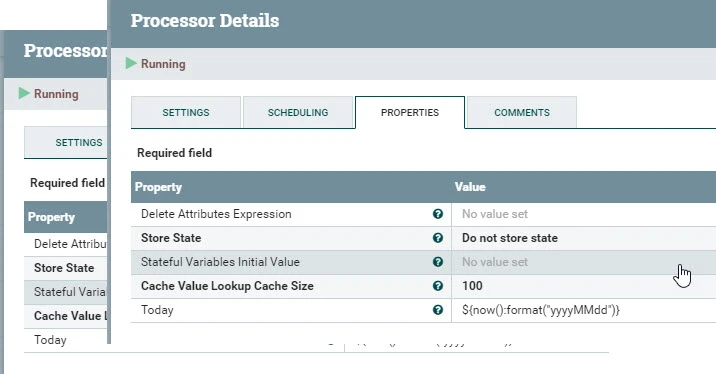
 

Update.jpg


RouteOnAttribute: Extract only the file which matches

${filename:matches(${today:prepend('[^\.].*gz.'):append('\d{8}')})} (where $filename is the target file name) and pass it as Relationship "target_file"


But when executing, looks like it's not matching my requirement and all files are matching.

Could you please assist me on this.

stevenmatison
Platinum ⭐️⭐️
Mar 27, 2020 1:16 PM UTC

@Gubbi It sounds like you have the getFile working and just having issues with the matching to target_file route?  


I would recommend to simply the match in RouteOnAttribute:


${filename:endsWith(${today})}


If you are having problems with the GetFile, please share that proc configuration so we can see what you have going on there.

5 replies

stevenmatison
Platinum ⭐️⭐️
Mar 27, 2020 1:16 PM UTC

@Gubbi It sounds like you have the getFile working and just having issues with the matching to target_file route?  


I would recommend to simply the match in RouteOnAttribute:


${filename:endsWith(${today})}


If you are having problems with the GetFile, please share that proc configuration so we can see what you have going on there.

Translate
Gubbi
GubbiAuthor
Gold ⭐️
Mar 27, 2020 5:33 PM UTC

@stevenmatison : I am not using GetFile here. i followed that approach you suggested but issue still persists. Below is dataflow i have been using. i need to route all matching files into target folder based on date. So for today's date 20200327, all files ending with _202003027 must reside in target folder 20200327.

So in my fetch file i am passing this /users/FIDS_OZ_DEV/Datastore/Bloomberg/backoffice/${now():format("yyyyMMdd")}

MFT.jpg

Translate
Gubbi
GubbiAuthor
Gold ⭐️
Mar 27, 2020 5:46 PM UTC

Ignore my previous reply. Solution which you provided is working. Thanks a lot.

Translate

