

Solved
Trying to integrate Nifi with ldap gives the supplied username and password are not valid.
Here is my login-identity-providers.xml
<provider>
<identifier>ldap-provider</identifier>
<class>org.apache.nifi.ldap.LdapProvider</class>
<property name="Authentication Strategy">SIMPLE</property>
<property name="Manager DN">cn=admin,dc=example,dc=com</property>
<property name="Manager Password">secret</property>
<property name="TLS - Keystore"></property>
<property name="TLS - Keystore Password"></property>
<property name="TLS - Keystore Type"></property>
<property name="TLS - Truststore"></property>
<property name="TLS - Truststore Password"></property>
<property name="TLS - Truststore Type"></property>
<property name="TLS - Client Auth"></property>
<property name="TLS - Protocol"></property>
<property name="TLS - Shutdown Gracefully"></property>
<property name="Referral Strategy">FOLLOW</property>
<property name="Connect Timeout">10 secs</property>
<property name="Read Timeout">10 secs</property>
<property name="Url">ldap://localhost:389</property>
<property name="User Search Base">cn=vishnu,cn=admin,dc=example,dc=com</property>
<property name="User Search Filter">(objectClass=*)</property>
<property name="Identity Strategy">USE_USERNAME</property>
<property name="Authentication Expiration">12 hours</property>
<property name="User Object Class">person</property>
<property name="User Search Scope">ONE_LEVEL</property>
<property name="User Identity Attribute">cn</property>
</provider>
The authorizers is shown below.
<userGroupProvider>
<identifier>file-user-group-provider</identifier>
<class>org.apache.nifi.authorization.FileUserGroupProvider</class>
<property name="Users File">./conf/users.xml</property>
<property name="Legacy Authorized Users File"></property>
<property name="Initial User Identity 1">cn=vishnu,cn=admin,dc=example,dc=com</property>
</userGroupProvider>

<accessPolicyProvider>
<identifier>file-access-policy-provider</identifier>
<class>org.apache.nifi.authorization.FileAccessPolicyProvider</class>
<property name="User Group Provider">file-user-group-provider</property>
<property name="Authorizations File">./conf/authorizations.xml</property>
<property name="Initial Admin Identity">cn=vishnu,cn=admin,dc=example,dc=com</property>
<property name="Legacy Authorized Users File"></property>
<property name="Node Identity 1"></property>
<property name="Node Group"></property>
</accessPolicyProvider>

<authorizer>
<identifier>managed-authorizer</identifier>
<class>org.apache.nifi.authorization.StandardManagedAuthorizer</class>
<property name="User Group Provider">ldap-user-group-provider</property>
<property name="Access Policy Provider">file-access-policy-provider</property>
<property name="Initial Admin Identity">cn=vishnu,cn=admin,dc=example,dc=com</property>
<property name="Legacy Authorized Users File"></property>
<property name="Node Identity 1"></property>
</authorizer>
The following values of properties are updated
nifi.login.identity.provider.configuration.file=./conf/login-identity-providers.xml
Below is the view of LDAP from Apache Directory studio.
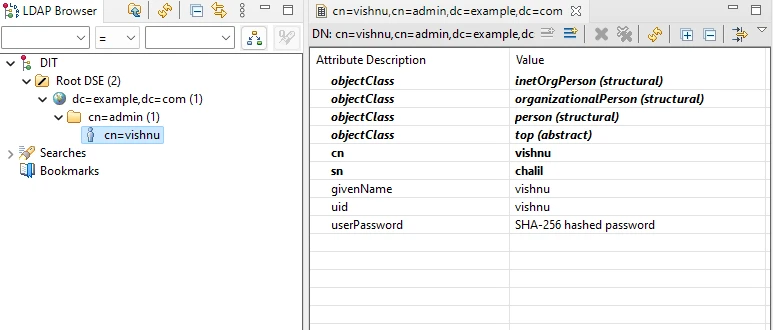
Currently there is only one user in that search base. Can someone help identify why the authentication is failing? I referred other articles within Cloudera community and outside but none seem to be working.

