soumM
Silver ⭐️⭐️
April 24, 2024
Solved

Unable to access Livy admin ui from Cloudera manager getting 403 error (CDP 7.1.7)

I have installed Livy service in Cloudera CDP (7.1.7) cluster, accessing the admin web ui throwing 403 error. 

See the details below:
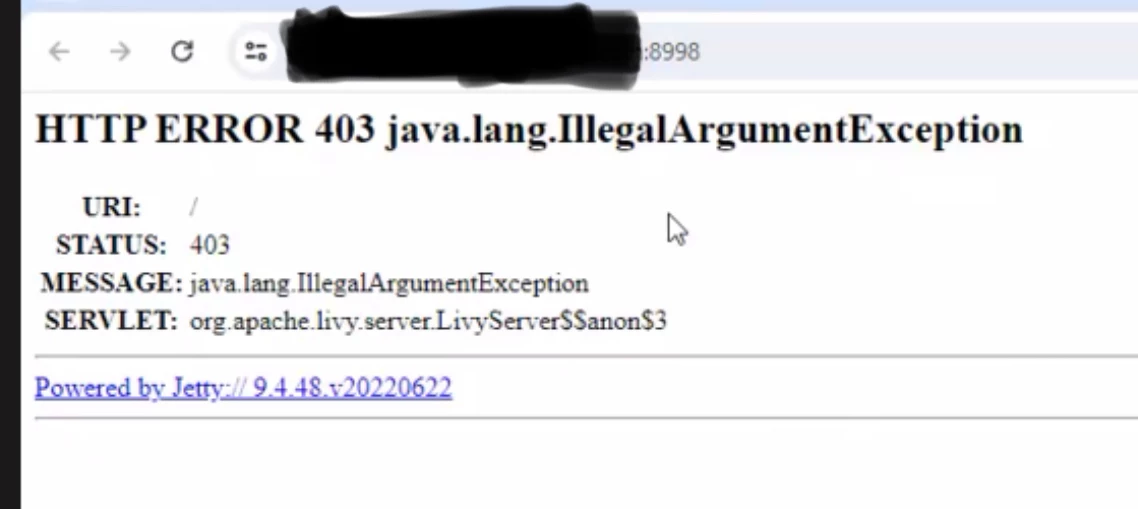
 

soumM_0-1713938803360.png

soumM_1-1713939027573.png


Scharan
ScharanAnswer
Gold ⭐️
April 24, 2024

Hello @soumM 

Seem Spnego is enabled for livy web UI.

Can you check Livy >> Configuration >> livy_spnego_enabled
If Spnego is enabled, you need to have a Kerberos ticket on the local machine, and the browser needs to be configured for Kerberos authentication.

You can uncheck spnego_enabled to allow anonomous user to access the web ui

Livy >> Configuration >> livy_spnego_enabled and try accessing it without any authentication.

2 replies

Scharan
Gold ⭐️
ScharanAnswer
Gold ⭐️
April 24, 2024

Hello @soumM 

Seem Spnego is enabled for livy web UI.

Can you check Livy >> Configuration >> livy_spnego_enabled
If Spnego is enabled, you need to have a Kerberos ticket on the local machine, and the browser needs to be configured for Kerberos authentication.

You can uncheck spnego_enabled to allow anonomous user to access the web ui

Livy >> Configuration >> livy_spnego_enabled and try accessing it without any authentication.

Translate
soumM
soumMAuthor
Silver ⭐️⭐️
April 24, 2024

@Scharan THANKS , Its working now.

Translate