@kellerj
You can use the NiFi-Registry Rest-Api to change the description on an existing version controlled flow.
https://nifi.apache.org/docs/nifi-registry-docs/rest-api/index.html#updateFlow
curl -X 'PUT' 'https://<nifi-registry-hostname>:<nifi-registry-port>/nifi-registry-api/buckets/<bucket UUID>/flows/<versioned flow UUID>' -H 'Authorization: Bearer <token>' -H 'Content-Type: application/json' --data-raw '{"bucketIdentifier":"<bucket UUID>","description":"new-description","name":"<versioned flow name>","type":"Flow"}' --compressed --insecure
My NiFi-Registry is secured and uses a login provider for user authentication. If you are doing the same, you will need to obtain a bearer token for your user who has read/write/delete on the bucket containing the flow you want to modify.
The rest of what you need to make this rest-api call can be obtained via the NiFi-registry's UI for the flow to be modified:
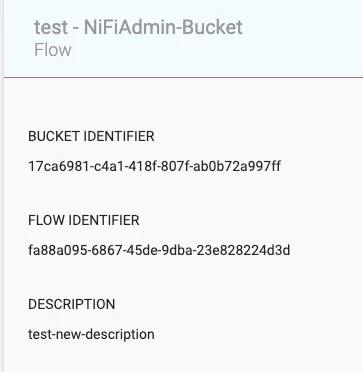
Using above example:
<versioned flow name> = "test"
<bucket uuid> = "17ca6981-c4a1-418f-807f-ab0b72a997ff"
<versioned flow UUID> = "fa88a095-6867-45de-9dba-23e828224d3d"
If you found this response assisted with your query, please take a moment to login and click on "Accept as Solution" below this post.
Thank you,
Matt