alexmarco
Gold ⭐️
July 16, 2021
Solved

Update Json field via Nifi

I have a json like this coming from an input port:


{
"url": "blablabla",
"keyword": "foo"
}


then I have to generate a new json to pass to a post call. The new json is something like this:


{
"requests": [
{
"source": "blablabla",
"params": {
"keywords": [
"something"
],
"sub-field1": "1"
}
}
],
"field1": "1",
"field2": "2",
"field3": false
}


where the array keywords should be replaced with a new array with the value of the previous Json ("foo"). The resulting is:


{
"requests": [
{
"source": "blablabla",
"params": {
"keywords": [
"foo"
],
"sub-field1": "1"
}
}
],
"field1": "1",
"field2": "2",
"field3": false
}


then i pass this json to a invokehttp to call the post. 


Could you please explain me how to generate this flow?


thanks



adhishankarit
Gold ⭐️
July 16, 2021

Hi @alexmarco


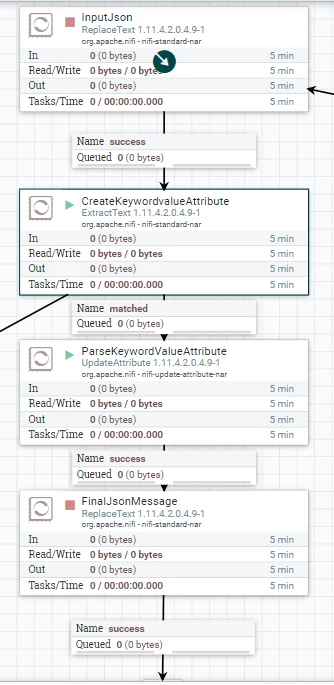
If your final json format is fixed and input json also coming in same format always with values different then you extract keyword value (foo or new value) into flowfile attribute and you can use attribute in following replacetext processor to pass the value .

SampleJson.PNG


ExtractText processor --> UpdateAttributeProcessor --> ReplaceText Processor

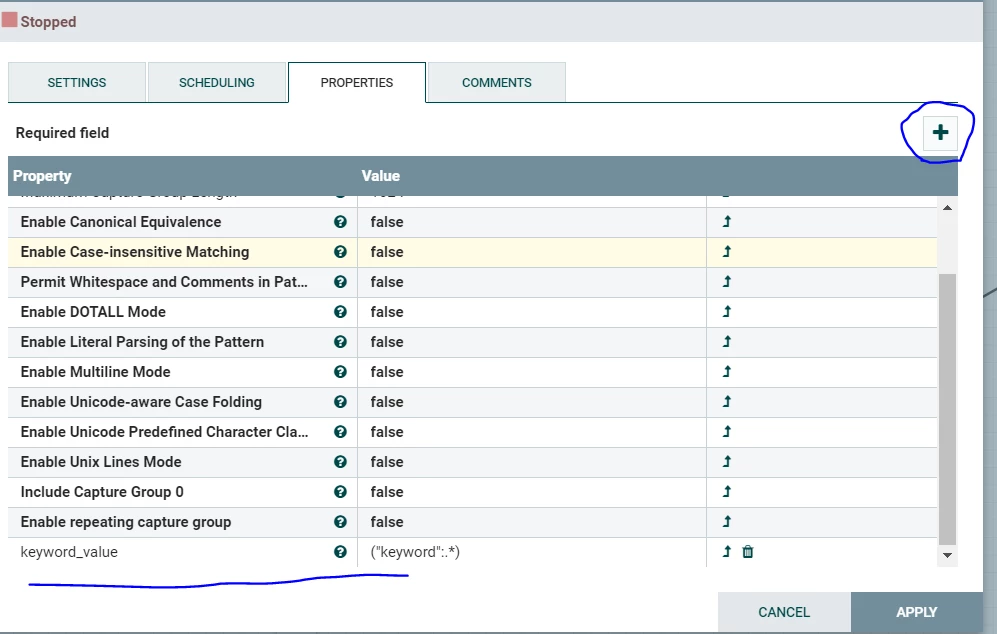
1. Add a new property(keyword_value) in ExtractText and value/expression should be below

 ("keyword":.*)

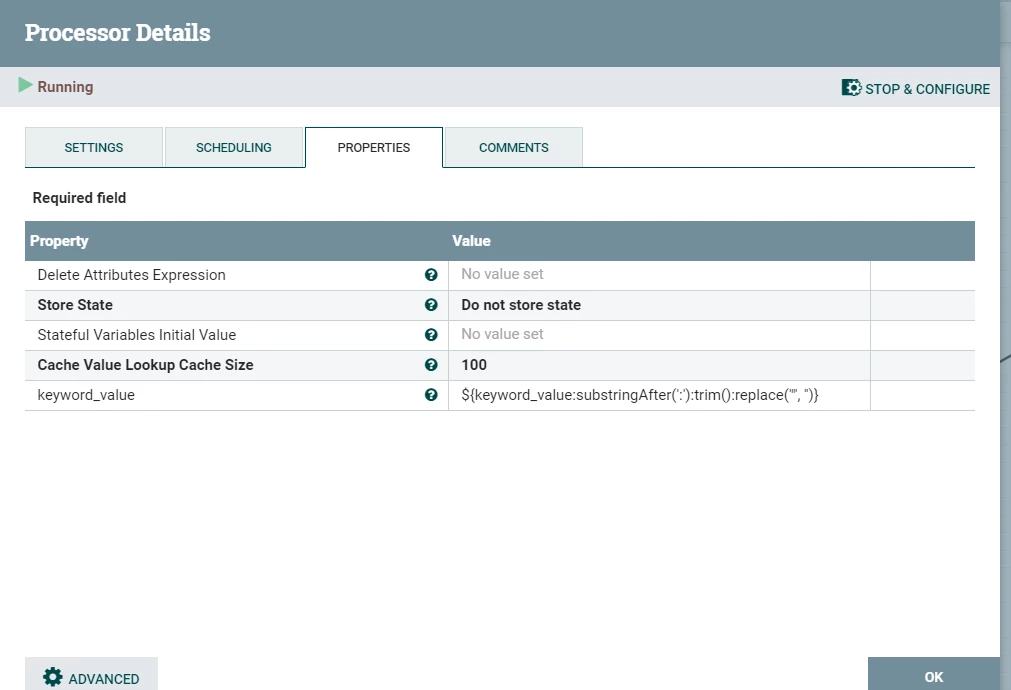
2. Remove space,double quotes from the extracted keyword_value attribute in UpdateAttributeProcessor. (You can add the updateattribute logic directly in Replacetext processor itself for retrieving the keyword_value also as ReplaceText processor supports NiFi expression language. Its optional and you avoid Updateattribute processor in this flow then if you chose )

3. Append the keyword_value in ReplaceText processor (keep the final json ) as in sample .

4. Connect the success flow into Invokehttp processor.


* CreateKeywordvalueAttribute (Extract processor) expression below  : ("keyword":.*)

CreateKeywordvalueAttribute.PNG

* Updateattributeprocessor  ${keyword_value:substringAfter(':'):trim():replace('"', '')}


ParseKeywordValueAttribute.PNG

* FinalReplaceText processor : Place the below JSON into Replacement Value section of the processor 


{
"requests": [
{
"source": "blablabla",
"params": {
"keywords": [
"${keyword_value}"
],
"sub-field1": "1"
}
}
],
"field1": "1",
"field2": "2",
"field3": false
}


I have attached the sample tested flow(.xml) for your reference . 


Please accept the solution if it works as expected.


Thanks

Adhi


3 replies

adhishankarit
Gold ⭐️
July 16, 2021

Hi @alexmarco


If your final json format is fixed and input json also coming in same format always with values different then you extract keyword value (foo or new value) into flowfile attribute and you can use attribute in following replacetext processor to pass the value .

SampleJson.PNG


ExtractText processor --> UpdateAttributeProcessor --> ReplaceText Processor

1. Add a new property(keyword_value) in ExtractText and value/expression should be below

 ("keyword":.*)

2. Remove space,double quotes from the extracted keyword_value attribute in UpdateAttributeProcessor. (You can add the updateattribute logic directly in Replacetext processor itself for retrieving the keyword_value also as ReplaceText processor supports NiFi expression language. Its optional and you avoid Updateattribute processor in this flow then if you chose )

3. Append the keyword_value in ReplaceText processor (keep the final json ) as in sample .

4. Connect the success flow into Invokehttp processor.


* CreateKeywordvalueAttribute (Extract processor) expression below  : ("keyword":.*)

CreateKeywordvalueAttribute.PNG

* Updateattributeprocessor  ${keyword_value:substringAfter(':'):trim():replace('"', '')}


ParseKeywordValueAttribute.PNG

* FinalReplaceText processor : Place the below JSON into Replacement Value section of the processor 


{
"requests": [
{
"source": "blablabla",
"params": {
"keywords": [
"${keyword_value}"
],
"sub-field1": "1"
}
}
],
"field1": "1",
"field2": "2",
"field3": false
}


I have attached the sample tested flow(.xml) for your reference . 


Please accept the solution if it works as expected.


Thanks

Adhi


Translate
alexmarco
alexmarcoAuthor
Gold ⭐️
July 19, 2021

Hi @adhishankarit, thanks for your response....one question...I don't see the link to download the xml..where i can find it?

Translate
adhishankarit
Gold ⭐️
July 19, 2021

 Hi @alexmarco


I did not find the 'Upload/Attach' option to upload the template file . Could you please follow the steps/screenshots mentioned , it should work for your example well.


thanks


Translate