

yagoaparecidoti
Gold ⭐️
April 26, 2022
Question

URGENT - Constant "Network Interface Speed Unknown" and "Agent Status Bad" errors in cloudera manager

we are getting a lot of "Network Interface Speed Unknown" and "Agent Status Bad" alerts on two specific hosts in the cluster and when accessing these hosts through cloudera manager we collect the details.


error details:


"Network Interface Speed Unknown

The health test result for HOST_NETWORK_INTERFACES_SLOW_MODE has become unknown: Not enough data to test: Test of whether the host has network interfaces that appear to be operating at less than full speed.


Agent Status Bad

The health test result for HOST_SCM_HEALTH has become bad: This host is in contact with the Cloudera Manager Server. This host is not in contact with the Host Monitor."
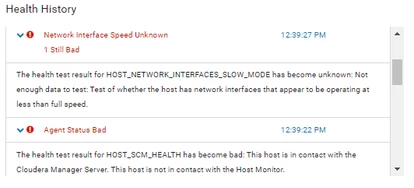
 

screenshot_erros_cdm.PNG


we checked the cloudera agent logs on both hosts and found no alerts that could be impacting these alerts.


we would like to know what may be impacting to generate this alert?

9 replies

Elias
Gold ⭐️
Gold ⭐️
April 27, 2022

The speed unknown is simply stating that the agent could not collect the data that would allow the speed to be tested.

The agent status being Bad, most likely means that the agent may not be heart - beating in. When this happens, check the heartbeat from the Host page.

Translate
GangWar
Platinum ⭐️⭐️
Platinum ⭐️⭐️
April 28, 2022

@yagoaparecidoti This alert comes when agent is not able to collect data using ethtool <device name> command. 

More specifically at the time of the issue if you run the command from host. 

 ethtool eth0    <-----------Start replacing eth0 with other network interfaces 

and in the output you will see


Speed: Unknown <<<<<<<<<<<<<<<<<<<<<<<<<<<<< THIS

Duplex: Unknown <<<<<<<<<<<<<<<<<<<<<<<<<<<<<<<<< THIS


Which needs network review. 


While the healthy output from host should look like this: 

# Expected behaviour
[root@host-1 ~]# ethtool eth0
Settings for eth0:
Supported ports: [ ]
Supported link modes: Not reported
Supported pause frame use: No
Supports auto-negotiation: No
Supported FEC modes: Not reported
Advertised link modes: Not reported
Advertised pause frame use: No
Advertised auto-negotiation: No
Advertised FEC modes: Not reported
Speed: 10000Mb/s <<<<<<<<<<<<<<<<<<<<<<<<<<<<< THIS
Duplex: Full <<<<<<<<<<<<<<<<<<<<<<<<<<<<<<<<< THIS
Port: Twisted Pair
PHYAD: 0
Transceiver: internal
Auto-negotiation: off
MDI-X: Unknown
Link detected: yes


Translate
Cheers! Was your question answered? Make sure to mark the answer as the accepted solution. If you find a reply useful, say thanks by clicking on the thumbs up button.
yagoaparecidoti
Gold ⭐️
April 28, 2022

hello @Elias / @GangWar , how are you?


I ran ethtool on all hosts in the cloudera cluster and the network interface speed and duplex mode were returned successfully, this shows that ethtool is running smoothly.


with ethtool working fine, what could be generating these alerts and leaving the agent not sending a heartbeat for a few seconds?

Translate
GangWar
Platinum ⭐️⭐️
Platinum ⭐️⭐️
April 28, 2022
This needs to be checked when alert is there
Translate
Cheers! Was your question answered? Make sure to mark the answer as the accepted solution. If you find a reply useful, say thanks by clicking on the thumbs up button.
DianaTorres
Community Manager
Community Manager
May 3, 2022

@yagoaparecidoti Has the reply helped resolve your issue? If so, please mark the appropriate reply as the solution, as it will make it easier for others to find the answer in the future. Thanks!

Translate
Regards, Diana Torres, Senior Community Moderator
Emanuel_MXN
Gold ⭐️
January 12, 2023

what was the solution for this problem?

Translate
Elias
Gold ⭐️
Gold ⭐️
January 12, 2023

There can be several reasons that can cause this.

Run host inspector to get a better understanding of the issue:

CM -> Hosts -> All Hosts -> Inspect Hosts

Translate
