

Question
Using dynamic property with StandardOauth2AccessTokenProvider
Hi,
I am looking to use invokehttp with StandardOAuth2AccessTokenProvider controller to automatically get Access Token and make the API call with the token. The requirement to get token has an extra field compared to standard OAUTH token :
Below is the curl command. It includes extra key called auth_chain.
curl --location 'https://xyedfrg.xom/access_token' \
--header 'content-type: application/x-www-form-urlencoded' \
--data-urlencode 'username=test' \
--data-urlencode 'password=test' \
--data-urlencode 'client_id=F1234rdcfhkv' \
--data-urlencode 'client_secret=test-secret' \
--data-urlencode 'grant_type=password' \
--data-urlencode 'auth_chain=OAuthLdapService'
But this is how the StandardOAuth2AccessTokenProvider looks:
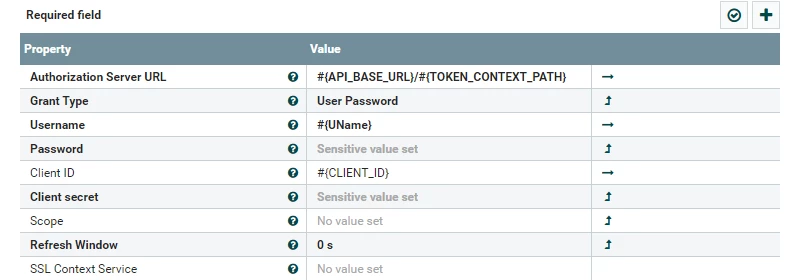
If I add auth_chain as property it errors out saying :

How can I make this OAUTH call to get token using invoke http.
*please note, cannot use the option provided here (https://community.cloudera.com/t5/Support-Questions/NIFI-Is-it-possible-to-make-a-x-www-form-urlencoded-POST/m-p/339398), as it exposes the credentials in data provenance and application layer and network layer too.

