sunilb
Silver ⭐️
Dec 5, 2019 11:43 AM UTC
Solved

Using regular expressions to fetch all files having .txt in nifi.

Hi,

I am trying to fetch all files with .txt extension from a list of files present in s3 bucket using nifi.

Is there any way to fetch the file based on the format of file and what processors we will use here.

Can any one explain me with an example as i am new to this.


Thanks 

Sunil  

MattWho
MattWhoAnswer
Titanium ⭐️⭐️
Dec 5, 2019 3:23 PM UTC

@sunilb 


You may want to look at using the listS3 processor to list the files from your S3 bucket.  This will produce one 0 byte (actual file content is not retrieved by this processor) FlowFile for each S3 file that is listed.  
Each of these generated FlowFile will have attributes/metadata about the file that was listed.  This includes the "filename".


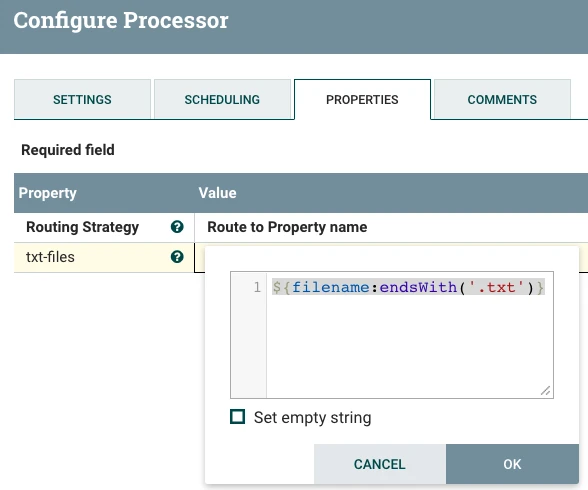
You can then route the success relationship from the listS3 processor to a RouteOnAttribute processor where you route those FlowFiles where the "filename" attribute value ends with ".txt" on to a FetchS3Object processor (This processor uses the "filename" attribute from the inbound FlowFile to fetch the actual content for that S3 file and add it to the FlowFile).   Any FlowFile where the filename attribute does not end in ".txt" could just be auto-terminated.

RouteOnAttribute configuration:
Screen Shot 2019-12-05 at 10.15.07 AM.png

Screen Shot 2019-12-05 at 10.16.40 AM.png


Here is an example of what this portion of the dataflow would look like:
Screen Shot 2019-12-05 at 10.18.39 AM.png


The connection between RouteOnAttribute and FetchS3Object processors should be configured to use the Round Robin Load Balancing Strategy if your NiFi is setup as a cluster.  The ListS3  processor should only be configured to run on the NiFi cluster's primary node (you'll notice the mall "P" on the icon of the listS3 processor in upper left corner).  So the load balancing strategy will redistribute the listed FlowFiles amongst all nodes in your cluster before actually fetching the content for more efficient/performant use of resources.


Hope this helps,

Matt


2 replies

MattWho
Titanium ⭐️⭐️
MattWhoAnswer
Titanium ⭐️⭐️
Dec 5, 2019 3:23 PM UTC

@sunilb 


You may want to look at using the listS3 processor to list the files from your S3 bucket.  This will produce one 0 byte (actual file content is not retrieved by this processor) FlowFile for each S3 file that is listed.  
Each of these generated FlowFile will have attributes/metadata about the file that was listed.  This includes the "filename".


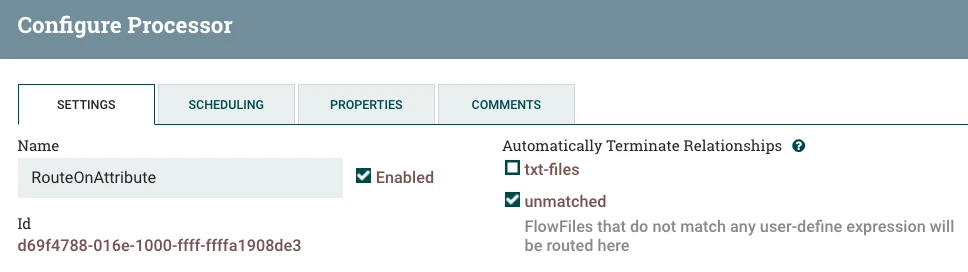
You can then route the success relationship from the listS3 processor to a RouteOnAttribute processor where you route those FlowFiles where the "filename" attribute value ends with ".txt" on to a FetchS3Object processor (This processor uses the "filename" attribute from the inbound FlowFile to fetch the actual content for that S3 file and add it to the FlowFile).   Any FlowFile where the filename attribute does not end in ".txt" could just be auto-terminated.

RouteOnAttribute configuration:
Screen Shot 2019-12-05 at 10.15.07 AM.png

Screen Shot 2019-12-05 at 10.16.40 AM.png


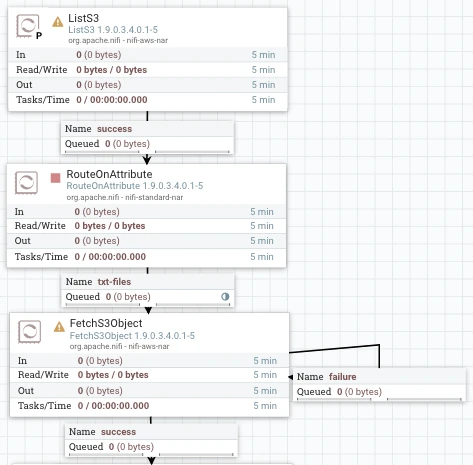
Here is an example of what this portion of the dataflow would look like:
Screen Shot 2019-12-05 at 10.18.39 AM.png


The connection between RouteOnAttribute and FetchS3Object processors should be configured to use the Round Robin Load Balancing Strategy if your NiFi is setup as a cluster.  The ListS3  processor should only be configured to run on the NiFi cluster's primary node (you'll notice the mall "P" on the icon of the listS3 processor in upper left corner).  So the load balancing strategy will redistribute the listed FlowFiles amongst all nodes in your cluster before actually fetching the content for more efficient/performant use of resources.


Hope this helps,

Matt

 

Translate
sunilb
sunilbAuthor
Silver ⭐️
Dec 6, 2019 11:01 AM UTC

Thank u Matt. Its working.

Translate