


Automating Cluster Connectivity Manager (CCM) in CDP for private deployments in AWS and Azure
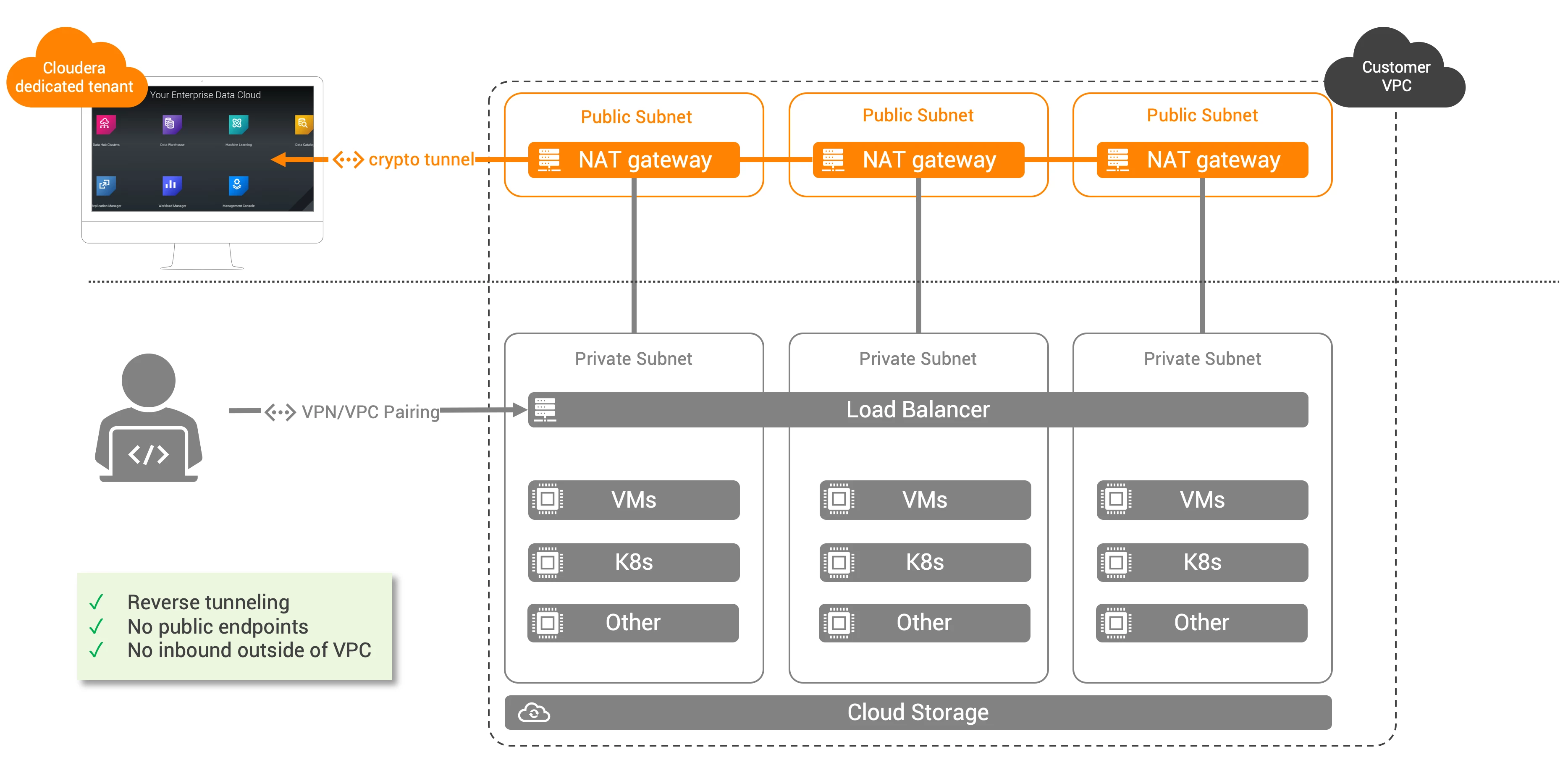
- Each tenant (i.e. customer) will have their own dedicated tunnel using a dedicated Apache Mina server
- The diagram above describes a setup in AWS. The Azure setup is very similar but does not require public subnets or NAT gateways.
Network Setup
Note: for both setup, you will notice that the open port 22 is inbound for a specific CIDR. This is to enable SSH to the different boxes for CDP and can be restricted to a CIDR within the VPC.
AWS
For AWS, we will need the following setup:
- One VPC
- 3 public networks
- 1 internet gateway
- 1 public route from a public network to IGW
- 3 private networks
- 3 private network to NAT gateway
- 2 security groups
The following is a sample code:
#!/bin/bash


 display_usage() {
	echo "
Usage:
    $(basename "$0") [--help or -h] <prefix> <region> <sg_cidr>

Description:
    Creates network assets for CDP env demployment

Arguments:
    prefix:         prefix of your assets
    region:         AWS region
    sg_cidr:        CIDR to open in your security group
    --help or -h:   displays this help"

}

# check whether user had supplied -h or --help . If yes display usage
if [[ ( $1 == "--help") ||  $1 == "-h" ]]
then
    display_usage
    exit 0
fi


# Check the numbers of arguments
if [  $# -lt 3 ]
then
    echo "Not enough arguments!"  >&2
    display_usage
    exit 1
fi

if [  $# -gt 3 ]
then
    echo "Too many arguments!"  >&2
    display_usage
    exit 1
fi

prefix=$1
region=$2
sg_cidr=$3


# 1. Creating VPC
vpc_id=$(aws ec2 create-vpc --cidr 10.10.0.0/16 | jq -r .Vpc.VpcId)
aws ec2 create-tags --resources $vpc_id --tags Key=Name,Value="$prefix-cdp-vpc" > /dev/null 2>&1

# 2. Creating public subnets

# 2.1. Subnets
public_sub_1=$(aws ec2 create-subnet --vpc-id $vpc_id --cidr-block 10.10.0.0/24 --availability-zone "$region"a | jq -r .Subnet.SubnetId)
public_sub_2=$(aws ec2 create-subnet --vpc-id $vpc_id --cidr-block 10.10.1.0/24 --availability-zone "$region"b | jq -r .Subnet.SubnetId)
public_sub_3=$(aws ec2 create-subnet --vpc-id $vpc_id --cidr-block 10.10.2.0/24 --availability-zone "$region"c | jq -r .Subnet.SubnetId)
aws ec2 create-tags --resources $public_sub_1 --tags Key=Name,Value="$prefix-pub-subnet-1" > /dev/null 2>&1
aws ec2 create-tags --resources $public_sub_2 --tags Key=Name,Value="$prefix-pub-subnet-2" > /dev/null 2>&1
aws ec2 create-tags --resources $public_sub_3 --tags Key=Name,Value="$prefix-pub-subnet-3" > /dev/null 2>&1


# 2.2. Internet gateway
igw_id=$(aws ec2 create-internet-gateway | jq -r .InternetGateway.InternetGatewayId)
aws ec2 create-tags --resources $igw_id --tags Key=Name,Value="$prefix-igw"

aws ec2 attach-internet-gateway --internet-gateway-id $igw_id --vpc-id $vpc_id > /dev/null 2>&1
aws ec2 modify-vpc-attribute --enable-dns-support "{\"Value\":true}" --vpc-id $vpc_id > /dev/null 2>&1
aws ec2 modify-vpc-attribute --enable-dns-hostnames "{\"Value\":true}" --vpc-id $vpc_id > /dev/null 2>&1


# 2.3. Route
route_pub=$(aws ec2 create-route-table --vpc-id $vpc_id | jq -r .RouteTable.RouteTableId)
aws ec2 create-tags --resources $route_pub --tags Key=Name,Value="$prefix-pub-route" > /dev/null 2>&1

aws ec2 create-route --route-table-id $route_pub --destination-cidr-block 0.0.0.0/0 --gateway-id $igw_id > /dev/null 2>&1

aws ec2 associate-route-table  --subnet-id $public_sub_1 --route-table-id $route_pub > /dev/null 2>&1
aws ec2 associate-route-table  --subnet-id $public_sub_2 --route-table-id $route_pub > /dev/null 2>&1
aws ec2 associate-route-table  --subnet-id $public_sub_3 --route-table-id $route_pub > /dev/null 2>&1


# 3. Creating private subnets

# 3.1. Subnets
private_sub_1=$(aws ec2 create-subnet --vpc-id $vpc_id --cidr-block 10.10.160.0/19 --availability-zone "$region"a | jq -r .Subnet.SubnetId)
private_sub_2=$(aws ec2 create-subnet --vpc-id $vpc_id --cidr-block 10.10.192.0/19 --availability-zone "$region"b | jq -r .Subnet.SubnetId)
private_sub_3=$(aws ec2 create-subnet --vpc-id $vpc_id --cidr-block 10.10.224.0/19 --availability-zone "$region"c | jq -r .Subnet.SubnetId)
aws ec2 create-tags --resources $private_sub_1 --tags Key=Name,Value="$prefix-priv-subnet-1" > /dev/null 2>&1
aws ec2 create-tags --resources $private_sub_2 --tags Key=Name,Value="$prefix-priv-subnet-2" > /dev/null 2>&1
aws ec2 create-tags --resources $private_sub_3 --tags Key=Name,Value="$prefix-priv-subnet-3" > /dev/null 2>&1

# 3.1. NAT gateways
alloc_id_1=$(aws ec2 allocate-address --domain vpc | jq -r .AllocationId)
alloc_id_2=$(aws ec2 allocate-address --domain vpc | jq -r .AllocationId)
alloc_id_3=$(aws ec2 allocate-address --domain vpc | jq -r .AllocationId)

nat_1=$(aws ec2 create-nat-gateway --subnet-id $public_sub_1 --allocation-id $alloc_id_1 | jq -r .NatGateway.NatGatewayId)
sleep 30
nat_2=$(aws ec2 create-nat-gateway --subnet-id $public_sub_2 --allocation-id $alloc_id_2 | jq -r .NatGateway.NatGatewayId)
sleep 30
nat_3=$(aws ec2 create-nat-gateway --subnet-id $public_sub_3 --allocation-id $alloc_id_3 | jq -r .NatGateway.NatGatewayId)
sleep 30

# 3.2. Routes
route_priv_1=$(aws ec2 create-route-table --vpc-id $vpc_id | jq -r .RouteTable.RouteTableId)
route_priv_2=$(aws ec2 create-route-table --vpc-id $vpc_id | jq -r .RouteTable.RouteTableId)
route_priv_3=$(aws ec2 create-route-table --vpc-id $vpc_id | jq -r .RouteTable.RouteTableId)
aws ec2 create-tags --resources $route_priv_1 --tags Key=Name,Value="$prefix-priv-route-1" > /dev/null 2>&1
aws ec2 create-tags --resources $route_priv_2 --tags Key=Name,Value="$prefix-priv-route-2" > /dev/null 2>&1
aws ec2 create-tags --resources $route_priv_3 --tags Key=Name,Value="$prefix-priv-route-3" > /dev/null 2>&1

aws ec2 create-route --route-table-id $route_priv_1 --destination-cidr-block 0.0.0.0/0 --nat-gateway-id $nat_1 > /dev/null 2>&1
aws ec2 create-route --route-table-id $route_priv_2 --destination-cidr-block 0.0.0.0/0 --nat-gateway-id $nat_2 > /dev/null 2>&1
aws ec2 create-route --route-table-id $route_priv_3 --destination-cidr-block 0.0.0.0/0 --nat-gateway-id $nat_3 > /dev/null 2>&1


aws ec2 associate-route-table  --subnet-id $private_sub_1 --route-table-id $route_priv_1 > /dev/null 2>&1
aws ec2 associate-route-table  --subnet-id $private_sub_2 --route-table-id $route_priv_2 > /dev/null 2>&1
aws ec2 associate-route-table  --subnet-id $private_sub_3 --route-table-id $route_priv_3 > /dev/null 2>&1


# 4. VPC endpoints
s3_endpoint=$(aws ec2 create-vpc-endpoint --vpc-id $vpc_id --service-name com.amazonaws.${region}.s3 | jq -r .VpcEndpoint.VpcEndpointId)
dynamo_endpoint=$(aws ec2 create-vpc-endpoint --vpc-id $vpc_id --service-name com.amazonaws.${region}.dynamodb | jq -r .VpcEndpoint.VpcEndpointId)

aws ec2 modify-vpc-endpoint --vpc-endpoint-id $s3_endpoint --add-route-table-ids $route_pub $route_priv_1 $route_priv_2 $route_priv_3 > /dev/null 2>&1
aws ec2 modify-vpc-endpoint --vpc-endpoint-id $dynamo_endpoint --add-route-table-ids $route_pub $route_priv_1 $route_priv_2 $route_priv_3 > /dev/null 2>&1

# 5. Security groups


knox_sg_id=$(aws ec2 create-security-group --description "AWS CDP Knox security group" --group-name "$prefix-knox-sg" --vpc-id $vpc_id | jq -r .GroupId)
aws ec2 create-tags --resources $knox_sg_id --tags Key=Name,Value="$prefix-knox-sg" > /dev/null 2>&1


aws ec2 authorize-security-group-ingress --group-id $knox_sg_id --protocol tcp --port 22 --cidr $sg_cidr
aws ec2 authorize-security-group-ingress --group-id $default_sg_id --protocol tcp --port 0-65535 --cidr 10.10.0.0/16  > /dev/null 2>&1
aws ec2 authorize-security-group-ingress --group-id $default_sg_id --protocol udp --port 0-65535 --cidr 10.10.0.0/16 > /dev/null 2>&1
aws ec2 authorize-security-group-ingress --group-id $default_sg_id --protocol tcp --port 0-65535 --cidr 10.10.224.0/19  > /dev/null 2>&1
aws ec2 authorize-security-group-ingress --group-id $default_sg_id --protocol udp --port 0-65535 --cidr 10.10.224.0/19 > /dev/null 2>&1


default_sg_id=$(aws ec2 create-security-group --description "AWS default security group" --group-name "$prefix-default-sg" --vpc-id $vpc_id | jq -r .GroupId)
aws ec2 create-tags --resources $default_sg_id --tags Key=Name,Value="$prefix-default-sg"

aws ec2 authorize-security-group-ingress --group-id $default_sg_id --protocol tcp --port 0-65535 --cidr 10.10.0.0/16  > /dev/null 2>&1
aws ec2 authorize-security-group-ingress --group-id $default_sg_id --protocol udp --port 0-65535 --cidr 10.10.0.0/16 > /dev/null 2>&1
aws ec2 authorize-security-group-ingress --group-id $default_sg_id --protocol tcp --port 0-65535 --cidr 10.10.224.0/19  > /dev/null 2>&1
aws ec2 authorize-security-group-ingress --group-id $default_sg_id --protocol udp --port 0-65535 --cidr 10.10.224.0/19 > /dev/null 2>&1


echo "{\"VpcId\": \"$vpc_id\",
       \"InternetGatewayId\": \"$igw_id\",
       \"PublicSubnets\": [\"$public_sub_1\", \"$public_sub_2\", \"$public_sub_3\"],
       \"PublicRouteTableId\": \"$route_pub\",
       \"PublicNatGatewayIds\": [\"$nat_1\", \"$nat_2\", \"$nat_3\"],
       \"PrivateSubnets\": [\"$private_sub_1\", \"$private_sub_2\", \"$private_sub_3\"],
       \"PrivateRouteTableIds\": [\"$route_priv_1\", \"$route_priv_2\", \"$route_priv_3\"],
       \"VPCEndpoints\": [\"$s3_endpoint\", \"$dynamo_endpoint\"],
       \"KnoxGroupId\": \"$knox_sg_id\" ,
       \"DefaultGroupId\": \"$default_sg_id\"}"
Azure
For Azure, we will need the following setup:
- One vnet
- 3 private subnets
- 2 security groups
The following is a sample code:
#!/bin/bash


 display_usage() {
	echo "
Usage:
    $(basename "$0") [--help or -h] <prefix> <sg_cidr>

Description:
    Creates network assets for CDP env demployment

Arguments:
    prefix:         prefix of your assets
    sg_cidr:        CIDR to open in your security group
    --help or -h:   displays this help"

}

# check whether user had supplied -h or --help . If yes display usage
if [[ ( $1 == "--help") ||  $1 == "-h" ]]
then
    display_usage
    exit 0
fi


# Check the numbers of arguments
if [  $# -lt 2 ]
then
    echo "Not enough arguments!"  >&2
    display_usage
    exit 1
fi

if [  $# -gt 2 ]
then
    echo "Too many arguments!"  >&2
    display_usage
    exit 1
fi

prefix=$1
sg_cidr=$2


# 1. Vnets and subnets
az network vnet create -g $prefix-cdp-rg  --name $prefix-cdp-vnet --address-prefix 10.10.0.0/16

az network vnet subnet create -g $prefix-cdp-rg --vnet-name $prefix-cdp-vnet  -n $prefix-priv-subnet-1 --address-prefixes 10.10.160.0/19
az network vnet subnet create -g $prefix-cdp-rg --vnet-name $prefix-cdp-vnet  -n $prefix-priv-subnet-2 --address-prefixes 10.10.192.0/19
az network vnet subnet create -g $prefix-cdp-rg --vnet-name $prefix-cdp-vnet  -n $prefix-priv-subnet-3 --address-prefixes 10.10.224.0/19

az network vnet subnet update -n $prefix-priv-subnet-1 --vnet-name $prefix-cdp-vnet -g $prefix-cdp-rg --service-endpoints "Microsoft.Sql" "Microsoft.Storage"
az network vnet subnet update -n $prefix-priv-subnet-2 --vnet-name $prefix-cdp-vnet -g $prefix-cdp-rg --service-endpoints "Microsoft.Sql" "Microsoft.Storage"
az network vnet subnet update -n $prefix-priv-subnet-3 --vnet-name $prefix-cdp-vnet -g $prefix-cdp-rg --service-endpoints "Microsoft.Sql" "Microsoft.Storage"


# 2. NSG

az network nsg create -g $prefix-cdp-rg  -n $prefix-knox-nsg
az network nsg create -g $prefix-cdp-rg  -n $prefix-default-nsg

az network nsg rule create -g $prefix-cdp-rg --nsg-name $prefix-knox-nsg -n ssh_cidr --priority 102 --source-address-prefixes "$sg_cidr" --destination-address-prefixes '*'  --destination-port-ranges 22 --direction Inbound --access Allow --protocol Tcp --description "Allow SSH to boxes from CIDR."
az network nsg rule create -g $prefix-cdp-rg --nsg-name $prefix-knox-nsg -n outbound --priority 107 --source-address-prefixes '*' --destination-address-prefixes '*'  --destination-port-ranges '*' --direction Outbound --access Allow --protocol '*' --description "Allow outbound access."


az network nsg rule create -g $prefix-cdp-rg --nsg-name $prefix-default-nsg -n outbound --priority 107 --source-address-prefixes '*' --destination-address-prefixes '*'  --destination-port-ranges '*' --direction Outbound --access Allow --protocol '*' --description "Allow outbound access."
CDP setup
Note: This setup is using the CDP CLI. You could also select these networks from the UI directly. It also assumes the creation of a proper IAM and storage, which can also be automated in my github.
AWS
    cdp environments create-aws-environment --environment-name ${prefix}-cdp-env \
        --credential-name ${credential} \
        --region ${region} \
        --security-access securityGroupIdForKnox="${knox_sg_id}",defaultSecurityGroupId="${default_sg_id}"  \
        --authentication publicKeyId="${key}" \
        --log-storage storageLocationBase="${prefix}-cdp-bucket",instanceProfile="arn:aws:iam::$AWS_ACCOUNT_ID:instance-profile/${prefix}-log-role" \
        --subnet-ids "${pub_sub_1}" "${pub_sub_2}" "${pub_sub_3}" "${priv_sub_1}" "${priv_sub_2}" "${priv_sub_3}" \
        --vpc-id "${vpc}" \
        --s3-guard-table-name ${prefix}-cdp-table \
        --enable-tunnel \
        --tags key="enddate",value="${END_DATE}" key="project",value="${PROJECT}"
Azure
    cdp environments create-azure-environment  --environment-name ${prefix}-cdp-env \
        --credential-name ${credential} \
        --region "${region}" \
        --public-key "${key}" \
        --security-access securityGroupIdForKnox="$knox_nsg",defaultSecurityGroupId="$default_nsg" \
        --log-storage storageLocationBase="abfs://logs@${prefix}cdpsa.dfs.core.windows.net",managedIdentity="/subscriptions/${SUBSCRIPTION_ID}/resourceGroups/${prefix}-cdp-rg/providers/Microsoft.ManagedIdentity/userAssignedIdentities/loggerIdentity" \
        --existing-network-params networkId="$network_id",resourceGroupName="$prefix-cdp-rg",subnetIds="$subnet_1","$subnet_2","$subnet_3" \
        --tags key="enddate",value="${END_DATE}" key="project",value="${PROJECT}" \
        --no-use-public-ip \
        --enable-tunnel

