


Deploy NiFi On Kubernetes

My Kubernetes series (Part1, Part2) was strictly focused on MiNiFi on K8S. NiFi and MiNiFi may communicate over Site 2 Site; however, often the pattern is to leverage Kafka for a clean message handoff. NiFi within these patterns is generally the central router and transformer of messages. Think of it like "FedEx" for data. Till now most have deployed NiFi on bare metal or VMs. Natural evolution kicks in. Deploy NiFi on k8s and yes it's super simple. In this article I will demonstrate how to deploy both a NiFi and ZooKeeper cluster (none being a single pod!) on Azure Kubernetes Service (AKS); however, all artifacts may be leveraged to deploy on virtually any kubernetes offering.
Prerequisites
- Some knowledge of Kubernetes and NiFi
- AKS / k8s Cluster
- kubectl cli
- NiFi image available in a registry (ie dockerhub)
Deployment
All the contents in the ymls below can be placed into single file for deployment. For this demonstration, chucking it into smaller components makes it easier to explain.
I have loaded a NiFi image into Azure Container Repository. You can use the NiFi image available here in DockerHub.
ZooKeeper
NiFi uses ZooKeeper for several state management functions. More on that here. ZooKeeper for NiFi can be deployed using embedded or stand alone mode. Here I will deploy 3 pods of ZK on k8s. Deploying ZK on k8s is super simple.
kubectl apply -f https://k8s.io/examples/application/zookeeper/zookeeper.yaml
After a few minutes 3 pods of ZK will be available for NiFi to use. Once ZK pods become available, proceed to deploy NiFi on k8s
kubectl get pods -w -l app=zk
NiFi
Below is the k8s deployment yml for NiFi (named nifi.yml). Few fields to highlight
- replicas
- This will be number of NiFi pods to deploy (Cluster)
- Image
- Replace with your image location
apiVersion: extensions/v1beta1
kind: Service             #+
apiVersion: v1            #+
metadata:                 #+
  name: nifi-service     #+
spec:                     #+
  selector:               #+
    app: nifi            #+
  ports:                  #+
  - protocol: TCP         #+
    targetPort: 8080     #+
    port: 8080              #+
    name: ui            #+
  - protocol: TCP         #+
    targetPort: 9088     #+
    port: 9088              #+
    name: node-protocol-port            #+
  - protocol: TCP         #+
    targetPort: 8888     #+
    port: 8888              #+
    name: s2s            #+
  type: LoadBalancer      #+
---
kind: Deployment
apiVersion: extensions/v1beta1
metadata:
  name: nifi
spec:
  replicas: 2
  selector:
    matchLabels:
      app: nifi
  template:
    metadata:
      labels:
        app: nifi
    spec:
      hostNetwork: true
      dnsPolicy: ClusterFirstWithHostNet
      containers:
      - name: nifi-container
        image: sunmanregistry.azurecr.io/nifi:latest
        ports:
        - containerPort: 8080
          name: http
        - containerPort: 22
          name: ssh
        resources:
          requests:
            cpu: ".5"
            memory: "6Gi"
          limits:
            cpu: "1"
        env:
        - name: VERSION
          value: "1.9"
        - name: NIFI_CLUSTER_IS_NODE
          value: "true"
        - name: NIFI_CLUSTER_NODE_PROTOCOL_PORT
          value: "9088"
        - name: NIFI_ELECTION_MAX_CANDIDATES
          value: "1"
        - name: NIFI_ZK_CONNECT_STRING
          value: "zk-0.zk-hs.default.svc.cluster.local:2181,zk-1.zk-hs.default.svc.cluster.local:2181,zk-2.zk-hs.default.svc.cluster.local:2181"
To deploy this NiFi k8s manifest:
kubectl apply -f nifi.yml
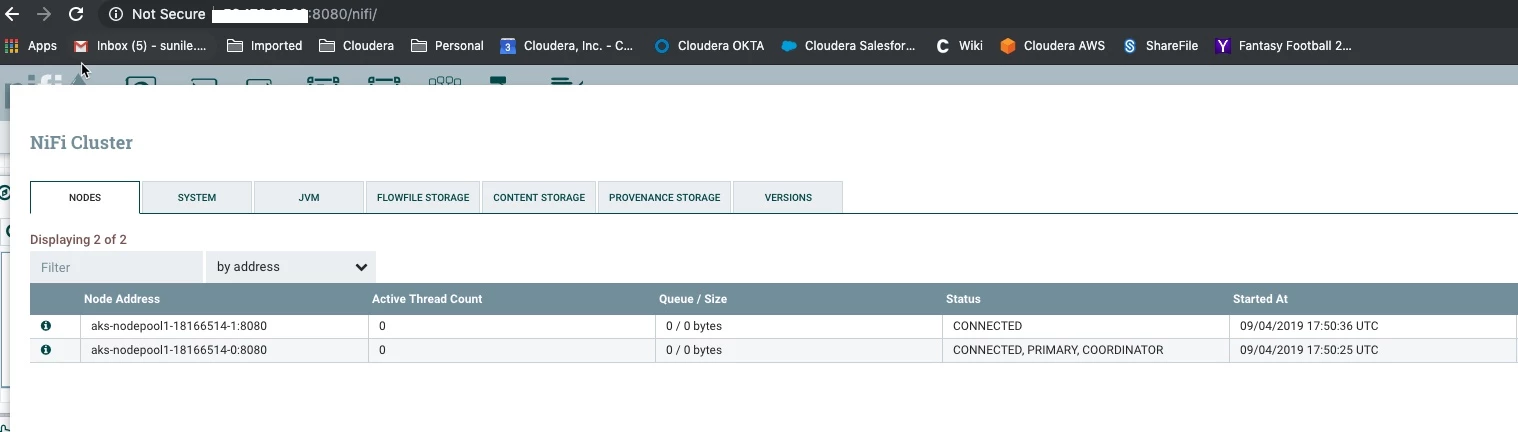
Few minutes later you will have a fully functioning NiFi cluster on Kubernetes
I use super simple a lot. I know. Deploying MiNiFi & NiFi on k8s is just that, super simple. Enjoy.

