

jgeorge
Gold ⭐️
February 1, 2016

NiFi + Spark : Feeding Data to Spark Streaming

  • October 5, 2026 at 8:46 AM
  • 22 replies
  • 68593 views
  • Translate All

Introduction

Spark doesn't supply a mechanism to have data pushed to it - instead, it wants to pull data from other sources. In NiFi, this data can be exposed in such a way that a receiver can pull from it by adding an Output Port to the root process group. For Spark, we will use this same mechanism - we will use the Site-to-Site protocol to pull data from NiFi's Output Ports.

Prerequisite

1) Assuming you already have latest version of NiFi-0.4.1/HDF-1.1.1 downloaded on your HW Sandbox, else execute below after ssh connectivity to sandbox is established:

# cd /opt/
# wget http://public-repo-1.hortonworks.com/HDF/1.1.1.0/nifi-1.1.1.0-12-bin.tar.gz
# tar -xvf nifi-1.1.1.0-12-bin.tar.gz

2) Download Compatible version [in our case 0.4.1] of "nifi-spark-receiver" and "nifi-site-to-site-client" to Sandbox in a specific location:

# mkdir /opt/spark-receiver
# cd /opt/spark-receiver
# wget http://central.maven.org/maven2/org/apache/nifi/nifi-site-to-site-client/0.4.1/nifi-site-to-site-client-0.4.1.jar
# wget http://central.maven.org/maven2/org/apache/nifi/nifi-spark-receiver/0.4.1/nifi-spark-receiver-0.4.1.jar

Steps:

1) Configure Spark to load some specific NiFi Libraries as below, edit spark-defaults.conf to add jars to ClassPath. Append Below lines to bottom:

# vi /usr/hdp/current/spark-client/conf/spark-defaults.conf

spark.driver.extraClassPath /opt/spark-receiver/nifi-spark-receiver-0.4.1.jar:/opt/spark-receiver/nifi-site-to-site-client-0.4.1.jar:/opt/nifi-1.1.1.0-12/lib/nifi-api-1.1.1.0-12.jar:/opt/nifi-1.1.1.0-12/lib/bootstrap/nifi-utils-1.1.1.0-12.jar:/opt/nifi-1.1.1.0-12/work/nar/framework/nifi-framework-nar-1.1.1.0-12.nar-unpacked/META-INF/bundled-dependencies/nifi-client-dto-1.1.1.0-12.jar
spark.driver.allowMultipleContexts = true

2) Open nifi.properties for updating configurations:

# vi /opt/nifi-1.1.1.0-12/conf/nifi.properties

3) Change NIFI http port to run on 8090 as default 8080 will conflict with Ambari web UI

# web properties #
nifi.web.http.port=8090

4) Configure NiFi instance to run site-to site by changing below configuration : add a port say 8055 and set "nifi.remote.input.secure" as "false"

# Site to Site properties
nifi.remote.input.socket.host=
nifi.remote.input.socket.port=8055
nifi.remote.input.secure=false

5) Now Start [Restart if already running as configuration change to take effect] NiFi on your Sandbox.

# /opt/nifi-1.1.1.0-12/bin/nifi.sh start

6) Let us build a small flow on NiFi canvas to read app log generated by NiFi itself to feed to spark:

a) Connect to below url in your browser: http://<your_vm_ip>:8090/nifi/

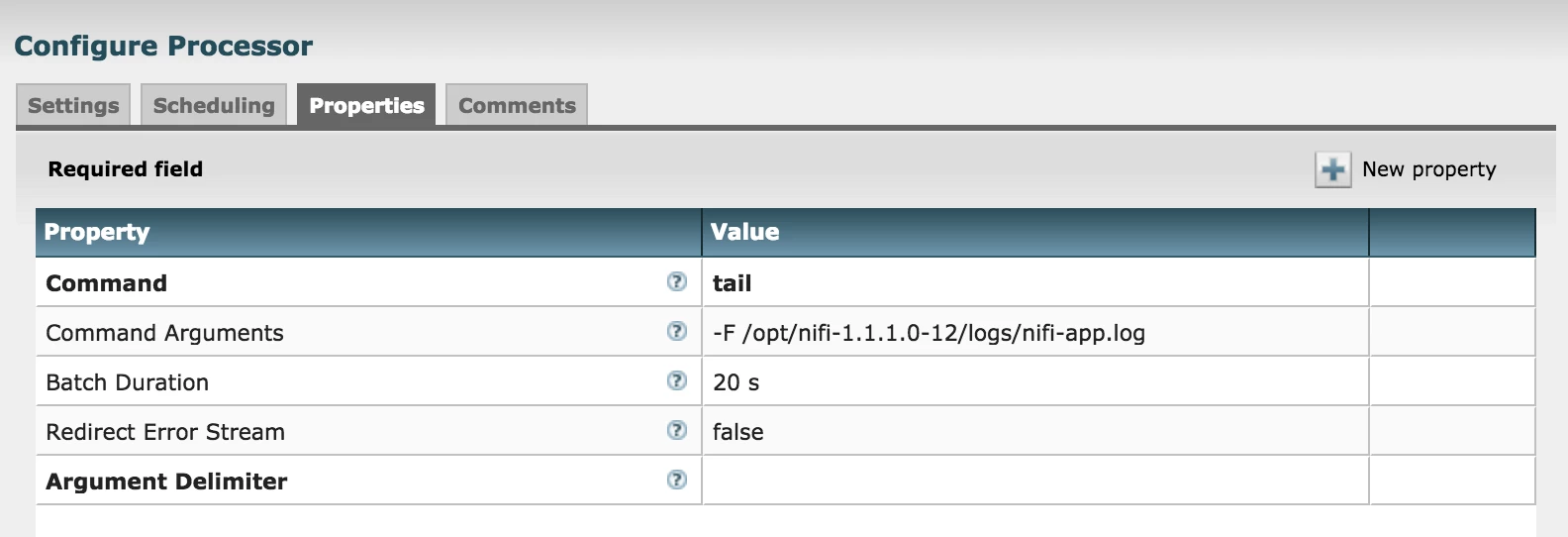
b) Drop an "ExecuteProcess" Processor to canvas [or you can use TailFile Processor] to read lines added to "nifi-app.log". Auto Terminate relationship Failure. The configuration on the processor would look like below:
1668-screen-shot-2016-01-31-at-125710-pm.png

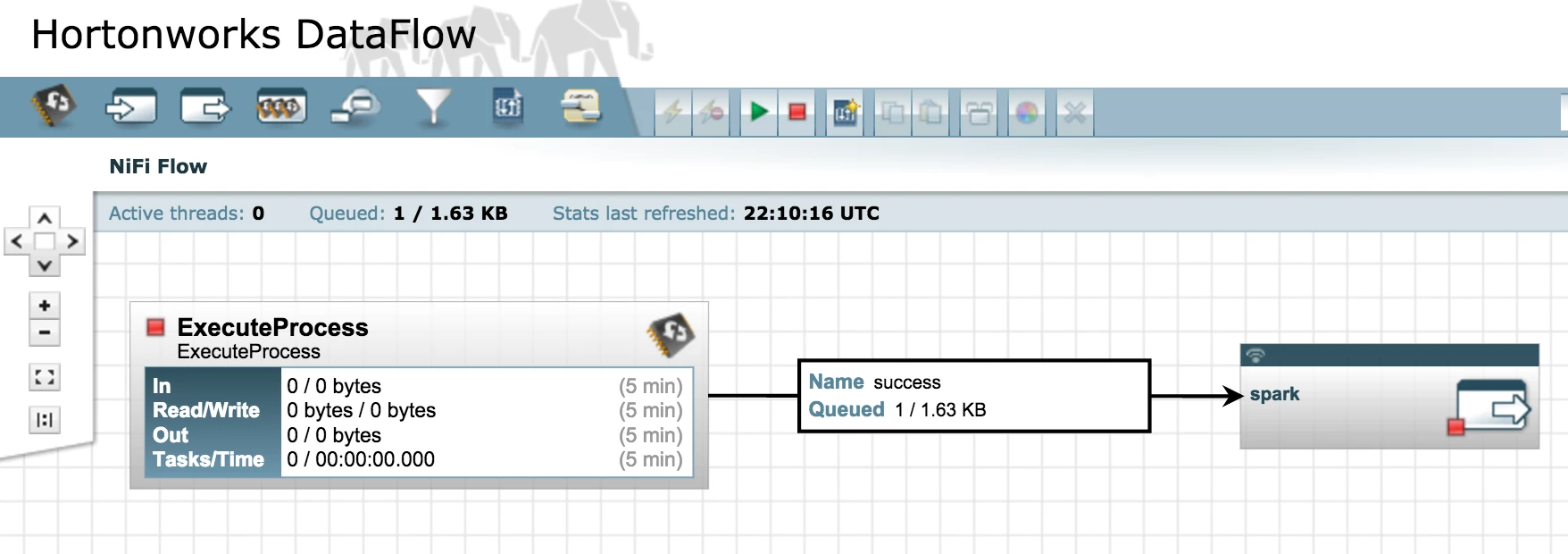
c) Drop an OutputPort to the canvas and Name it 'spark', Once added, connect "ExecuteProcess" to the port for Success relationship. This simple flow will look like below:
1669-screen-shot-2016-01-31-at-21029-pm.png

7) Now lets go back to VM command line and create the Scala application to pull data from NiFi output port we just created: change directory to "/opt/spark-receiver" and create a shell script file "spark-data.sh"

# cd /opt/spark-receiver
# vi spark-data.sh

😎 Add the below lines to the script file required for application to pull the data from NiFi output port and save it:

// Import all the libraries required
import org.apache.nifi._
import java.nio.charset._
import org.apache.nifi.spark._
import org.apache.nifi.remote.client._
import org.apache.spark._
import org.apache.nifi.events._
import org.apache.spark.streaming._
import org.apache.spark.streaming.StreamingContext._
import org.apache.nifi.remote._
import org.apache.nifi.remote.client._
import org.apache.nifi.remote.protocol._
import org.apache.spark.storage._
import org.apache.spark.streaming.receiver._
import java.io._
import org.apache.spark.serializer._
object SparkNiFiAttribute {
def main(args: Array[String]) {
// Build a Site-to-site client config with NiFi web url and output port name[spark created in step 6c]
val conf = new SiteToSiteClient.Builder().url("http://localhost:8090/nifi").portName("spark").buildConfig()
// Set an App Name
val config = new SparkConf().setAppName("Nifi_Spark_Data")
// Create a StreamingContext
val ssc = new StreamingContext(config, Seconds(10))
// Create a DStream using a NiFi receiver so that we can pull data from specified Port
val lines = ssc.receiverStream(new NiFiReceiver(conf, StorageLevel.MEMORY_ONLY))
// Map the data from NiFi to text, ignoring the attributes
val text = lines.map(dataPacket => new String(dataPacket.getContent, StandardCharsets.UTF_8))
// Print the first ten elements of each RDD generated
text.print()
// Start the computation
ssc.start()
}
}
SparkNiFiAttribute.main(Array())

9) Lets Go back to the NiFi Web UI and start the flow we created, make sure nothing is wrong and you shall see data flowing

10) Now load the script to spark-shell with below command and start streaming:

# spark-shell -i spark-data.sh

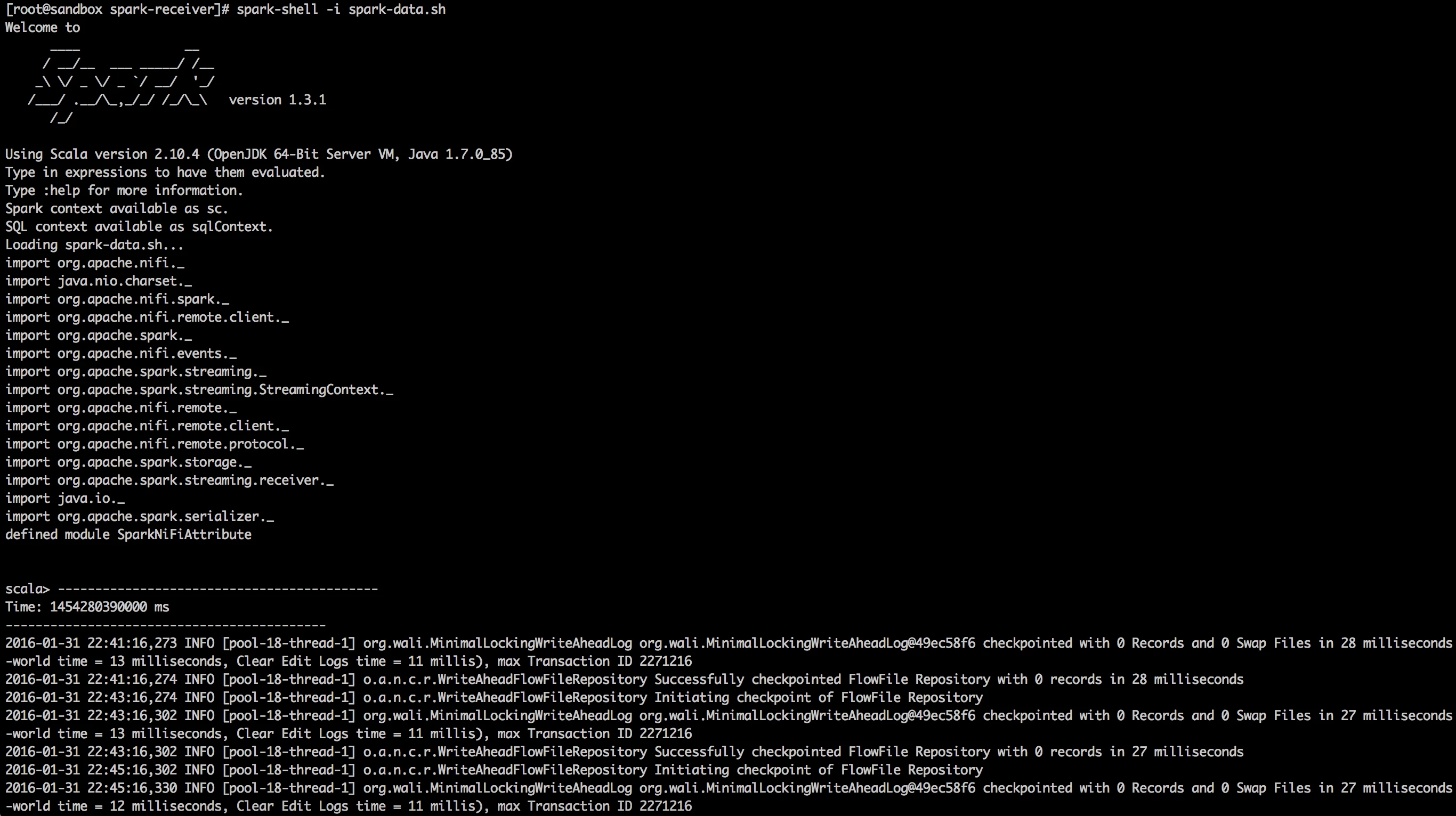
11) In the screenshot below, you can see the NiFi logs being pulled and printed on the console:
1670-screen-shot-2016-01-31-at-25841-pm.png

12) Same way we can pull data from NiFi and extract the associated Attributes:

// Import all the libraries required
import org.apache.nifi._
import java.nio.charset._
import org.apache.nifi.spark._
import org.apache.nifi.remote.client._
import org.apache.spark._
import org.apache.nifi.events._
import org.apache.spark.streaming._
import org.apache.spark.streaming.StreamingContext._
import org.apache.nifi.remote._
import org.apache.nifi.remote.client._
import org.apache.nifi.remote.protocol._
import org.apache.spark.storage._
import org.apache.spark.streaming.receiver._
import java.io._
import org.apache.spark.serializer._

object SparkNiFiData {
def main(args: Array[String]) {
// Build a Site-to-site client config with NiFi web url and output port name
val conf = new SiteToSiteClient.Builder().url("http://localhost:8090/nifi").portName("spark").buildConfig()
// Set an App Name
val config = new SparkConf().setAppName("Nifi_Spark_Attributes")
// Create a StreamingContext
val ssc = new StreamingContext(config, Seconds(5))
// Create a DStream using a NiFi receiver so that we can pull data from specified Port
val lines = ssc.receiverStream(new NiFiReceiver(conf, StorageLevel.MEMORY_ONLY))

// Extract the 'uuid' attribute
val text = lines.map(dataPacket => dataPacket.getAttributes.get("uuid"))
text.print()
ssc.start()
ssc.awaitTermination()
}
}
SparkNiFiData.main(Array())

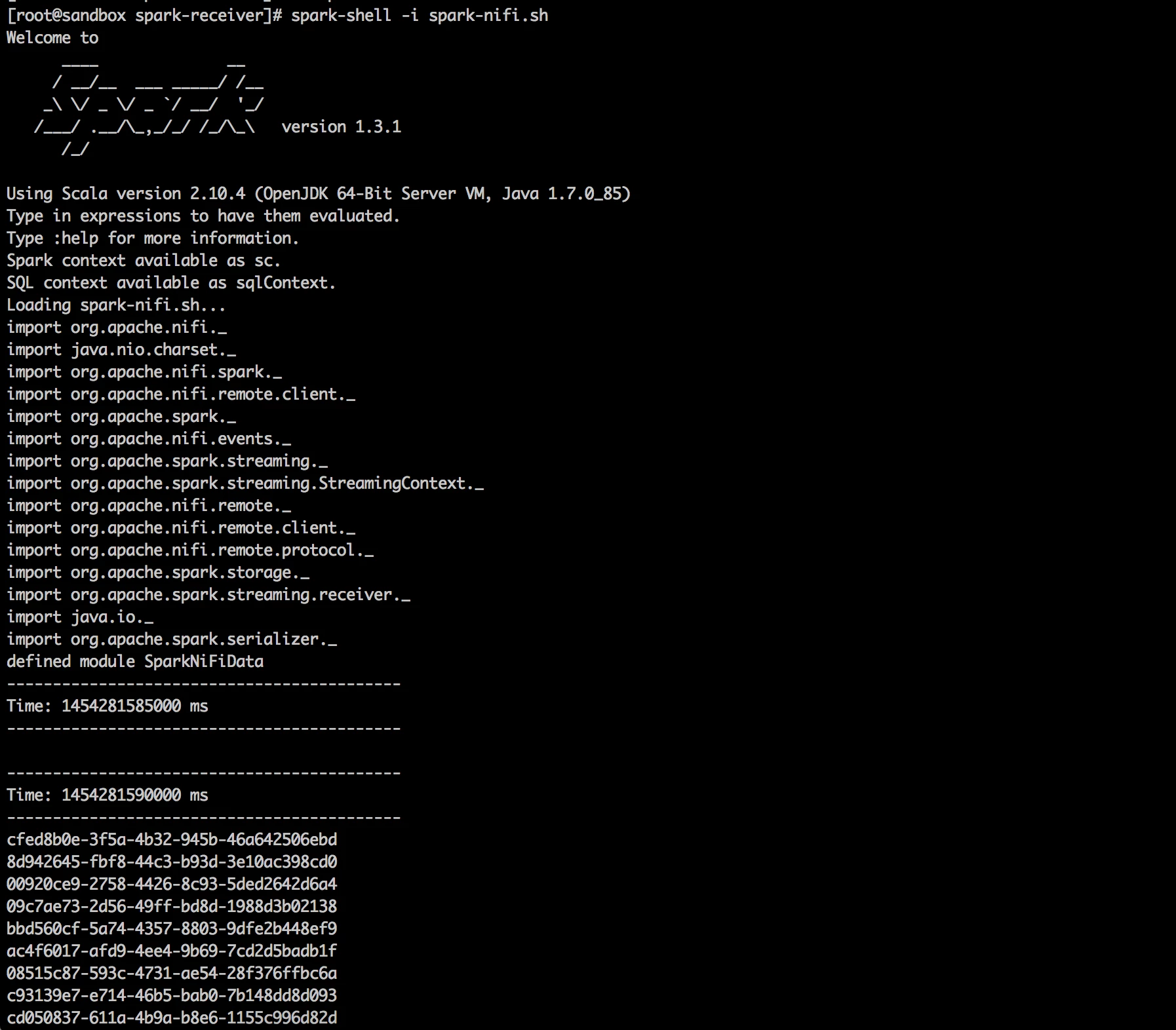
13) In the screenshot below, you can see the FlowFile attribute "uuid" being extracted and printed on the console:
1671-screen-shot-2016-01-31-at-30645-pm.png

14) You can create multiple output ports to transmit data to different Spark application from same NiFi Instance at the same time.

Thanks,

Jobin George

22 replies

obins_choudhary
Silver ⭐️⭐️⭐️
March 1, 2016

I get below error in step 6.c.

Port Spark is invalid because output connection for port 'Spark' is not defined. Please assist.

Translate
jgeorge
jgeorgeAuthor
Gold ⭐️
March 2, 2016

Hi Obins,

Please make sure you added 'output port' instead of Input port. I assume you are running HDF.1.1 or nifi-0.4.0

Below is a screenshot of input n output port, input will throw error with out any incoming connection.

2498-screen-shot-2016-03-01-at-11518-pm.png

Thanks,

Jobin

Translate
obins_choudhary
Silver ⭐️⭐️⭐️
March 2, 2016

I am using DataFLow on HDP 2.3 which has Nifi 0.3.

2519-screen-shot-2016-03-02-at-10745-pm.pngAlso, do i need to use port 8055 for SiteToSiteClient in step 8 based nifi.remote.input.socket.port set in step 4?

Translate
sai_gopalakrish
Silver ⭐️⭐️⭐️
June 27, 2016

Hi @Jobin George,

Thanks for the tutorial! I am connecting to Spark from Nifi using the Output Port. I tried an example - sending a HTTP POST request using the HandleHttpRequest processor with random JSON message which is processed by Spark (code in Java) and is ultimately stored in a MongoDB collection.

As a next step, I am going to send a real-world JSON request (let's say IoT data) and predict using a model (which I had already trained using MLLib). I want to predict the score and *return the result* back to Nifi's HandleHttpResponse processor as a response.

I am not able to connect an output relationship from the Output Port to the Response processor. Is there another way to send the response (from Spark side) ?

Thanks,

Sai

Translate
jgeorge
jgeorgeAuthor
Gold ⭐️
July 1, 2016

Hi @Saisubramaniam Gopalakrishnan,

I haven't Tried it, but you can add an input port to the root nifi canvas and try communicating from spark(nifi site-to-site client), and then push it to other processors as required.

Thanks,

Jobin

Translate
sai_gopalakrish
Silver ⭐️⭐️⭐️
July 1, 2016

Thanks for the reply @Jobin George, can you tell me how to send the results from Spark back to NiFi? There is a NiFiReceiver but no NiFiSender. Does the former have a method to send back the results? (I currently use the Java version) Thanks.

Translate
yuminled2901
Silver ⭐️
January 25, 2017

Hello, i got a error after step 10 when run spark-data.sh. It is "nifi is not member of package org.apache". How can i fix this problem? thank you

11675-spark.png

Translate
jgeorge
jgeorgeAuthor
Gold ⭐️
January 26, 2017

@Yumin Dong Which version of HDF/NiFi are you using? if the latest one, I hope you downloaded the latest version of dependencies. Let me know.

Jobin

Translate
harsh_b26
Silver ⭐️
February 14, 2017

Hi George thanks for the wonderful tutorial..

I am trying to connect Nifi and Spark in HDInsight(Azure) cluster and ending up a lots of error..

Is this code only work for HDF only?

Please have a look on screenshot attached.untitled.png

Translate
jgeorge
jgeorgeAuthor
Gold ⭐️
February 16, 2017

Hi Harsh, Cant make out much from the screenshot as the main error cause is not visible. First glance, it looks more like environment issue.

Translate
arsalan_siddiqi
Gold ⭐️
June 8, 2017

Hi George

I am not using the sandbox but rather have a standalone installation of spark and nifi on my pc

I am using apache nifi 1.2.0 and I have followed the entire tutorial. I get the error in

import org.apache.nifi.events._

<console>:38: error: object events is not a member of package org.apache.nifi import org.apache.nifi.events._

I have included all the relevant jars that you have mentioned.

  1. nifi-site-to-site-client-1.2.0.jar
  2. nifi-spark-receiver-1.2.0.jar
  3. nifi-api-1.2.0.jar
  4. nifi-utils-1.2.0.jar
  5. nifi-client-dto-1.2.0.jar

I opened all the jars and sure enough there in no directory org.apache.nifi.events in any of the jars.

How can i find this missing import?

also i tried to run the code in intellij i dont get any errors but i get the following warning:

17/06/08 18:16:14 INFO ReceiverSupervisorImpl: Stopping receiver with message: Registered unsuccessfully because Driver refused to start receiver 0

i copied the following code in Intellij. i commented the last line

// Import all the libraries required
import org.apache.nifi._
import java.nio.charset._
import org.apache.nifi.spark._
import org.apache.nifi.remote.client._
import org.apache.spark._
import org.apache.nifi.events._
import org.apache.spark.streaming._
import org.apache.spark.streaming.StreamingContext._
import org.apache.nifi.remote._
import org.apache.nifi.remote.client._
import org.apache.nifi.remote.protocol._
import org.apache.spark.storage._
import org.apache.spark.streaming.receiver._
import java.io._
import org.apache.spark.serializer._

object SparkNiFiAttribute {
def main(args: Array[String]) {
/*
import java.util
val additionalJars = new util.ArrayList[String]
additionalJars.add("/home/arsalan/NiFiSparkJars/nifi-site-to-site-1.2.0.jar")

*/
val config = new SparkConf().setAppName("Nifi_Spark_Data")
// .set("spark.driver.extraClassPath","/home/arsalan/NiFiSparkJars/nifi-site-to-site-client-1.2.0.jar:/home/arsalan/NiFiSparkJars/nifi-spark-receiver-1.2.0.jar:/home/arsalan/nifi-1.2.0/lib/nifi-api-1.2.0.jar:/home/arsalan/nifi-1.2.0/lib/bootstrap/nifi-utils-1.2.0.jar:/home/arsalan/nifi-1.2.0/work/nar/framework/nifi-framework-nar-1.2.0.nar-unpacked/META-INF/bundled-dependencies/nifi-client-dto-1.2.0.jar")
.set("spark.driver.allowMultipleContexts", "true")
.setMaster("local[*]")
// Build a Site-to-site client config with NiFi web url and output port name[spark created in step 6c]
val conf = new SiteToSiteClient.Builder().url("http://localhost:8080/nifi").portName("Data_to_Spark").buildConfig()
// Set an App Name


// Create a StreamingContext
val ssc = new StreamingContext(config, Seconds(1))
ssc.sparkContext.getConf.getAll.foreach(println)
// Create a DStream using a NiFi receiver so that we can pull data from specified Port
val lines = ssc.receiverStream(new NiFiReceiver(conf, StorageLevel.MEMORY_ONLY))
// Map the data from NiFi to text, ignoring the attributes
val text = lines.map(dataPacket => new String(dataPacket.getContent, StandardCharsets.UTF_8))
// Print the first ten elements of each RDD generated
text.print()
// Start the computation
ssc.start()
}
}
//SparkNiFiAttribute.main(Array())

Translate
arsalan_siddiqi
Gold ⭐️
June 9, 2017

to run the code in intellij the above code is fine! Only need to add ssc.awaitTermination() after ssc.start(). To run in shell, I need to create a fatJar (uberjar/standalone Jar)The missing import org.apache.nifi.events._ was available in nifi-framework-api-1.2.0.jar .

I used maven to create the fat jar using the maven-assembly-plugin

Translate
jgeorge
jgeorgeAuthor
Gold ⭐️
June 10, 2017

hello @Arsalan Siddiqi,

Here you can find spark integration with HDF-2.x (still only nifi-1.1) you can figure out the dependency from there.[ first step under:Configuring and Restarting Spark section]

https://community.hortonworks.com/content/kbentry/84631/hdf-21-nifi-site-to-site-direct-streaming-to-spark.html

Thanks

Translate
lweichberger
Silver ⭐️⭐️
June 11, 2017

Awesome! Love this work, great job Jobin!

Translate
daniel_scheiner
Gold ⭐️
September 12, 2017

How can we deal with SECURED http connections?

NiFi runs on:

https://<ip>:8443

and I'm using SSL certificates for authentication

Translate
ManishaJain
Gold ⭐️
September 26, 2017

Hi @Jobin George,

Im using the open source nifi version 1.3.0

Followed steps shared by you.

Im not able to enable the transmission of the output port .nifisparkreciever.png.Have i missed anything?

Translate
avrahamfried400
Silver ⭐️
November 5, 2017

Hi,

i got exception

unable to create serializer "com.esotericsoftware.kryo.serializer" for class: org.apache.nifi.remote.client.SiteToSiteClient$StandardSiteToSiteClientConfig

what could be the problem?

Translate
witnessthevil
Silver ⭐️
October 8, 2022

Hi, I have been following your instruction.

If I want to do the same thing, but with pyspark, will the code similar to this? 

Translate
