hbashir
Silver ⭐️⭐️⭐️
January 3, 2019
Solved

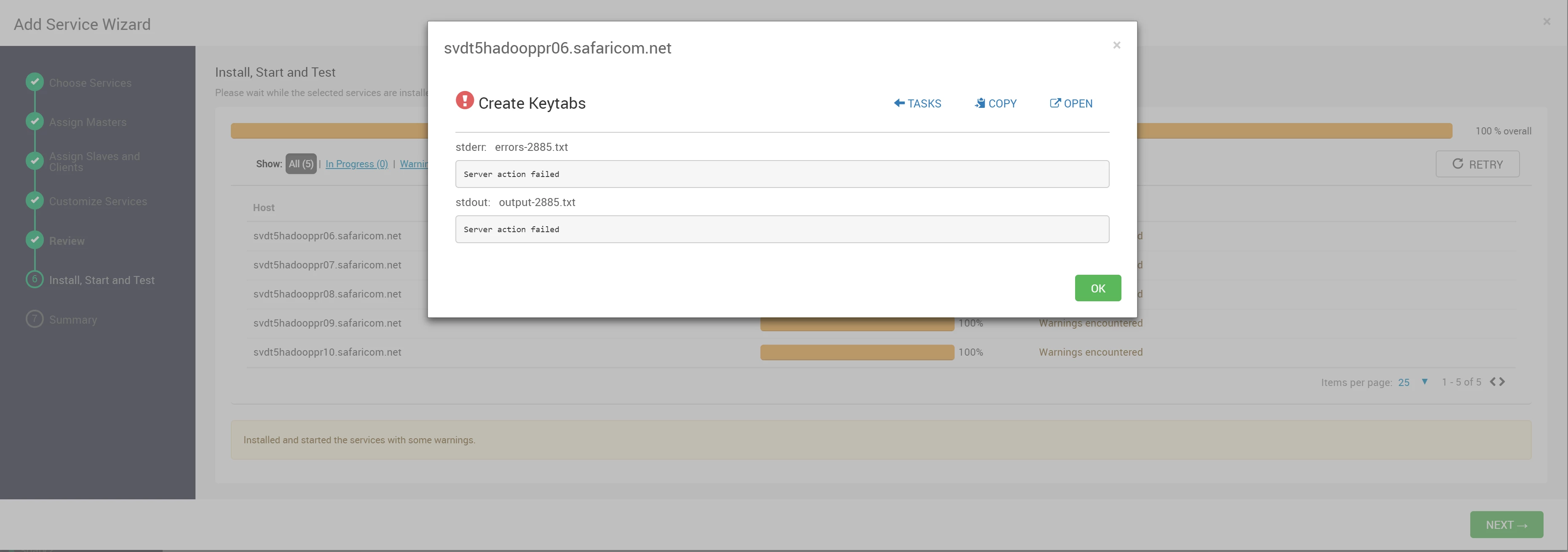
Ambari Fails to create Keytabs when Installing new services or when trying to regenerate keytabs of existing services

I am getting a server action failed error when ambari tries to create keytabs. I have no idea what is causing this error. I am using KDC admin to install the service. Please help. @Geoffrey Shelton Okot

96567-keytab-error.png

Shelton
SheltonAnswer
Gold ⭐️⭐️⭐️
January 16, 2019

@huzaira bashir

There seems to be a mismatch between the Active Directory encryption type and the MIT encryption types can you align the 2 supported_enctypes to be the same.

Windows supports the below encryption types depending on the Windows version which are weak encryption

DES_CBC_CRC
DES_CBC_MD5
RC4_HMAC_MD5
AES128_HMAC_SHA1
AES256_HMAC_SHA1

In your kdc.conf you have stronger encryption types you validate the AD encryption types? Else try to comment out the kdc.conf encryptions see below

# supported_enctypes = aes256-cts:normal aes128-cts:normal des3-hmac-sha1:normal arcfour-hmac:normal camellia256-cts:normal camellia128-cts:normal des-hmac-sha1:normal des-cbc-md5:normal des-cbc-crc:normal

and see whether the error persists?

27 replies

rlevas
Gold ⭐️
January 3, 2019
@huzaira bashir

Can you take a look at your Ambari server log (/var/log/ambari-server/ambari-server.log) and see if there are any interesting error messages?

Translate
Shelton
Gold ⭐️⭐️⭐️
January 4, 2019

@huzaira bashir

What is the HDP version? The screenshot doesn't look a typical MIT Kerberos enabling UI? Could you be using the AD as KDC? Having said that can you share how you procedure used? Can you share the Kerberos enabling screenshots from Ambari?

If you could answer promptly with the above info then it would help a great deal.

HTH


Translate
hbashir
hbashirAuthor
Silver ⭐️⭐️⭐️
January 4, 2019

96614-kerberos-service.png

@Geoffrey Shelton Okot

The screenshot shared previously was of Ambari UI when adding hbase as a service.

Kerberos is MIT and was working fine when initially enabled. I realized there was a problem when adding a new service to the cluster. Ambari creates the principles needed in the kerberos db but is unable to create the keytabs.

HDP version is 3.0.0.0-1634

Ambari Version 2.7.1.0

The procedure i used was the one in the guidelines of ambari using an exsisting MIT kerberos. It works fine until you try and add a new service or regenerate keytabs for an existing service.

@Robert Levas There are no error messages in the logs that say anything.

Translate
Shelton
Gold ⭐️⭐️⭐️
January 4, 2019

@huzaira bashir

At least I am reassured about the previous screenshot. From the screenshot, I don't see domain which should be in the format and comma separated if your REALM is TEST.COM note the dot(.)

.test.com,test.com

And the Kadmin too, meanwhile can you share a tokenized version of you krb5.conf,kdc.conf and kadm5.acl most important ensure these 2 daemons are running

Enable auto start

# systemctl enable krb5kdc
# systemctl enable kadmin

Start the daemons

# /etc/rc.d/init.d/krb5kdc start
# /etc/rc.d/init.d/kadmin start

or

# systemctl start krb5kdc
# systemctl start kadmin

Whichever is applicable

HTH


Translate
rlevas
Gold ⭐️
January 4, 2019
@huzaira bashir

Is the Ambari server on a host that is registered with the cluster? If not, I was recently alerted to an issue where this case was causing an error. But enabling Kerberos would have failed for you... unless you had enabled Kerberos before upgrading to Ambari 2.7.1. See AMBARI-25088 - Enable Kerberos fails when Ambari server is not on a registered host.

Translate
hbashir
hbashirAuthor
Silver ⭐️⭐️⭐️
January 7, 2019

Hi @Robert Levas the server is on the same domain. Kerberos is ok. the only issue is generation of keytabs when I add a new service. The principals are also created it just fails at keytab generation.

Translate
Shelton
Gold ⭐️⭐️⭐️
January 6, 2019

@huzaira bashir

Please find a complete process of the kerberization process


Translate
Shelton
Gold ⭐️⭐️⭐️
January 6, 2019

@huzaira bashir
Please follow the steps and update this thread, I am sure there is a step you missed follow page by page. On your screenshot I didn't see the Domain

Translate
hbashir
hbashirAuthor
Silver ⭐️⭐️⭐️
January 7, 2019

97530-krb5kdc-status.png

97531-kadmin-status.png

@Geoffrey Shelton Okot

Hi have done everything accordingly, the domain is defined in the krb5.conf file. The ACL file is also ok.

my process are running as expected. the only problem is Ambari is not able to generate keytabs. Like I said, Ambari creates the principals required in the kerberos db but is unable to generate keytabs..

I can run Kadmin and list the princs.

Translate
hbashir
hbashirAuthor
Silver ⭐️⭐️⭐️
January 7, 2019

@Geoffrey Shelton Okot @Robert Levas

Attached is the error in the ambari-server log when trying to regenerate keytab for hbase

97532-error-in-ambari-server-log.png

Translate
Shelton
Gold ⭐️⭐️⭐️
January 7, 2019

@huzaira bashir

Can you share the corresponding to my screenshots photo5 and 6 , I built a VM to test your case and documented all the steps over the weekend and I am surprised it can't work for you.
Is Java Cryptography Extension (JCE) installed, check the syntax below please adjust your jdk_home accordingly

# zipgrep CryptoAllPermission /usr/jdk64/jdk1.8.0_112/jre/lib/security/local_policy.jar

The desired output should be

default_local.policy: permission javax.crypto.CryptoAllPermission;

Translate
hbashir
hbashirAuthor
Silver ⭐️⭐️⭐️
January 9, 2019

@Geoffrey Shelton Okot

Hi, my Javax policy is fine. see attached. Also I dont see photo 5 and 6 that you mentioned in your previous comment.

97559-javax-policy.png

Translate
Shelton
Gold ⭐️⭐️⭐️
January 9, 2019

@huzaira bashir

Here they are


photo05.pngphoto06.png
Translate