

rvillanueva
Gold ⭐️
July 25, 2019
Solved

Ambari files view upload error: java.net.NoRouteToHostException: myhost:50075: No route to host (Host unreachable)

Trying to upload a simple csv file into HDFS via the Ambari files view, getting the error below

java.net.NoRouteToHostException: hw04.ucera.local:50075: No route to host (Host unreachable)     
at java.net.PlainSocketImpl.socketConnect(Native Method)    
at java.net.AbstractPlainSocketImpl.doConnect(AbstractPlainSocketImpl.java:350)    
at java.net.AbstractPlainSocketImpl.connectToAddress(AbstractPlainSocketImpl.java:206)    
at java.net.AbstractPlainSocketImpl.connect(AbstractPlainSocketImpl.java:188)    
at java.net.SocksSocketImpl.connect(SocksSocketImpl.java:392)    
at java.net.Socket.connect(Socket....

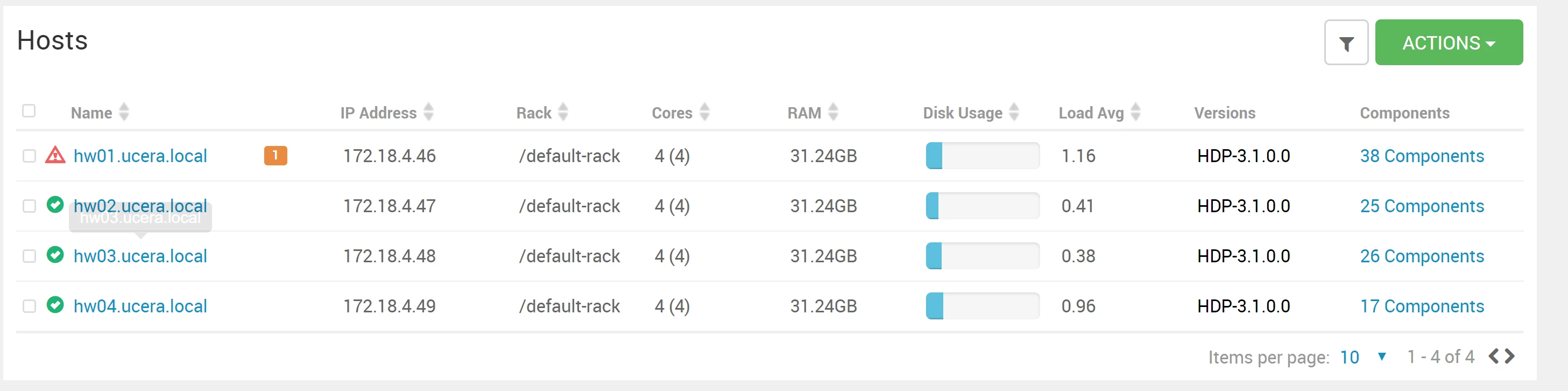
For reference, here the hosts on the cluster
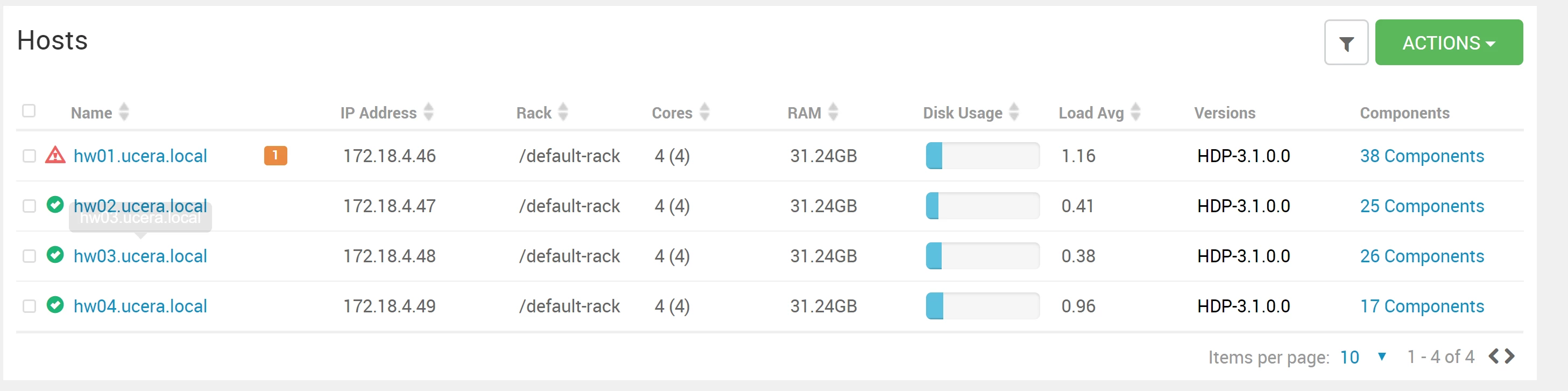
110039-1564016464453.png

and the services on the HW04 node

  • Accumulo Client
  • DataNode
  • HBase Client
  • HDFS Client
  • Hive Client
  • HST Agent
  • Infra Solr Client
  • Log Feeder
  • MapReduce2 Client
  • Metrics Monitor
  • Oozie Client
  • Pig Client
  • Spark2 Client
  • Sqoop Client
  • Tez Client
  • YARN Client
  • ZooKeeper Client

Not sure what the error means. Any debugging suggestions or fixes?

1564016455599.png
rvillanueva
Gold ⭐️
July 27, 2019

Think I found the problem, TLDR: firewalld (nodes running on centos7) was still running, when should be disabled on HDP clusters.

From another community post:

For Ambari to communicate during setup with the hosts it deploys to and manages, certain ports must be open and available. The easiest way to do this is to temporarily disable iptables, as follows:

systemctl disable firewalld

service firewalld stop

So apparently iptables and firewalld need to be disabled across the cluster (supporting docs can be found here, I only disabled them on the Ambari installation node). After stopping these services across the cluster (I recommend using clush), was able to run the upload job without incident.

7 replies

jsensharma
Platinum ⭐️⭐️
Platinum ⭐️⭐️
July 25, 2019

@Reed Villanueva

The most important requirement for the Cluster is that Not only ambari to be able to resolve each cluster nodes with they FQDN.

BUT all the cluster nodes also should be able to resolve each other using their FQDN.

So please make sure that all your cluster nodes are able to resolve each other using their hostname / FQDN


Please check the "/etc/hosts" file on ambari server node as well as on other cluster nodes. (they can be same to resolve all the cluster nodes). If you are using DNS entry then please make sure that each host is able to resolve each others DNS name.

https://docs.hortonworks.com/HDPDocuments/Ambari-2.6.2.2/bk_ambari-installation-ppc/content/edit_the_host_file.html
https://docs.hortonworks.com/HDPDocuments/Ambari-2.6.2.2/bk_ambari-installation-ppc/content/check_dns.html

Translate
jsensharma
Platinum ⭐️⭐️
Platinum ⭐️⭐️
July 25, 2019

@Reed Villanueva

Please check if you can acccess the hostname "hw04.ucera.local" from all your cluster nodes? Without any hostname/firewall issue?


Please run the same command from all cluster nodes:

# ping hw04.ucera.local
# telnet hw04.ucera.local  50075

# hostname -f

.

Translate
rvillanueva
Gold ⭐️
July 26, 2019

@Jay Kumar SenSharma

Running you precribed tests across all the cluster nodes, getting...

[root@HW01 groups.d]# clush -ab hostname -f
---------------
HW01
---------------
HW01.ucera.local
---------------
HW02
---------------
HW02.ucera.local
---------------
HW03
---------------
HW03.ucera.local
---------------
HW04
---------------
HW04.ucera.local

[root@HW01 groups.d]# clush -ab cat /etc/hosts
---------------
HW[01-04] (4)
---------------
127.0.0.1   localhost localhost.localdomain localhost4 localhost4.localdomain4
::1         localhost localhost.localdomain localhost6 localhost6.localdomain6
172.18.4.46 HW01.ucera.local
172.18.4.47 HW02.ucera.local
172.18.4.48 HW03.ucera.local
172.18.4.49 HW04.ucera.local
[root@HW01 groups.d]#
[root@HW01 groups.d]#
[root@HW01 groups.d]#
[root@HW01 groups.d]# clush -ab ping hw04.ucera.local
^CHW03: Killed by signal 2.
HW04: Killed by signal 2.
HW02: Killed by signal 2.
Warning: Caught keyboard interrupt!
---------------
HW01
---------------
PING HW04.ucera.local (172.18.4.49) 56(84) bytes of data.
64 bytes from HW04.ucera.local (172.18.4.49): icmp_seq=1 ttl=64 time=0.231 ms
64 bytes from HW04.ucera.local (172.18.4.49): icmp_seq=2 ttl=64 time=0.300 ms
---------------
HW02
---------------
PING HW04.ucera.local (172.18.4.49) 56(84) bytes of data.
64 bytes from HW04.ucera.local (172.18.4.49): icmp_seq=1 ttl=64 time=0.177 ms
---------------
HW03
---------------
PING HW04.ucera.local (172.18.4.49) 56(84) bytes of data.
64 bytes from HW04.ucera.local (172.18.4.49): icmp_seq=1 ttl=64 time=0.260 ms
---------------
HW04
---------------
PING HW04.ucera.local (172.18.4.49) 56(84) bytes of data.
64 bytes from HW04.ucera.local (172.18.4.49): icmp_seq=1 ttl=64 time=0.095 ms
Keyboard interrupt (HW[01-04] did not complete).
[root@HW01 groups.d]#
[root@HW01 groups.d]#
[root@HW01 groups.d]#
[root@HW01 groups.d]# clush -ab "telnet hw04.ucera.local 50075"
HW01: telnet: connect to address 172.18.4.49: No route to host
HW02: telnet: connect to address 172.18.4.49: No route to host
HW03: telnet: connect to address 172.18.4.49: No route to host
HW04: Killed by signal 2.
Warning: Caught keyboard interrupt!
---------------
HW[01-03] (3)
---------------
Trying 172.18.4.49...
---------------
HW04
---------------
Trying 172.18.4.49...
Connected to hw04.ucera.local.
Escape character is '^]'.
clush: HW[01-03] (3): exited with exit code 1
Keyboard interrupt.

So other than telnet not working things seem to be OK. Will continue looking into why telnet can't connect.

Translate
rvillanueva
rvillanuevaAuthorAnswer
Gold ⭐️
July 27, 2019

Think I found the problem, TLDR: firewalld (nodes running on centos7) was still running, when should be disabled on HDP clusters.

From another community post:

For Ambari to communicate during setup with the hosts it deploys to and manages, certain ports must be open and available. The easiest way to do this is to temporarily disable iptables, as follows:

systemctl disable firewalld

service firewalld stop

So apparently iptables and firewalld need to be disabled across the cluster (supporting docs can be found here, I only disabled them on the Ambari installation node). After stopping these services across the cluster (I recommend using clush), was able to run the upload job without incident.

Translate

