Rupesh_Raghani
Silver ⭐️⭐️
May 27, 2021
Solved

Apche Nifi Show Templates and Workflows to only Owner

We want to hide templates and workflows created by one user to the other users in the system. So the workflow should be visible to only its owner.

MattWho
MattWhoAnswer
Titanium ⭐️⭐️⭐️
May 27, 2021

@Rupesh_Raghani 

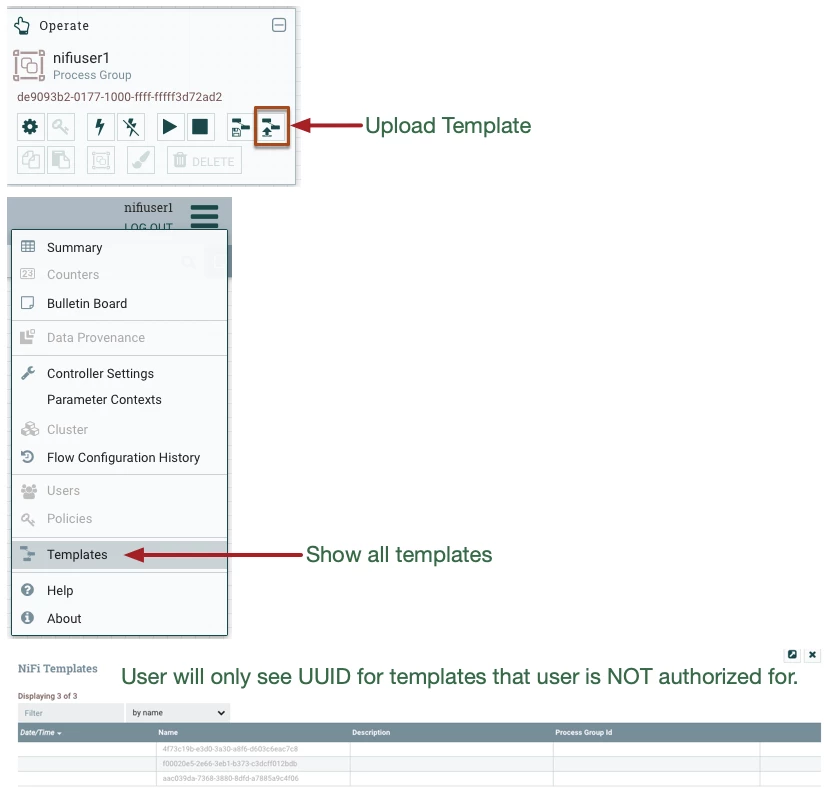
NiFI templates are uploaded to the process group selected.  Only users who have been granted view and modify on that PG will be able to instantiate those templates on to the NiFi canvas.
MattWho_0-1622129648194.png

NiFi operates within a single JVM, so there are not separate per user canvases. 
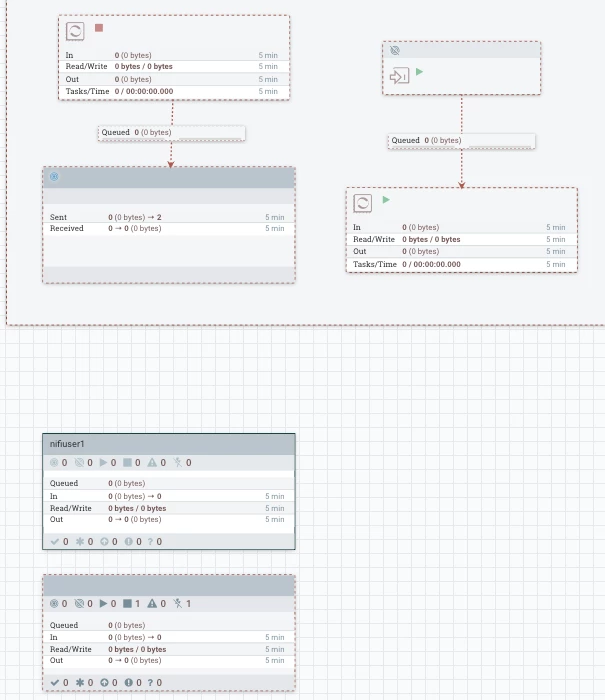
User not authorized on a specific NiFi Process Group (PG) will only see a blank representation for that component on the canvas (non-authorized users can not see name, description, configuration details, etc...). Non-authorized users can still see metrics presented on components and queue counts on connections only.
MattWho_1-1622129912097.png


The reason NiFi still renders all components is because everything is executing within a single JVM. 
- One users flows can impact another team (Some flow with huge backlog of queued data, high volume, etc can impact resource availability to other teams/users.
- Stats on information bar is representative of entire canvas (all dataflows), so it is still important for all teams/users to be able to identify areas of concern even if is not their dataflows and they have no authorizations allowing them to do anything about it. But they could alert other teams/users.
- Typical use case is team/user 1 has a PG and then team/user 2 has a different authorized PG.  If NiFi did not render both PG to both users, nothing prevents users from building flows on top of one another.  Then assume we have team/user 3 that is authorized for both above team/users PGs.  This becomes unreadable useable by that third user.

If you found this helped with your query, please take a moment to login and click "Accept" on this solution.
Thank you,

Matt

4 replies

MattWho
Titanium ⭐️⭐️⭐️
MattWhoAnswer
Titanium ⭐️⭐️⭐️
May 27, 2021

@Rupesh_Raghani 

NiFI templates are uploaded to the process group selected.  Only users who have been granted view and modify on that PG will be able to instantiate those templates on to the NiFi canvas.

MattWho_0-1622129648194.png

NiFi operates within a single JVM, so there are not separate per user canvases. 
User not authorized on a specific NiFi Process Group (PG) will only see a blank representation for that component on the canvas (non-authorized users can not see name, description, configuration details, etc...). Non-authorized users can still see metrics presented on components and queue counts on connections only.

MattWho_1-1622129912097.png


The reason NiFi still renders all components is because everything is executing within a single JVM. 
- One users flows can impact another team (Some flow with huge backlog of queued data, high volume, etc can impact resource availability to other teams/users.
- Stats on information bar is representative of entire canvas (all dataflows), so it is still important for all teams/users to be able to identify areas of concern even if is not their dataflows and they have no authorizations allowing them to do anything about it. But they could alert other teams/users.
- Typical use case is team/user 1 has a PG and then team/user 2 has a different authorized PG.  If NiFi did not render both PG to both users, nothing prevents users from building flows on top of one another.  Then assume we have team/user 3 that is authorized for both above team/users PGs.  This becomes unreadable useable by that third user.

If you found this helped with your query, please take a moment to login and click "Accept" on this solution.
Thank you,

Matt

Translate
cjervis
Community Manager
Community Manager
June 3, 2021

@Rupesh_Raghani Has the reply helped resolve your issue? If so, please mark the appropriate reply as the solution, as it will make it easier for others to find the answer in the future. 


Screen Shot 2019-08-06 at 1.54.47 PM.pngmark as solution button


Translate
Keep the questions coming
Rupesh_Raghani
Silver ⭐️⭐️
June 14, 2021

Hey Jervis, 


Is there any way to show the blank canvas for every logged in user ?

Translate

