Anderosn
Silver ⭐️⭐️⭐️
December 11, 2023
Solved

Avro to Json adding extra delemeters

I am using ExecuteSQL to pull a colb column from DB. ExecuteSQL provides the result in the avro format. Then I am converting that to Json using AvroToJsonProcessor but it is adding escape characters. 
I want the value that is being pulled from DB as a Json but I am getting it as a string with escape characters. 

[
    {
        "SEARCH_RESULT": "{ \"requestId\": \"203680\", \"responseData\": [ { \"searchKey\": \"cardNumber\", \"data\": [ { \"firstName\": \"Martin\", \"lastName\": \"Garry\" }, { \"firstName\": \"Martin\", \"lastName\": \"Garry\"}, { \"firstName\": \"Martin\", \"lastName\": \"Garry\",  } ] } ] }"
    }
]

I want that value of Search result to be a Json instead of a String so that I can use JOLT to transform it as needed. 
Can you someone pls suggest how to do it.

SAMSAL
SAMSALAnswer
Platinum ⭐️⭐️⭐️
December 11, 2023

@Anderosn,

Another option is to use the UpdateRecod with an Avro schema in the JsonRecordSetWriter that reflects the actual json structure coming out of the ExecuteSQL

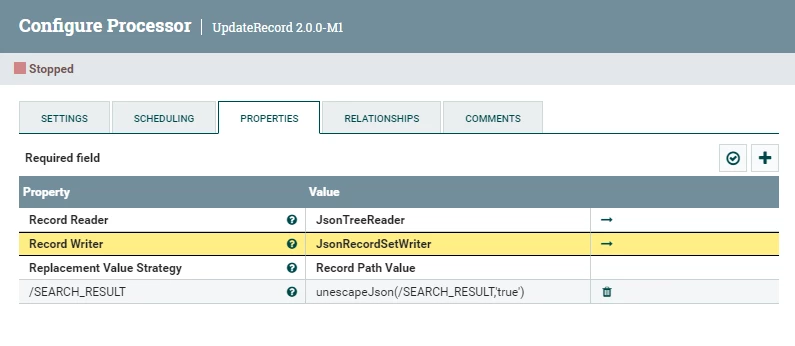
The UpdateRecord will look like this:

SAMSAL_0-1702321845649.png

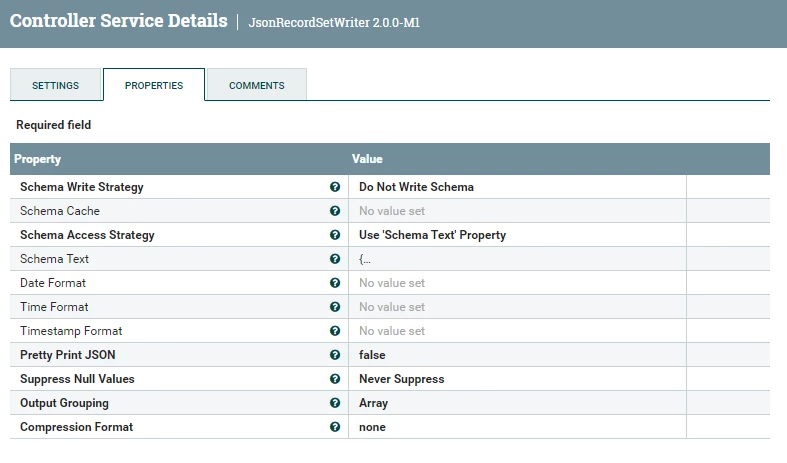
The JsonRecorSetWriter looks like this:

SAMSAL_1-1702321891411.png

The AvroSchema provided in the ShemaText property is the following:

{
"name": "nifi",
"type": "record",
"namespace": "nifi.com",
"fields": [
{
"name": "SEARCH_RESULT",
"type": {
"name": "SEARCH_RESULT",
"type": "record",
"fields": [
{
"name": "requestId",
"type": "string"
},
{
"name": "responseData",
"type": {
"name": "responseData",
"type": "array",
"items": {
"name": "responseData",
"type": "record",
"fields": [
{
"name": "searchKey",
"type": "string"
},
{
"name": "data",
"type": {
"name": "data",
"type": "array",
"items": {
"name": "data",
"type": "record",
"fields": [
{
"name": "firstName",
"type": "string"
},
{
"name": "lastName",
"type": "string"
}
]
}
}
}
]
}
}
}
]
}
}
]
}

This will produce the following output json out of the UpdateRecord:

[ {
"SEARCH_RESULT" : {
"requestId" : "203680",
"responseData" : [ {
"searchKey" : "cardNumber",
"data" : [ {
"firstName" : "Martin",
"lastName" : "Garry"
}, {
"firstName" : "Martin",
"lastName" : "Garry"
}, {
"firstName" : "Martin",
"lastName" : "Garry"
} ]
} ]
}
} ]


You can use EvaluateJsonPath to get the data as json array to do the needed processing.

If that helps please accept solution.

Thanks


12 replies

SAMSAL
Platinum ⭐️⭐️⭐️
December 11, 2023

Hi @Anderosn ,

Have you tried using ExecuteSQLRecord providing JsonRecordSetWriter as RecordWriter ? This will give you the result in json instead of Avro to begin with.

Translate
Anderosn
AnderosnAuthor
Silver ⭐️⭐️⭐️
December 11, 2023

Hi @SAMSAL 
yes I have tried it now, it is also returning the same 

[
    {
        "SEARCH_RESULT": "{ \"requestId\": \"203680\", \"responseData\": [ { \"searchKey\": \"cardNumber\", \"data\": [ { \"firstName\": \"Martin\", \"lastName\": \"Garry\" }, { \"firstName\": \"Martin\", \"lastName\": \"Garry\"}, { \"firstName\": \"Martin\", \"lastName\": \"Garry\",  } ] } ] }"
    }
]
Translate
SAMSAL
Platinum ⭐️⭐️⭐️
December 11, 2023

Can you share screenshot of the ExecuteSQL processor configuration? Also it seems from provided output you are getting all\multiple rows result in one flowfile , is this correct? I'm carious to see if you can adjust that by setting the "Max Rows Per Flow File" property which by default returns everything in 1 flowfile.

Translate
Anderosn
AnderosnAuthor
Silver ⭐️⭐️⭐️
December 11, 2023

@SAMSAL  in the provided output it is a single record, the column that I am trying to pull is  a CLOB on SQL and the query is pulling only one column and the output contains only one record. ExecuteSqlRecrod.PNG

Translate
joseomjr
Gold ⭐️⭐️
December 11, 2023

I think you could probably use EvaluateJsonPath to parse the JSON value for "SEARCH_RESULT" but I like scripted processors so I would use a Groovy based InvokeScriptedProcessor with this code


import groovy.json.JsonOutput
import groovy.json.JsonSlurper
import java.nio.charset.StandardCharsets

class GroovyProcessor implements Processor {
PropertyDescriptor BATCH_SIZE = new PropertyDescriptor.Builder()
.name("BATCH_SIZE")
.displayName("Batch Size")
.description("The number of incoming FlowFiles to process in a single execution of this processor.")
.required(true)
.defaultValue("100")
.addValidator(StandardValidators.POSITIVE_INTEGER_VALIDATOR)
.build()

Relationship REL_SUCCESS = new Relationship.Builder()
.name("success")
.description('FlowFiles that were successfully processed are routed here')
.build()

Relationship REL_FAILURE = new Relationship.Builder()
.name("failure")
.description('FlowFiles that were not successfully processed are routed here')
.build()

ComponentLog log
JsonSlurper jsonSlurper = new JsonSlurper()
JsonOutput jsonOutput = new JsonOutput()

void initialize(ProcessorInitializationContext context) {
log = context.logger
}

Set<Relationship> getRelationships() {
Set<Relationship> relationships = new HashSet<>()
relationships.add(REL_FAILURE)
relationships.add(REL_SUCCESS)
return relationships
}

Collection<ValidationResult> validate(ValidationContext context) {

}

PropertyDescriptor getPropertyDescriptor(String name) {

}

void onPropertyModified(PropertyDescriptor descriptor, String oldValue, String newValue) {

}

List<PropertyDescriptor> getPropertyDescriptors() {
List<PropertyDescriptor> descriptors = new ArrayList<>()
descriptors.add(BATCH_SIZE)
return Collections.unmodifiableList(descriptors)
}

String getIdentifier() {

}

void onScheduled(ProcessContext context) throws ProcessException {

}

void onUnscheduled(ProcessContext context) throws ProcessException {

}

void onStopped(ProcessContext context) throws ProcessException {

}

void setLogger(ComponentLog logger) {

}

void onTrigger(ProcessContext context, ProcessSessionFactory sessionFactory) throws ProcessException {
ProcessSession session = sessionFactory.createSession()
try {
List<FlowFile> flowFiles = session.get(context.getProperty(BATCH_SIZE).asInteger())
if (!flowFiles) return

flowFiles.each { FlowFile flowFile ->
Map customAttributes = [ "mime.type": "application/json" ]
flowFile = session.write(flowFile, { inputStream, outputStream ->
List<Map> searchResults = jsonSlurper.parse(inputStream)
searchResults = searchResults.collect { jsonSlurper.parseText(it.SEARCH_RESULT) }
outputStream.write(JsonOutput.toJson(searchResults).getBytes(StandardCharsets.UTF_8))
} as StreamCallback)
session.putAllAttributes(flowFile, customAttributes)
session.transfer(flowFile, REL_SUCCESS)
}
session.commit()
} catch (final Throwable t) {
log.error('{} failed to process due to {}; rolling back session', [this, t] as Object[])
session.rollback(true)
throw t
}
}
}

processor = new GroovyProcessor()

It looks like a lot but most of it is just boilerplate with the actual work being done here:

joseomjr_0-1702314052932.png

...and the output

joseomjr_1-1702314074829.png


Translate
Anderosn
AnderosnAuthor
Silver ⭐️⭐️⭐️
December 11, 2023

@joseomjr Thank you for you response. I have thought of execute script. but Nifi team in my company doesn't allow us to use ExecuteScript ( unless you are able to get desired solution with existing processors). 
Can you pls share how we can get it working using evaluateJsonPath?
I have tried EvaluteJsonPath using $.[0].SEARCH_RESULT and Return Type as Json 
it is still picking up entire key value pair instead of value itself. 
Output of EvaluteJsonPath 

 {
        "SEARCH_RESULT": "{ \"requestId\": \"203680\", \"responseData\": [ { \"searchKey\": \"cardNumber\", \"data\": [ { \"firstName\": \"Martin\", \"lastName\": \"Garry\" }, { \"firstName\": \"Martin\", \"lastName\": \"Garry\"}, { \"firstName\": \"Martin\", \"lastName\": \"Garry\",  } ] } ] }"
    }
Another question if you have array of objects 
how to convert each of them using EvaluteJsonPath?
Translate
joseomjr
Gold ⭐️⭐️
December 11, 2023

How about SplitJson $[*] followed by EvaluateJson $.SEARCH_RESULT

Translate
Anderosn
AnderosnAuthor
Silver ⭐️⭐️⭐️
December 11, 2023

@joseomjr tried you suggestion, still seeing the same

 {
        "SEARCH_RESULT": "{ \"requestId\": \"203680\", \"responseData\": [ { \"searchKey\": \"cardNumber\", \"data\": [ { \"firstName\": \"Martin\", \"lastName\": \"Garry\" }, { \"firstName\": \"Martin\", \"lastName\": \"Garry\"}, { \"firstName\": \"Martin\", \"lastName\": \"Garry\",  } ] } ] }"
    }
Translate
Anderosn
AnderosnAuthor
Silver ⭐️⭐️⭐️
December 11, 2023

one thing that worked for me use combination of EvaluateJsonPath -> UpdateAttribute -> ReplaceText
I have added the entire json to attribute and in UpdateAttribute I have used "${searchValue:unescapeJson():replace('"{','{'):replace('"}','}')}" which does the trick and then used ReplaceText to replace the Entire Json content.

Translate
SAMSAL
SAMSALAnswer
Platinum ⭐️⭐️⭐️
December 11, 2023

@Anderosn,

Another option is to use the UpdateRecod with an Avro schema in the JsonRecordSetWriter that reflects the actual json structure coming out of the ExecuteSQL

The UpdateRecord will look like this:

SAMSAL_0-1702321845649.png

The JsonRecorSetWriter looks like this:

SAMSAL_1-1702321891411.png

The AvroSchema provided in the ShemaText property is the following:

{
"name": "nifi",
"type": "record",
"namespace": "nifi.com",
"fields": [
{
"name": "SEARCH_RESULT",
"type": {
"name": "SEARCH_RESULT",
"type": "record",
"fields": [
{
"name": "requestId",
"type": "string"
},
{
"name": "responseData",
"type": {
"name": "responseData",
"type": "array",
"items": {
"name": "responseData",
"type": "record",
"fields": [
{
"name": "searchKey",
"type": "string"
},
{
"name": "data",
"type": {
"name": "data",
"type": "array",
"items": {
"name": "data",
"type": "record",
"fields": [
{
"name": "firstName",
"type": "string"
},
{
"name": "lastName",
"type": "string"
}
]
}
}
}
]
}
}
}
]
}
}
]
}

This will produce the following output json out of the UpdateRecord:

[ {
"SEARCH_RESULT" : {
"requestId" : "203680",
"responseData" : [ {
"searchKey" : "cardNumber",
"data" : [ {
"firstName" : "Martin",
"lastName" : "Garry"
}, {
"firstName" : "Martin",
"lastName" : "Garry"
}, {
"firstName" : "Martin",
"lastName" : "Garry"
} ]
} ]
}
} ]


You can use EvaluateJsonPath to get the data as json array to do the needed processing.

If that helps please accept solution.

Thanks


Translate
Anderosn
AnderosnAuthor
Silver ⭐️⭐️⭐️
December 12, 2023

Hi @SAMSAL 
when I try in my local with the schema text that you provided.
I am seeing this error:

UpdateRecord[id=5e779eb4-018c-1000-b9ea-047535bdcfb5] Failed to write MapRecord[{SEARCH_RESULT=unescapeJson(/SEARCH_RESULT, 'true')}] with reader schema ["SEARCH_RESULT" : "STRING"] and writer schema {"type":"record","name":"nifi","namespace":"nifi.com","fields":[{"name":"SEARCH_RESULT","type":{"type":"record","name":"SEARCH_RESULT","fields":[{"name":"requestId","type":"string"},{"name":"responseData","type":{"type":"array","items":{"type":"record","name":"responseData","fields":[{"name":"searchKey","type":"string"},{"name":"data","type":{"type":"array","items":{"type":"record","name":"data","fields":[{"name":"firstName","type":"string"},{"name":"lastName","type":"string"}]}}}]}}}]}}]} as a JSON Object due to org.apache.nifi.serialization.record.util.IllegalTypeConversionException: Cannot convert value [unescapeJson(/SEARCH_RESULT, 'true')] of type class java.lang.String to Record for field SEARCH_RESULT
org.apache.nifi.serialization.record.util.IllegalTypeConversionException: Cannot convert value [unescapeJson(/SEARCH_RESULT, 'true')] of type class java.lang.String to Record for field SEARCH_RESULT
    at
Input that I am using is: [{
"SEARCH_RESULT": "{ \"requestId\": \"203680\", \"responseData\": [ { \"searchKey\": \"cardNumber\", \"data\": [ { \"firstName\": \"Martin\", \"lastName\": \"Garry\" }, { \"firstName\": \"Martin\", \"lastName\": \"Garry\"}, { \"firstName\": \"Martin\", \"lastName\": \"Garry\", } ] } ] }"
}]
also tried with 
{
"SEARCH_RESULT": "{ \"requestId\": \"203680\", \"responseData\": [ { \"searchKey\": \"cardNumber\", \"data\": [ { \"firstName\": \"Martin\", \"lastName\": \"Garry\" }, { \"firstName\": \"Martin\", \"lastName\": \"Garry\"}, { \"firstName\": \"Martin\", \"lastName\": \"Garry\", } ] } ] }"
}
org.apache.nifi.serialization.record.util.DataTypeUtils.toRecord(DataTypeUtils.java:444)
Translate
SAMSAL
Platinum ⭐️⭐️⭐️
December 12, 2023

Can you post screenshot of the UpdateRecord processor configuration? Also you have to be careful with the provided input because there is an extra comma after last Garry value which makes the json invalid.

Translate