JEG
Silver ⭐️
July 19, 2020
Solved

Backing up Kafka

Newbie question, apologies. We have a need to backup a Kafka cluster, so that we can restore to a given point in time (as far as possible according to backup granularity) in case of problems, e.g. bad data. Replication would not help here, since bad data could be replicated.

Does anyone out there have such a use case, and did you solve it (with Cloudera or open-source tools)?

Thanks in advance.

Kezia
KeziaAnswer
Gold ⭐️
July 21, 2020

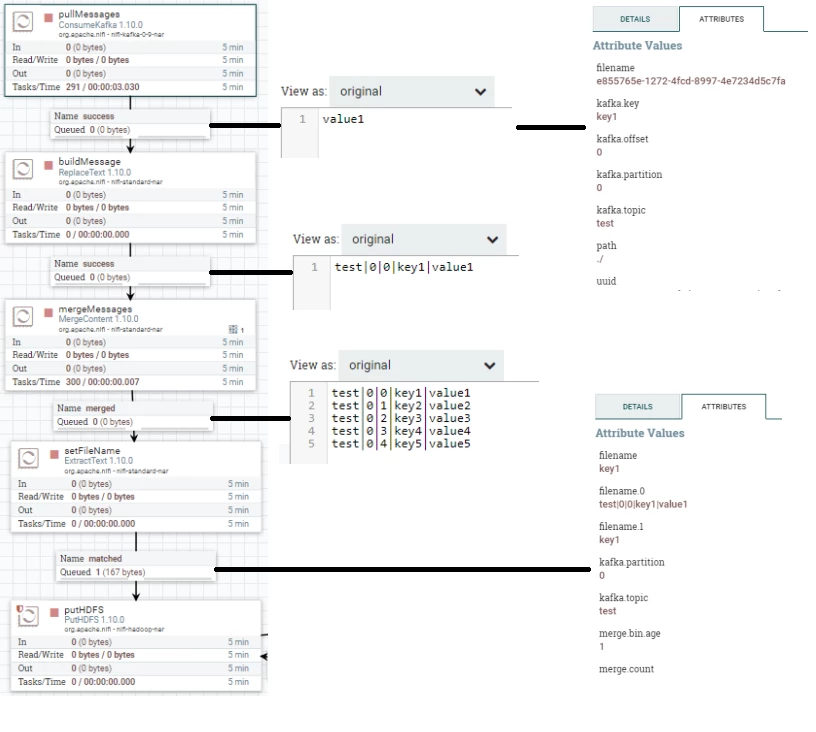
You can use Nifi to save your Kafka messages into HDFS (for instance).


Something like this :

Sans titre.png


- ConsumeKafka : flowfile content is the Kafka message itself, and you have access to some attributes : topic name, partition, offset, key...(but not timestamp !). When i need it I store the timestamp in the key.

- ReplaceText : build your backup line using flowfile content and attributes

- MergeContent : to build a big file containing multiple Kafka message

- Extracttext : to set attribute to be used as filename

- PutHDFS : to save the created file into HDFS


And you can do the reverse if you need to push it bash to your kafka cluster.

4 replies

aakulov
Platinum ⭐️
Platinum ⭐️
July 20, 2020

There's an open source tool kafka-backup that sounds like what you are looking for. I'm not sure I follow your granularity point though.

Translate
JEG
JEGAuthor
Silver ⭐️
July 20, 2020

Thanks

Yes, I came across this kafka-backup when doing searches around this area. But I was hoping that maybe there would have been support from Cloudera itself, as a vendor that wraps Kafka with value-added-services.


Regarding granularity, I meant that if I took a backup every six hours, I would presumably be able to return to point-of-time only at that granularity, e.g. to state at 13:00, 19:00, 01:00, 07:00, etc. Unless the backup capability included a continuous log that allowed fine-grained return to point of time.

Translate
aakulov
Platinum ⭐️
Platinum ⭐️
July 20, 2020

Ok, I get your granularity point. Thanks for clarifying. 


Unfortunately we don't have a Cloudera supported tool that can do a simple backup of the Kafka cluster. I can only speculate on the reason, but this is likely a rare case where a backup (rather than replication) is required. 

Translate
Kezia
KeziaAnswer
Gold ⭐️
July 21, 2020

You can use Nifi to save your Kafka messages into HDFS (for instance).


Something like this :

Sans titre.png


- ConsumeKafka : flowfile content is the Kafka message itself, and you have access to some attributes : topic name, partition, offset, key...(but not timestamp !). When i need it I store the timestamp in the key.

- ReplaceText : build your backup line using flowfile content and attributes

- MergeContent : to build a big file containing multiple Kafka message

- Extracttext : to set attribute to be used as filename

- PutHDFS : to save the created file into HDFS


And you can do the reverse if you need to push it bash to your kafka cluster.

Translate