

Our Community is getting an upgrade! To get everything ready for the relaunch, we’ll be placing the site in read-only mode starting September 21st.
We really appreciate your understanding while we get things set up behind the scenes. Catch up on all the exciting details about the move here.
Need help or have questions? Drop us a line at [email protected]

Support Questions

Find answers, ask questions, and share your expertise
Announcements
Share your experience with Cloudera on G2 and get a $25 Amazon Gift card.
Hi, I'm CLEO! Something exciting is coming to the Community. Stay Tuned!

Cloudera Manager 7.3.1 installation error in RHEL7.9

avatar
Expert Contributor

Good morning,

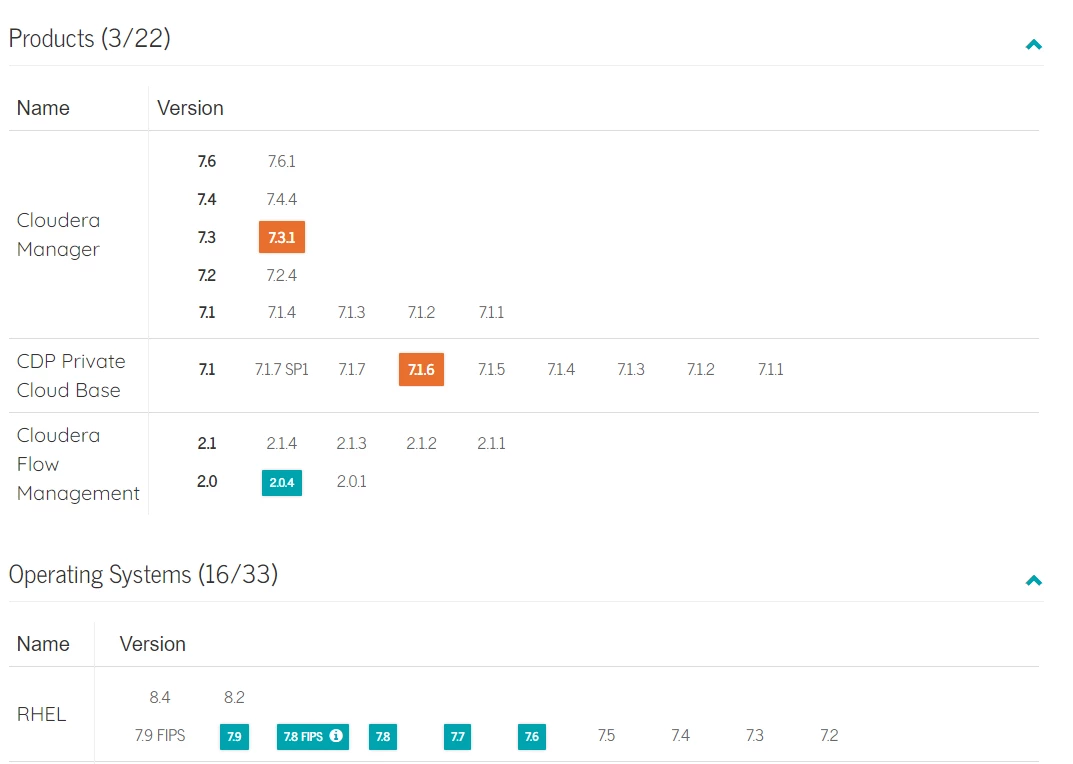
trying to install Cloudera Manager agents in a RH7.9 (this should be supported as seen in the Cloudera support matrix)

I realized that this is not supported ¿!!!?
Juanes_1-1660729854126.png

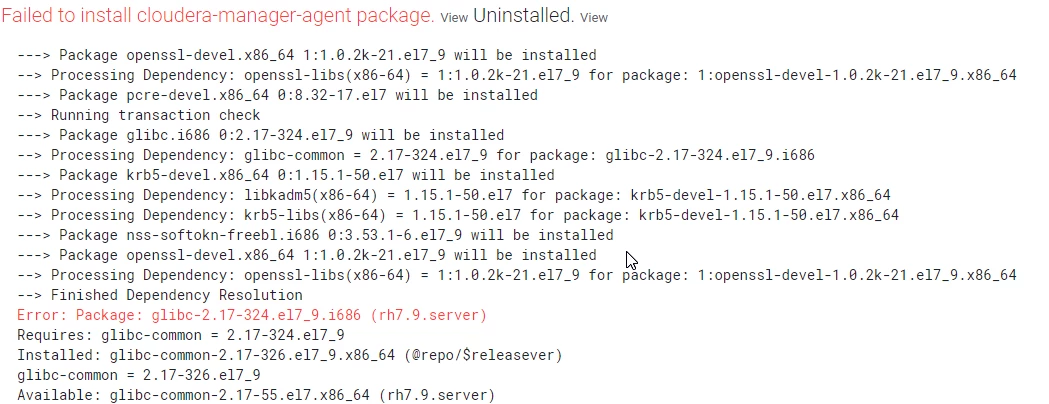
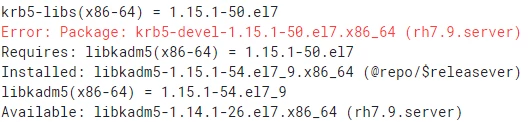
The packages installed in the server are newer as expected (they are from rh7.9) and the cloudera manager is looking for older versions...

Juanes_2-1660730066535.pngJuanes_3-1660730083909.pngJuanes_4-1660730100865.png

What crazy is having a support matrix if this is not applied 
Juanes_5-1660730253911.png


any idea? downgrade dependencies are not considered.

 

1 ACCEPTED SOLUTION

avatar
Expert Contributor

Added required dependencies to the repository:
glibc-2.17-326.el7_9.i686 --> this was missing and that was why it tried to install 2.17-324
krb5-devel-1.15.1-50.el7.x86_64
openssl-devel-1.0.2k-21.el7_9.x86_64

View solution in original post

5 REPLIES 5

avatar
Expert Contributor

Hi @Juanes ,


Try downgrading the packages in question to the required version and then retry.


I have also faced similar issue earlier, downgrading worked for me.


Thanks,

Megh

avatar
Expert Contributor

Hi,

First of all, many thanks for your comments.

I read about downgrading glibc could leave the system in undesired state :S 

Juanes_0-1660806951212.png

yu did downgraded glibc? I don't care about the kerberos packages, i'm not using it...


Best Regards

avatar
Expert Contributor

Hi @Juanes ,


I think I downgraded glibc as well. Not exactly sure though as it was sometime back. I think there is an option to downgrade an individual package with rpm without touching its dependencies.


But I would still advise you to be cautious. Maybe try it out once on a test system?


Thanks,

Megh

avatar
Expert Contributor

Many thanks for the recomendation, I will check again that it seems to be something related to the repositories, of course I will not downgrade glibc, this environment is quite important to broke it down 🙂 

avatar
Expert Contributor

Added required dependencies to the repository:
glibc-2.17-326.el7_9.i686 --> this was missing and that was why it tried to install 2.17-324
krb5-devel-1.15.1-50.el7.x86_64
openssl-devel-1.0.2k-21.el7_9.x86_64

