

pnmateus
Gold ⭐️
September 9, 2024
Solved

Connection malfunction ODBC to Impala using Kerberos

Hello everybody,


I have a ODBC (DSN=IMPALA_PRD) setup to connect to Impala server through kerberos authentication.

  1. I have created the ticket in MIT with success.
  2. I've tested the connection with success.
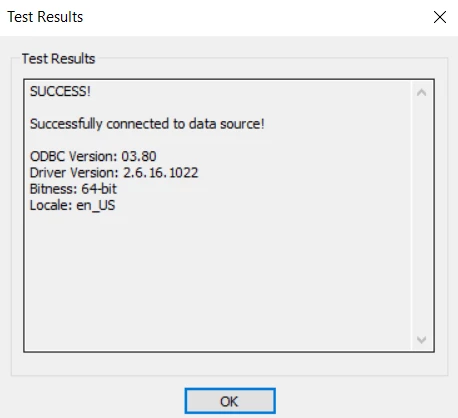
  3. Capture.PNG


However when using the same ODBC connection on a python script or a PowerBI dashboard, it returns the error: 

ODBC: ERROR [HY000] [Cloudera][DriverSupport] (1110) Unexpected response received from server. Please ensure the server host and port specified for the connection are correct and confirm if SSL should be enabled for the connection.\r\nERROR [HY000] [Cloudera][DriverSupport] (1110) Unexpected response received from server. Please ensure the server host and port specified for the connection are correct and confirm if SSL should be enabled for the connection.


For quick test i'm using this simple script:

import pyodbc

conn_impala = pyodbc.connect(DSN="IMPALA_PRD", autocommit = True)
cursor = conn_impala.cursor()

Could you please help me solve this riddle?

Best regards,

 

pnmateus
pnmateusAnswer
Gold ⭐️
September 18, 2024

Hello,

This problem happened in python and in PowerBI. Both installations were made from Microsoft Store.

For this problem to be solved, I had to uninstall both applications, get the instalation file from the web and install manually.

8 replies

VidyaSargur
Community Manager
Community Manager
September 10, 2024

@pnmateus, Welcome to our community! To help you get the best possible answer, I have tagged in our Impala experts @ChethanYM @mszurap @SVB who may be able to assist you further.

Please feel free to provide any additional information or details about your query, and we hope that you will find a satisfactory solution to your question.

Translate
Regards, Vidya Sargur, Community Manager Was your question answered? Make sure to mark the answer as the accepted solution. If you find a reply useful, say thanks by clicking on the thumbs up button.
mszurap
Platinum ⭐️
Platinum ⭐️
September 10, 2024

Hi @pnmateus ,

There are a couple of points to check:

- Have you created a "System wide" datasource or a "user specific" datasource in the "ODBC Data sources"? 

- Per the screenshot you are using a 64 bit driver. That works only for 64 bit applications. Please verify if your Power BI (and the started python process) is also 64 bit (use Windows Task Manager to determine that)

- When using MIT kerberos, the best is to define a User specific environment variable (go to your system settings / Environment variables) with name "KRB5CCNAME" and set it to a path / file which can be read only by your user. This ensures that MIT Kerberos tool will create the kerberos ticket cache file in that location and all the processes started by your user will also use the same ticket cache file when authenticating to the services (like Impala through ODBC).

- If that still does not help, ultimately collect the ODBC driver logs, enable the DEBUG or Trace level logging in the datasource settings / Logging options.

Translate
pnmateus
pnmateusAuthor
Gold ⭐️
September 10, 2024

Hello,

1- The ODBC DataSource was created at the system level.

2- The application is running in 64 bit

3- The variable KRB5CCNAME has a path acessible only by the user.

4 - The log from the ODBC driver shows this on failed connection:
Sep 10 09:22:46.113 INFO  17524 Simba::ThriftExtension::TETSaslClientTransport::SaslLoggingCallback: ::LogUsername: Username returned by QueryCredentialsAttributes(SECPKG_ATTR_NAMES): userexample@example.com
Sep 10 09:22:46.113 ERROR 17524 Simba::ThriftExtension::TETSaslClientTransport::SaslLoggingCallback: ::LogUsername: User name returned by GetUsernameEx(NameUserPrincipal): userexample@example.com
Sep 10 09:22:46.234 DEBUG 17524 Simba::ThriftExtension::TETSaslClientTransport::SaslLoggingCallback: Failed to initialize security context: The specified target is unknown or unreachable

Note: The ticket was created with another user (userexampleOther@example.com) and the user logged in the machine is userexample@example.com

Translate
mszurap
Platinum ⭐️
Platinum ⭐️
September 10, 2024

Thanks for checking. That error message "The specified target is unknown or unreachable" is not too descriptive, but suggests some Kerberos related setup problem.

If you are connecting to a CDP 7.x cluster, please use the latest Cloudera Impala ODBC 2.7.x driver as it may contain additional fixes:

https://www.cloudera.com/downloads/connectors/impala/odbc/

Also you can try to add another environment variable KRB5_CONFIG and point to the krb5.ini file used by the MIT kerberos client. (c:\ProgramData\MIT\Kerberos5\krb5.ini)

If none of these help, please open a support case through our support portal where you can attach more details (and the driver logs).

Thank you

 Miklos

Translate
mszurap
Platinum ⭐️
Platinum ⭐️
September 11, 2024

Most likely. Try to figure out the differences between those VMs. The SSPI is the Windows' integrated Kerberos library, it also has tools for "kinit" and "klist" but it's kerberos configuration is in a different place and works only if the VM is part of the Active Directory domain and the user is logged in with it's AD username.

Translate
VidyaSargur
Community Manager
Community Manager
September 18, 2024

@pnmateus, Did the response help resolve your query? If it did, kindly mark the relevant reply as the solution, as it will aid others in locating the answer more easily in the future. 

Translate
Regards, Vidya Sargur, Community Manager Was your question answered? Make sure to mark the answer as the accepted solution. If you find a reply useful, say thanks by clicking on the thumbs up button.
pnmateus
pnmateusAuthorAnswer
Gold ⭐️
September 18, 2024

Hello,

This problem happened in python and in PowerBI. Both installations were made from Microsoft Store.

For this problem to be solved, I had to uninstall both applications, get the instalation file from the web and install manually.

Translate
