maykiwogno
Silver ⭐️⭐️⭐️
February 21, 2017
Solved

Deleting Files from HDFS Using Apache NiFi and the DeleteHDFS Processor

Hi all,

Do you know how use deleteHDFS to remove empty directories ?

thanks

MattWho
MattWhoAnswer
Titanium ⭐️⭐️⭐️
February 21, 2017
@mayki wogno

Make sure the user your NiFi is running as is authorized to delete files and directories in your target HDFS.

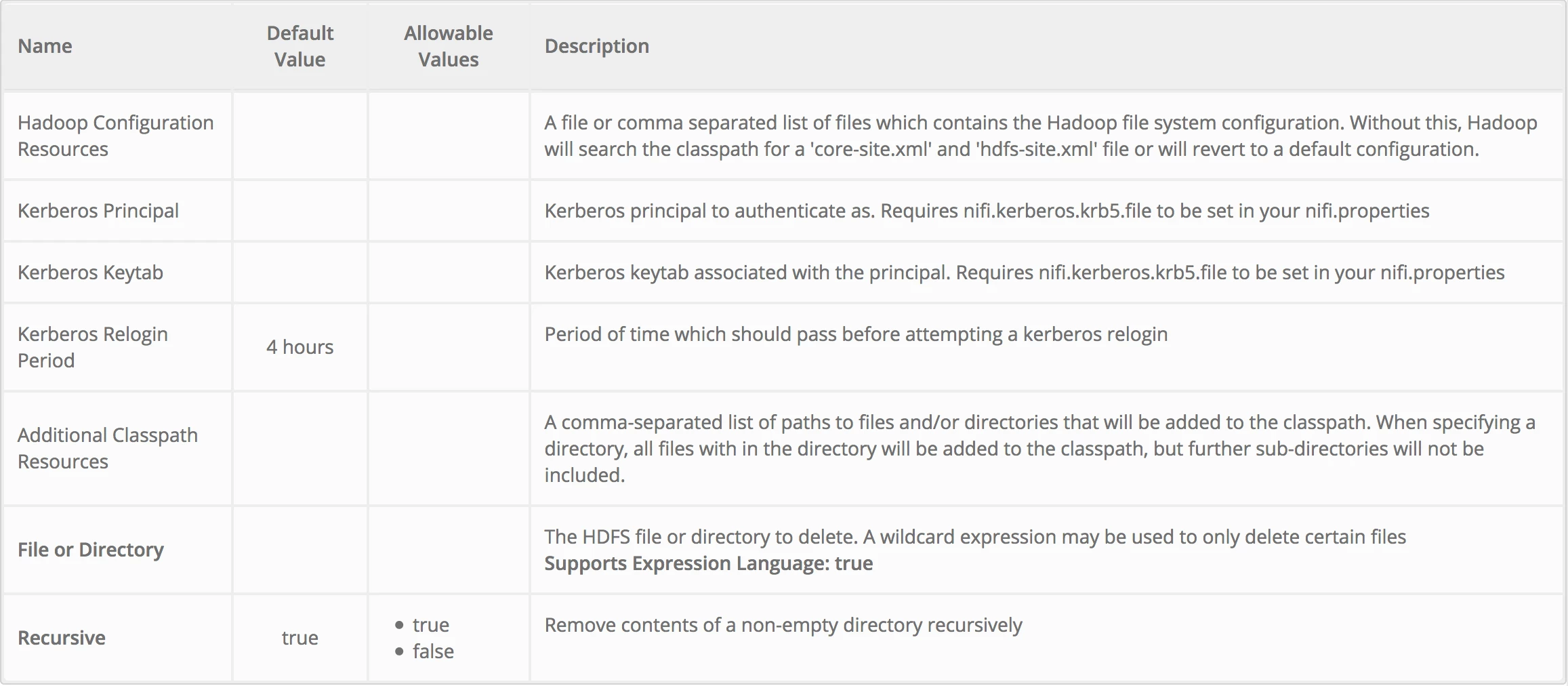
The DeleteHDFS processor properties are as follows:

12757-screen-shot-2017-02-21-at-81354-am.png

Thanks,

Matt

11 replies

MattWho
Titanium ⭐️⭐️⭐️
MattWhoAnswer
Titanium ⭐️⭐️⭐️
February 21, 2017
@mayki wogno

Make sure the user your NiFi is running as is authorized to delete files and directories in your target HDFS.

The DeleteHDFS processor properties are as follows:

12757-screen-shot-2017-02-21-at-81354-am.png

Thanks,

Matt

Translate
MattWho
Titanium ⭐️⭐️⭐️
Titanium ⭐️⭐️⭐️
February 21, 2017

@mayki wogno

FlowFiles generated by the listHDFS processor all have a "path" attribute created on them:

12758-screen-shot-2017-02-21-at-83810-am.png

That attribute could be used to trigger you directory deletion via the DeleteHDFS processor.

What is difficult here is determining when all data has been successfully pulled from an HDFS directory before deleting the directory itself.

You could try using two DeleteHDFS processors in series with one another. The first DeleteHDFS deletes the files from the target "path" of the incoming FlowFiles and the second deletes the directory (Recursive property set to false).

Matt

Translate
maykiwogno
Silver ⭐️⭐️⭐️
February 21, 2017

@Matt : thanks, i've already used this processor for deleleting files, but how use it with listHDFS to delete empty directories.

Translate
maykiwogno
Silver ⭐️⭐️⭐️
February 21, 2017

@matt: it is partially worked but we received errors for directory non-empty

2017-02-21 15:00:28,938 WARN [Timer-Driven Process Thread-8] o.a.nifi.processors.hadoop.DeleteHDFS DeleteHDFS[id=85d330b2-6cdd-1d81-a764-460fe51ef064] Error processing delete for file or directory
org.apache.hadoop.ipc.RemoteException: `/user/ml/apply/toto/03 is non empty': Directory is not empty

Translate
MattWho
Titanium ⭐️⭐️⭐️
Titanium ⭐️⭐️⭐️
February 21, 2017

That was the intent... It would only be successful after all files where deleted first. So only after the last file was removed would the directory deletion be successful.

Translate
maykiwogno
Silver ⭐️⭐️⭐️
February 21, 2017

It worked but it is not clean to have warning in the log file.

Translate
MattWho
Titanium ⭐️⭐️⭐️
Titanium ⭐️⭐️⭐️
February 21, 2017

@mayki wogno

You can reduce or even eliminate the WARN messages by placing a MergeContent processor between your first and second DeleteHDFS processors that merges using "path" as the value to the "Correlation Attribute Name" property. The resulting merged FlowFile(s) would still have the same "path" that would be used by the second DeleteHDFS to remove your directory.

Matt

Translate
maykiwogno
Silver ⭐️⭐️⭐️
February 22, 2017

@Former Member thanks for your helps.

Do you know if it is possible to move to the next flowfile and send failed flowfile to the next processor ?

I'm trying to send one of failure flowfile from deleteHDFS to RouteText but nothing goes to.

12782-deletehdfs.jpg

Translate
MattWho
Titanium ⭐️⭐️⭐️
Titanium ⭐️⭐️⭐️
February 22, 2017

@mayki wogno

One thing you could do is set "FlowFile Expiration" on the connection containing the "merged" relationship. And set the "Available Prioritizers" to " Newest FlowFileFirstPrioritizer". FlowFile expiration is measured against the age of the FlowFile (from creation time to now) and not how long it has been in a particular connection. If the FlowFile age exceeds this configured value, it is purged from the queue.

Translate
maykiwogno
Silver ⭐️⭐️⭐️
February 22, 2017

@Matt : thanks. I'm appreciate your helps

Translate
MattWho
Titanium ⭐️⭐️⭐️
Titanium ⭐️⭐️⭐️
February 22, 2017

@mayki wogno

No problem... If one of the answers help drive you to a solution to your question, please accept that answer to help drive this community forward.

Translate