mazen_elshayeb
Silver ⭐️⭐️⭐️
May 13, 2019
Solved

Error while enabling kerberos on ambari

Hello

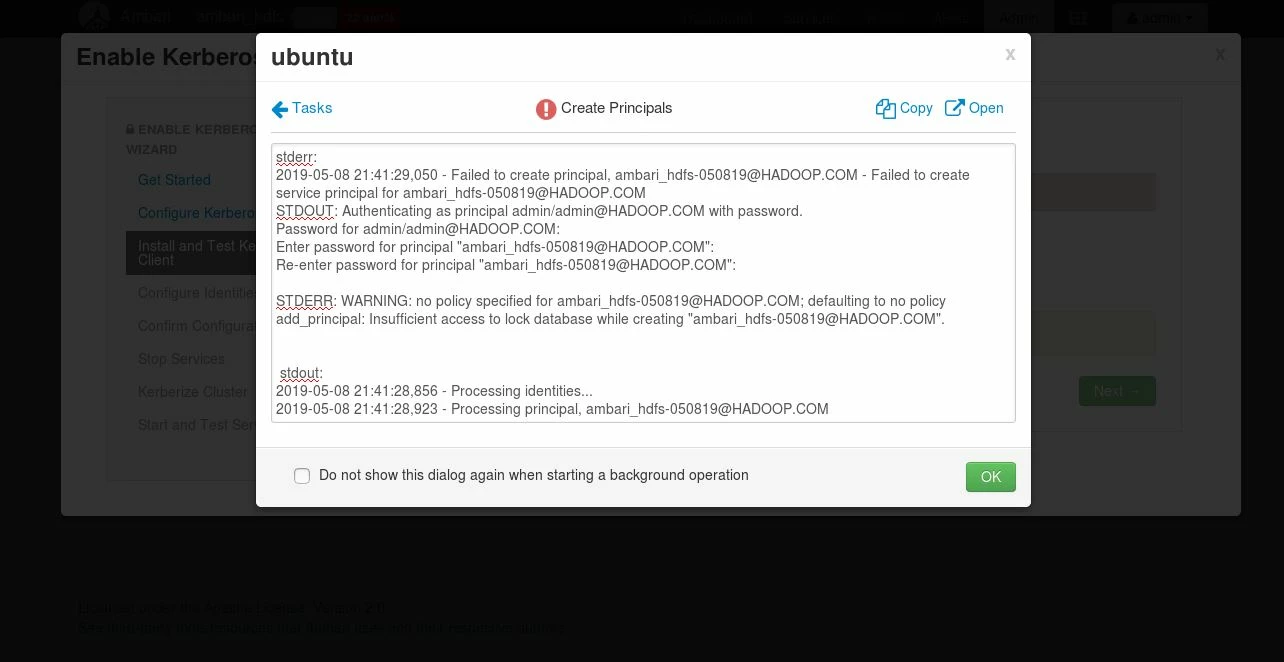
I receive an error while enabling kerberos on ambari as below;

108652-capture.jpg

i have installed krb5-kdc krb5-admin-server and config krb5.conf, kdc.conf and kadm5.acl then created new principle (as attached)

Note when i wrote the realm name in the kdc file in uppercase letter i got an error while using kadmin.local master key cannot be fetch, it only works in lowercase letter

Also when i try to restart the krb5 services, it said service can't be found although it is running so i restart the server instead

Last thing when i installed krb5-kdc krb5-admin-server the /var/kerberos folder didn't create automatically and i had to create it manually.

Please help me solve this issue, thank you in advanced.

KADM5.acl.txt

KDC.conf.txt

KRB5.conf.txt

Shelton
SheltonAnswer
Gold ⭐️⭐️⭐️
May 14, 2019

@Mazen Elshayeb

There is something I don't understand can you share how you create the KDC database? How come you have a principal "ambari_hdfs-050819@HADOOP.COM"?

I suggest starting afresh so delete/destroy the current KDC as the root user or sudo on ubuntu whichever is appropriate


# sudo  kdb5_util -r HADOOP.COM destroy

Accept with a "Yes"

Now create a new Kerberos database

Complete remove Kerberos

$ sudo apt purge -y krb5-kdc krb5-admin-server krb5-config krb5-locales krb5-user krb5.conf 
$ sudo rm -rf /var/lib/krb5kdc

Do a refresh installation

First, get the FQDN of your kdc server for this example

# hostanme -f 
test.hadoop.com

Use the above output for a later set up

# apt install krb5-kdc krb5-admin-server krb5-config

Proceed as follow

At the prompt for the Kerberos Realm = HADOOP.COM
Kerberos server hostname = test.hadoop.com
Administrative server for Kerberos REALM = test.hadoop.com

Configuring krb5 Admin Server

# krb5_newrealm

Open /etc/krb5kdc/kadm5.acl it should contain a line like this

*/admin@HADOOP.COM *

The kdc.conf should be adjusted to look like this

[kdcdefaults]
 kdc_ports = 88
 kdc_tcp_ports = 88

[realms]
 HADOOP.COM = {
  #master_key_type = aes256-cts
  acl_file = /var/kerberos/krb5kdc/kadm5.acl
  dict_file = /usr/share/dict/words
  admin_keytab = /var/kerberos/krb5kdc/kadm5.keytab
  supported_enctypes = aes256-cts:normal aes128-cts:normal des3-hmac-sha1:normal arcfour-hmac:normal camellia256-cts:normal camellia128-cts:normal des-hmac-sha1:normal des-cbc-md5:normal des-cbc-crc:normal
}


The krb5.conf should look like this if you are on a multi-node cluster this is the fines you will copy to all other hosts, notice the entry under domain_realm?

[libdefaults]
  renew_lifetime = 7d
  forwardable = true
  default_realm = HADOOP.COM
  ticket_lifetime = 24h
  dns_lookup_realm = false
  dns_lookup_kdc = false
  default_ccache_name = /tmp/krb5cc_%{uid}
  #default_tgs_enctypes = aes des3-cbc-sha1 rc4 des-cbc-md5
  #default_tkt_enctypes = aes des3-cbc-sha1 rc4 des-cbc-md5

[domain_realm]
  .hadoop.com = HADOOP.COM
  hadoop.com = HADOOP.COM

[logging]
  default = FILE:/var/log/krb5kdc.log
  admin_server = FILE:/var/log/kadmind.log
  kdc = FILE:/var/log/krb5kdc.log

[realms]
  HADOOP.COM = {
    admin_server = test.hadoop.com
    kdc = test.hadoop.com
  }


Restart the Kerberos kdc daemons and kerberos admin servers:


# for script in /etc/init.d/krb5*; do $script restart; done


Don't manually create any principle like the "ambari_hdfs-050819@HADOOP.COM"

Go to the ambari kerberos wizard for the domain notice the . (dot)


kdc host = test.hadoop.com
Real Name = HADOOP.COM
Domains = .hadoop.com ,hadoop.com
-----
kadmin host = test.hadoop.com
Admin principal = admin/admin@HADOOP.COM
Admin  password = password set during the creation of kdc database

Now from here just accept the default the keytabs should generate successfully. I have attached files to guide you Procedure to Kerberize HDP 3.1_Part2.pdfProcedure to Kerberize HDP 3.1_Part1.pdf Procedure to Kerberize HDP 3.1_Part3.pdf

Hope that helps please revert if you have any questions

14 replies

rlevas
Gold ⭐️
May 13, 2019

It seems like the user that runs the kadmin process does not have access to write to the backing database... or the backing data is locked by some other process. Take a look at the permission on the database file and make sure the permissions are set properly.

Translate
mazen_elshayeb
Silver ⭐️⭐️⭐️
May 13, 2019

hello robert, thank you so much for your reply, im new in working on this so can you please let me know the steps to do for checking if the permissions are set properly or not on the database

Translate
Shelton
SheltonAnswer
Gold ⭐️⭐️⭐️
May 14, 2019

@Mazen Elshayeb

There is something I don't understand can you share how you create the KDC database? How come you have a principal "ambari_hdfs-050819@HADOOP.COM"?

I suggest starting afresh so delete/destroy the current KDC as the root user or sudo on ubuntu whichever is appropriate


# sudo  kdb5_util -r HADOOP.COM destroy

Accept with a "Yes"

Now create a new Kerberos database

Complete remove Kerberos

$ sudo apt purge -y krb5-kdc krb5-admin-server krb5-config krb5-locales krb5-user krb5.conf 
$ sudo rm -rf /var/lib/krb5kdc

Do a refresh installation

First, get the FQDN of your kdc server for this example

# hostanme -f 
test.hadoop.com

Use the above output for a later set up

# apt install krb5-kdc krb5-admin-server krb5-config

Proceed as follow

At the prompt for the Kerberos Realm = HADOOP.COM
Kerberos server hostname = test.hadoop.com
Administrative server for Kerberos REALM = test.hadoop.com

Configuring krb5 Admin Server

# krb5_newrealm

Open /etc/krb5kdc/kadm5.acl it should contain a line like this

*/admin@HADOOP.COM *

The kdc.conf should be adjusted to look like this

[kdcdefaults]
 kdc_ports = 88
 kdc_tcp_ports = 88

[realms]
 HADOOP.COM = {
  #master_key_type = aes256-cts
  acl_file = /var/kerberos/krb5kdc/kadm5.acl
  dict_file = /usr/share/dict/words
  admin_keytab = /var/kerberos/krb5kdc/kadm5.keytab
  supported_enctypes = aes256-cts:normal aes128-cts:normal des3-hmac-sha1:normal arcfour-hmac:normal camellia256-cts:normal camellia128-cts:normal des-hmac-sha1:normal des-cbc-md5:normal des-cbc-crc:normal
}


The krb5.conf should look like this if you are on a multi-node cluster this is the fines you will copy to all other hosts, notice the entry under domain_realm?

[libdefaults]
  renew_lifetime = 7d
  forwardable = true
  default_realm = HADOOP.COM
  ticket_lifetime = 24h
  dns_lookup_realm = false
  dns_lookup_kdc = false
  default_ccache_name = /tmp/krb5cc_%{uid}
  #default_tgs_enctypes = aes des3-cbc-sha1 rc4 des-cbc-md5
  #default_tkt_enctypes = aes des3-cbc-sha1 rc4 des-cbc-md5

[domain_realm]
  .hadoop.com = HADOOP.COM
  hadoop.com = HADOOP.COM

[logging]
  default = FILE:/var/log/krb5kdc.log
  admin_server = FILE:/var/log/kadmind.log
  kdc = FILE:/var/log/krb5kdc.log

[realms]
  HADOOP.COM = {
    admin_server = test.hadoop.com
    kdc = test.hadoop.com
  }


Restart the Kerberos kdc daemons and kerberos admin servers:


# for script in /etc/init.d/krb5*; do $script restart; done


Don't manually create any principle like the "ambari_hdfs-050819@HADOOP.COM"

Go to the ambari kerberos wizard for the domain notice the . (dot)


kdc host = test.hadoop.com
Real Name = HADOOP.COM
Domains = .hadoop.com ,hadoop.com
-----
kadmin host = test.hadoop.com
Admin principal = admin/admin@HADOOP.COM
Admin  password = password set during the creation of kdc database

Now from here just accept the default the keytabs should generate successfully. I have attached files to guide you Procedure to Kerberize HDP 3.1_Part2.pdfProcedure to Kerberize HDP 3.1_Part1.pdf Procedure to Kerberize HDP 3.1_Part3.pdf

Hope that helps please revert if you have any questions

Translate
mazen_elshayeb
Silver ⭐️⭐️⭐️
May 14, 2019

Hello Geoffrey Shelton, thank you so much for your reply, i will follow your steps and if there any issue will refer back to you.

Translate
Shelton
Gold ⭐️⭐️⭐️
May 15, 2019

@Mazen Elshayeb

Any updates?


Translate
mazen_elshayeb
Silver ⭐️⭐️⭐️
May 16, 2019

Hello Geoffrey Shelton Okot

I followed all the steps that you sent to me and entered same ambari wizard configuration as you said but now the ambari wizard keeps asking for the admin principal and password, i have not created any principal manually as you mentioned in your reply. 108717-capture1.jpg

i couldn't open the attached pdf files you sent to me access forbidden.

Note: I'm working on VM and my hostname -f is ubuntu, is this will make any changes on the domain_realm or it will be as it is

.hadoop.com = HADOOP.COM

hadoop.com =HADOOP.COM

attached is my new /etc/krb5kdc/krb5.conf kdc.conf and kadm5.acl

KADM5.acl.txt

KDC.conf.txt

KRB5.conf.txt


Translate
Shelton
Gold ⭐️⭐️⭐️
May 16, 2019

@Mazen Elshayeb

That's good news the principal admin should be admin/admin@HADOOP.COM and the password is the magic password you used when creating the Kerberos database. You must have gotten a warning saying keep the password safely 🙂

Please proceed and revert!

Translate
ask_bill_brooks
Platinum ⭐️
Platinum ⭐️
May 20, 2019

The above question and the replies below were originally posted in the Community Help Track. On Mon May 20 16:56 UTC 2019, a member of the HCC moderation staff moved it to the Security track. The Community Help Track is intended for questions about using the HCC site itself.

Translate
Bill Brooks, Community Moderator Was your question answered? Make sure to mark the answer as the accepted solution. If you find a reply useful, say thanks by clicking on the thumbs up button.
mazen_elshayeb
Silver ⭐️⭐️⭐️
May 22, 2019

Hello

Any other solution i can do to solve this issue?

Translate
Shelton
Gold ⭐️⭐️⭐️
May 22, 2019

@Mazen Elshayeb

Unbelievable ping me on linkedin ,could help with remote

Translate
marin99
Silver ⭐️
January 13, 2020

Sorry for the bump. I tried this in the HDP Sandbox and discovered that installing krb5-workstation-1.15.1-37.el7_7.2.x86_64.rpm solved the problem

Translate