@Mazen Elshayeb
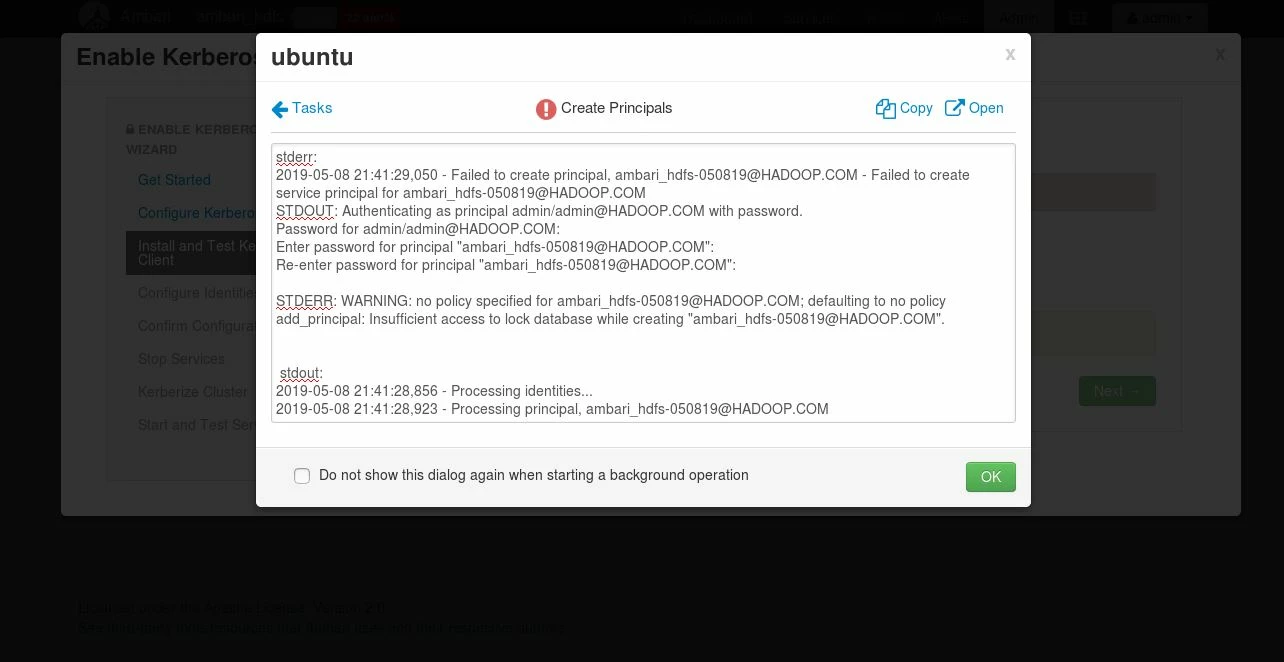
There is something I don't understand can you share how you create the KDC database? How come you have a principal "ambari_hdfs-050819@HADOOP.COM"?
I suggest starting afresh so delete/destroy the current KDC as the root user or sudo on ubuntu whichever is appropriate
# sudo kdb5_util -r HADOOP.COM destroy
Accept with a "Yes"
Now create a new Kerberos database
Complete remove Kerberos
$ sudo apt purge -y krb5-kdc krb5-admin-server krb5-config krb5-locales krb5-user krb5.conf
$ sudo rm -rf /var/lib/krb5kdc
Do a refresh installation
First, get the FQDN of your kdc server for this example
# hostanme -f
test.hadoop.com
Use the above output for a later set up
# apt install krb5-kdc krb5-admin-server krb5-config
Proceed as follow
At the prompt for the Kerberos Realm = HADOOP.COM
Kerberos server hostname = test.hadoop.com
Administrative server for Kerberos REALM = test.hadoop.com
Configuring krb5 Admin Server
# krb5_newrealm
Open /etc/krb5kdc/kadm5.acl it should contain a line like this
*/admin@HADOOP.COM *
The kdc.conf should be adjusted to look like this
[kdcdefaults]
 kdc_ports = 88
 kdc_tcp_ports = 88

[realms]
 HADOOP.COM = {
  #master_key_type = aes256-cts
  acl_file = /var/kerberos/krb5kdc/kadm5.acl
  dict_file = /usr/share/dict/words
  admin_keytab = /var/kerberos/krb5kdc/kadm5.keytab
  supported_enctypes = aes256-cts:normal aes128-cts:normal des3-hmac-sha1:normal arcfour-hmac:normal camellia256-cts:normal camellia128-cts:normal des-hmac-sha1:normal des-cbc-md5:normal des-cbc-crc:normal
}
The krb5.conf should look like this if you are on a multi-node cluster this is the fines you will copy to all other hosts, notice the entry under domain_realm?
[libdefaults]
  renew_lifetime = 7d
  forwardable = true
  default_realm = HADOOP.COM
  ticket_lifetime = 24h
  dns_lookup_realm = false
  dns_lookup_kdc = false
  default_ccache_name = /tmp/krb5cc_%{uid}
  #default_tgs_enctypes = aes des3-cbc-sha1 rc4 des-cbc-md5
  #default_tkt_enctypes = aes des3-cbc-sha1 rc4 des-cbc-md5

[domain_realm]
  .hadoop.com = HADOOP.COM
  hadoop.com = HADOOP.COM

[logging]
  default = FILE:/var/log/krb5kdc.log
  admin_server = FILE:/var/log/kadmind.log
  kdc = FILE:/var/log/krb5kdc.log

[realms]
  HADOOP.COM = {
    admin_server = test.hadoop.com
    kdc = test.hadoop.com
  }
Restart the Kerberos kdc daemons and kerberos admin servers:
# for script in /etc/init.d/krb5*; do $script restart; done
Don't manually create any principle like the "ambari_hdfs-050819@HADOOP.COM"
Go to the ambari kerberos wizard for the domain notice the . (dot)
kdc host = test.hadoop.com
Real Name = HADOOP.COM
Domains = .hadoop.com ,hadoop.com
-----
kadmin host = test.hadoop.com
Admin principal = admin/admin@HADOOP.COM
Admin  password = password set during the creation of kdc database
Now from here just accept the default the keytabs should generate successfully. I have attached files to guide you Procedure to Kerberize HDP 3.1_Part2.pdfProcedure to Kerberize HDP 3.1_Part1.pdf Procedure to Kerberize HDP 3.1_Part3.pdf
Hope that helps please revert if you have any questions