@bgumis
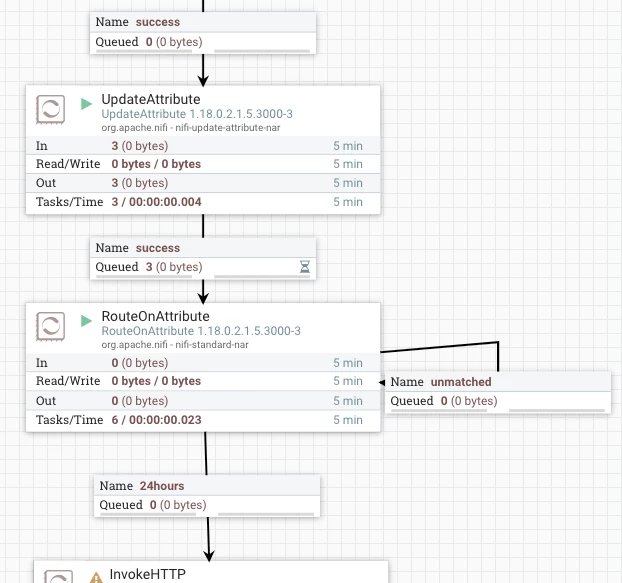
One way you can accomplish what you want to do is using an UpdateAttribute processor and RouteOnAttribute processor between your PutEmail and InvokeHTTP processors.
The UpdateAttribute would be used to add an attribute to the FlowFile with the current time in milliseconds using NiFi Expression Language (NEL) statement:
${now():toNumber()}
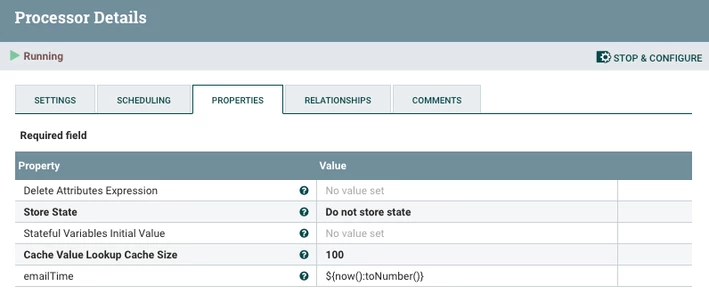
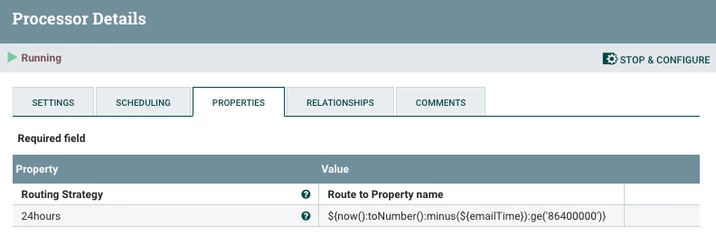
The success relationship of the update Attribute processor would be routed to the RouteOnAttribute processor. In the RouteOnAttribute processor you setup a new property that compares the records timestamp added to FlowFile by UpdateAttribute against the current time in milliseconds to see if 24 hours has passed yet. If true, the FlowFile will route to the expression property name relationship. If false, the FlowFile will route to the "unmatched" relationship which can be looped back on RouteOnAttribute. The "unmatched" relationship should be configured to use "retry" to trigger penalization of FlowFiles. This helps limit cpu usage by slowing how often the FlowFile is re-processed by penalizing the FlowFile on each retry. The "Retry Max Back Off Period" would translate into the max time beyond 24 hours a FlowFile may get routed to the invokeHTTP. I assume 24 hours is a min wait period and not a hard limit.
The NEL statement used in RouteOnAttribute would look like this:
${now():toNumber():minus(${emailTime}):ge('86400000')}
The other option would require a custom script to set penalization of 24 hours on each FlowFile after the putEmail processor.
Please help our community thrive. If you found any of the suggestions/solutions provided helped you with solving your issue or answering your question, please take a moment to login and click "Accept as Solution" on one or more of them that helped.
Thank you,
Matt