

Hive ODBC fails to list all tables and returns errors: DBCException: SQL Error [S1090]: [Microsoft][ODBC Driver Manager]
I'm connecting to Hive using Cloudera's ODBC driver version 2.6.9 and I'm getting a weird behavior that ruins the user experience. Any help to solve or debug this problem would be greatly appreciated.
I'm using DBeaver to connect to it. All my databases just display a few of it's tables. Here is an example. When I open DBeaver, The dabase just shows the table `localizacao`:
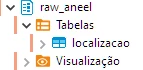
This database has 3 tables. If I run the command show tables from raw_aneel, DBeaver interface will display:

The error message in english would be:
org.jkiss.dbeaver.model.exec.DBCException: SQL Error [S1090]: [Microsoft][ODBC Driver Manager] Invalid string or buffer length
Here is the complete stack trace displayed in the Error Log. The error message above is in Brazilian Portuguese:
org.jkiss.dbeaver.model.exec.DBCException: SQL Error [S1090]: [Microsoft][ODBC Driver Manager] Comprimento inválido de cadeia de caracteres ou de buffer
at org.jkiss.dbeaver.model.impl.jdbc.data.handlers.JDBCAbstractValueHandler.fetchValueObject(JDBCAbstractValueHandler.java:55)
at org.jkiss.dbeaver.ui.controls.resultset.ResultSetDataReceiver.fetchRow(ResultSetDataReceiver.java:125)
at org.jkiss.dbeaver.ui.editors.sql.execute.SQLQueryJob.fetchQueryData(SQLQueryJob.java:718)
at org.jkiss.dbeaver.ui.editors.sql.execute.SQLQueryJob.executeStatement(SQLQueryJob.java:541)
at org.jkiss.dbeaver.ui.editors.sql.execute.SQLQueryJob.lambda$0(SQLQueryJob.java:441)
at org.jkiss.dbeaver.model.exec.DBExecUtils.tryExecuteRecover(DBExecUtils.java:171)
at org.jkiss.dbeaver.ui.editors.sql.execute.SQLQueryJob.executeSingleQuery(SQLQueryJob.java:428)
at org.jkiss.dbeaver.ui.editors.sql.execute.SQLQueryJob.extractData(SQLQueryJob.java:813)
at org.jkiss.dbeaver.ui.editors.sql.SQLEditor$QueryResultsContainer.readData(SQLEditor.java:3280)
at org.jkiss.dbeaver.ui.controls.resultset.ResultSetJobDataRead.lambda$0(ResultSetJobDataRead.java:118)
at org.jkiss.dbeaver.model.exec.DBExecUtils.tryExecuteRecover(DBExecUtils.java:171)
at org.jkiss.dbeaver.ui.controls.resultset.ResultSetJobDataRead.run(ResultSetJobDataRead.java:116)
at org.jkiss.dbeaver.ui.controls.resultset.ResultSetViewer$ResultSetDataPumpJob.run(ResultSetViewer.java:4624)
at org.jkiss.dbeaver.model.runtime.AbstractJob.run(AbstractJob.java:105)
at org.eclipse.core.internal.jobs.Worker.run(Worker.java:63)
Caused by: java.sql.SQLException: [Microsoft][ODBC Driver Manager] Comprimento inválido de cadeia de caracteres ou de buffer
at sun.jdbc.odbc.JdbcOdbc.createSQLException(JdbcOdbc.java:6964)
at sun.jdbc.odbc.JdbcOdbc.standardError(JdbcOdbc.java:7121)
at sun.jdbc.odbc.JdbcOdbc.SQLGetDataString(JdbcOdbc.java:3914)
at sun.jdbc.odbc.JdbcOdbcResultSet.getDataString(JdbcOdbcResultSet.java:5697)
at sun.jdbc.odbc.JdbcOdbcResultSet.getString(JdbcOdbcResultSet.java:353)
at sun.jdbc.odbc.JdbcOdbcResultSet.getObject(JdbcOdbcResultSet.java:1677)
at org.jkiss.dbeaver.model.impl.jdbc.exec.JDBCResultSetImpl.getObject(JDBCResultSetImpl.java:627)
at org.jkiss.dbeaver.model.impl.jdbc.data.handlers.JDBCStringValueHandler.fetchColumnValue(JDBCStringValueHandler.java:52)
at org.jkiss.dbeaver.model.impl.jdbc.data.handlers.JDBCAbstractValueHandler.fetchValueObject(JDBCAbstractValueHandler.java:49)
... 14 more
Before this stack trace there is a message `Can't read column 'tab_name' value`:

Any Idea how to debug this?

