

lucasmecanicapa
Bronze ⭐️⭐️⭐️
November 14, 2016
Solved

How to Use Dynamic FlowFile Attributes in NiFi InvokeHTTP via EvaluateJsonPath

Im trying to do an app that takes a json from a web filter the url attribute of the JSON and get the html of this url.
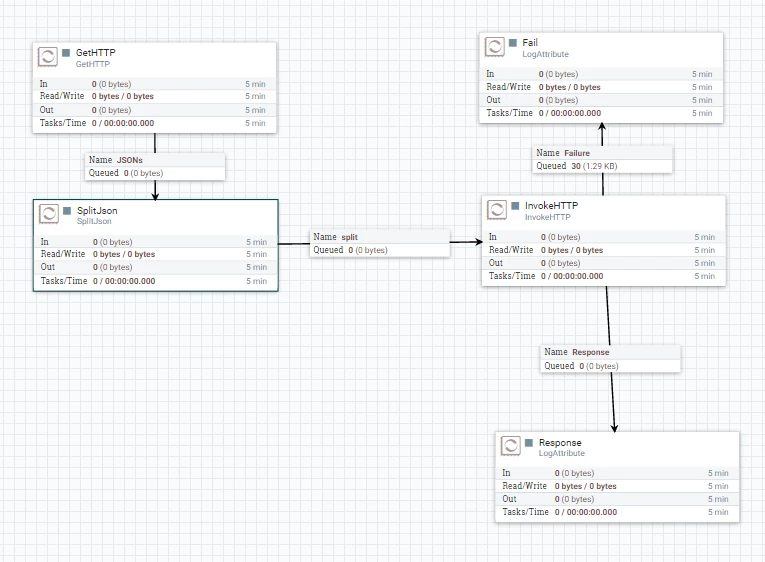
9409-architecture.png

My problem is that I can’t set in the property remote url in InvokeHTTP the url that I got in SplitJSON.

This is the config of splitJSON (it works, the output is the url that i want)
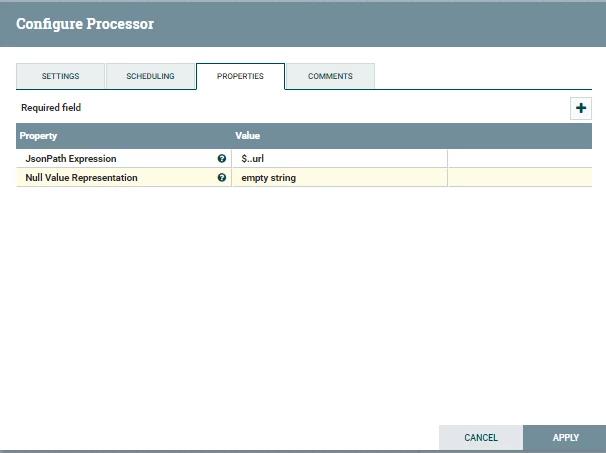
9410-confjson.png

And this is the conf of the InvokeHTTP (it work if I set manually the url) but I dont know how to set a dinamic url.
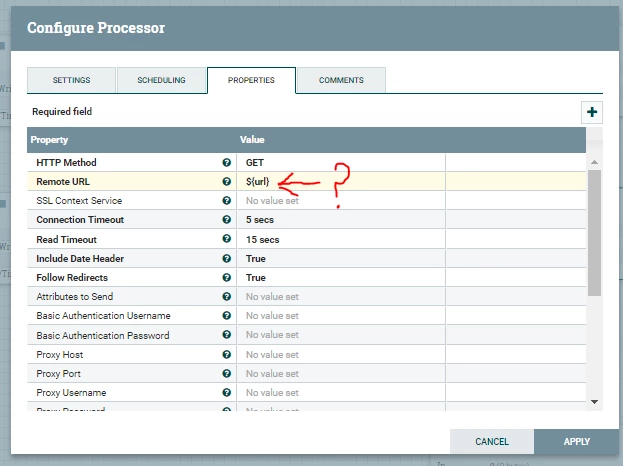
9421-conf2.png

MattWho
MattWhoAnswer
Titanium ⭐️⭐️⭐️
November 14, 2016
@Lucas Alvarez

The SplitJSON processor splits an incoming JSON on to multiple output JSON messages. You should use the EvaluateJSONPath processor to extract the URL from your splits and ssign them to a FlowFIle attribute you acn then use in your InvokeHTTP processor.

Thanks,

Matt

1 reply

MattWho
Titanium ⭐️⭐️⭐️
MattWhoAnswer
Titanium ⭐️⭐️⭐️
November 14, 2016
@Lucas Alvarez

The SplitJSON processor splits an incoming JSON on to multiple output JSON messages. You should use the EvaluateJSONPath processor to extract the URL from your splits and ssign them to a FlowFIle attribute you acn then use in your InvokeHTTP processor.

Thanks,

Matt

Translate

