Sean464
Sean464Answer
Gold ⭐️
June 7, 2021

Hello @Amn_468, 


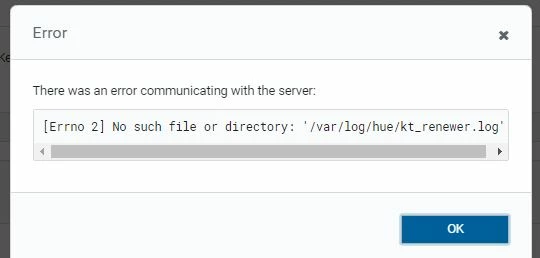
That's quite strange, as the service should generally look for the log file before starting. The only possibility that I can think of here is that the log file would have been removed manually while the service was running. 


Having said that, yes, let's try creating the log file manually with appropriate permissions as suggested by @nthomas, and restart Hue kt_renewer service to see if it is able to write to the newly created file. 


5 replies

nthomas
Gold ⭐️
Gold ⭐️
June 2, 2021

Try creating the file manually on the KT_renewer node with below permission and check again:

-rw-r--r-- 1 hue hue 3712920 Jun 2 15:23 kt_renewer.log

Translate
Sean464
Gold ⭐️
Gold ⭐️
June 2, 2021

Hello @Amn_468 ,


Are we setting up Hue KT_renewer for the first time? What is the status of Hue kt_renewer service please? 


stderr logs from Hue kt_renewer can give more insights. The below commands can take us to the directory were stderr log is stored. 


# export HUE_DIR="/var/run/cloudera-scm-agent/process/`ls -alrt /var/run/cloudera-scm-agent/process | grep hue-KT_RENEWER | tail -1 | awk '{print $9}'`"
# cd $HUE_DIR/logs


Translate
Amn_468
Amn_468Author
Silver ⭐️⭐️⭐️
June 5, 2021

Hello @Sean464 


Hue is already installed kt renewer service is also running fine/green. We noticed this post our upgrade from 5.16.x to 6.3.x


So can I follow the steps mentioned by @nthomas?


Thanks

Amn

Translate
Sean464
Gold ⭐️
Sean464Answer
Gold ⭐️
June 7, 2021

Hello @Amn_468, 


That's quite strange, as the service should generally look for the log file before starting. The only possibility that I can think of here is that the log file would have been removed manually while the service was running. 


Having said that, yes, let's try creating the log file manually with appropriate permissions as suggested by @nthomas, and restart Hue kt_renewer service to see if it is able to write to the newly created file. 


Translate