

eddy28
Silver ⭐️⭐️
August 21, 2024
Solved

In Apache Ranger, Audit logging not working for superuser only

Hi Everyone,

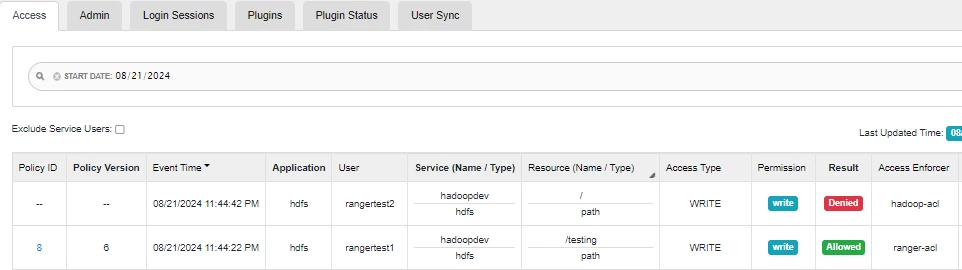
I’m new to Apache Ranger. I’ve created an HDFS policy and configured it to store audit logs in Solr. When I create or delete directories in HDFS, the audit logs are generated and visible in the Ranger UI. However, when I perform operations as the superuser (hdfs), no audit logs are generated.

As shown in below screenshot, rangertest1 and rangertest2 users audit logs are shown on UI. But any operations performed using hdfs user, those logs not going in Audit DB.
eddy28_0-1724264132109.png


Does Ranger not support audit logging for superuser actions?
I have already checked all the configs and there are no exclusions to any user.

Best regards,
Aditya

vats
vatsAnswer
Gold ⭐️
August 22, 2024

@eddy28 


To enable audit logging for superuser actions, you need to update the HDFS configuration. Follow these steps:

Open the hdfs-site.xml file in the Hadoop configuration directory ($HADOOP_HOME/etc/hadoop).

Add the following properties to enable audit logging for superuser actions:


<property> <name>dfs.namenode.inode.attributes.provider.class</name> <value>org.apache.ranger.authorization.hadoop.RangerHdfsAuthorizer</value> </property> <property> <name>ranger.plugin.hdfs.service.name</name> <value>hadoopdev</value> <!-- Replace with your Ranger service name --> </property>
 

Save the changes and restart the HDFS service for the new configuration to take effect.

With this configuration, the superuser actions should generate audit logs, which will be visible in the Ranger UI alongside other HDFS actions.

Note-Please test this configuration with you uat cluster 

7 replies

DianaTorres
Community Manager
Community Manager
August 21, 2024

@eddy28 Welcome to the Cloudera Community!

To help you get the best possible solution, I have tagged our Ranger experts @Atahar @vamsi_redd @Puni  who may be able to assist you further.

Please keep us updated on your post, and we hope you find a satisfactory solution to your query.

Translate
Regards, Diana Torres, Senior Community Moderator
vats
Gold ⭐️
Gold ⭐️
August 21, 2024

@eddy28 

If you are performing operations as the superuser (hdfs) and no audit logs are generated, it is likely because the superuser is bypassing the HDFS permissions and Ranger policies. The superuser has administrative privileges and can perform any action in HDFS without being subject to the policies defined in Ranger.

By default, HDFS does not generate audit logs for actions performed by the superuser. If you want to track the activities of the superuser, you can enable audit logging specifically for the superuser.


Translate
eddy28
eddy28Author
Silver ⭐️⭐️
August 22, 2024

Hi @vats ,

Thanks for your quick reply.

I have already tried below steps, but still not able to get audit logs for superuser.
1.) Added Audit filter:-

eddy28_2-1724310913441.png


2.) Gave allow permission in Ranger policy. 

eddy28_1-1724310709117.png

Is there anything else I need to follow to enable audit logging specifically for the superuser.


Regards,

Aditya

Translate
vats
Gold ⭐️
vatsAnswer
Gold ⭐️
August 22, 2024

@eddy28 


To enable audit logging for superuser actions, you need to update the HDFS configuration. Follow these steps:

Open the hdfs-site.xml file in the Hadoop configuration directory ($HADOOP_HOME/etc/hadoop).

Add the following properties to enable audit logging for superuser actions:


<property> <name>dfs.namenode.inode.attributes.provider.class</name> <value>org.apache.ranger.authorization.hadoop.RangerHdfsAuthorizer</value> </property> <property> <name>ranger.plugin.hdfs.service.name</name> <value>hadoopdev</value> <!-- Replace with your Ranger service name --> </property>
 

Save the changes and restart the HDFS service for the new configuration to take effect.

With this configuration, the superuser actions should generate audit logs, which will be visible in the Ranger UI alongside other HDFS actions.

Note-Please test this configuration with you uat cluster 

Translate
eddy28
eddy28Author
Silver ⭐️⭐️
August 22, 2024

Hi @vats ,
I have tried it, but still no luck. 

Regards,

Aditya

Translate
vats
Gold ⭐️
Gold ⭐️
August 23, 2024

@eddy28 

Have you configured this property properly
"<name>ranger.plugin.hdfs.service.name</name> <value>hadoopdev</value> <!-- Replace with your Ranger service name --> "
Do you have any exception after configuring the suggested property?


Translate
eddy28
eddy28Author
Silver ⭐️⭐️
August 23, 2024

Hi @vats ,

Yes I have added configs properly. Kindly see the screenshot below:

eddy28_0-1724404613256.png

My service name is also hadoopdev

eddy28_1-1724404670057.png

Regards,

Aditya


Translate

