sinRudra
Silver ⭐️⭐️
Aug 16, 2023 4:19 PM UTC
Solved

ListFTP not taking into account french special characters in filename [Nifi 1.21.0]

Hello,

I have upgraded nifi from 1.16.3 to 1.21.0

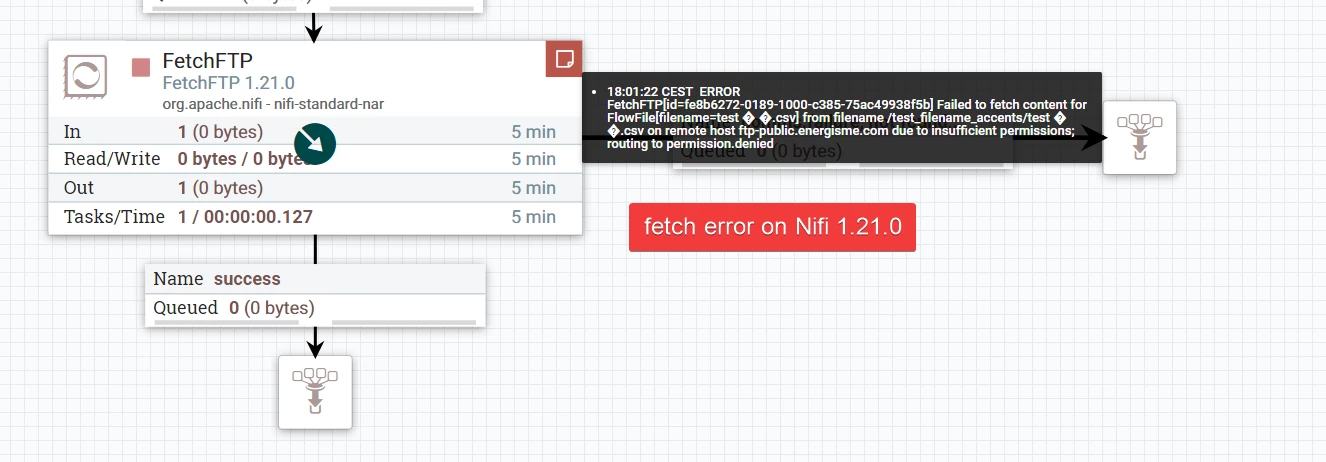
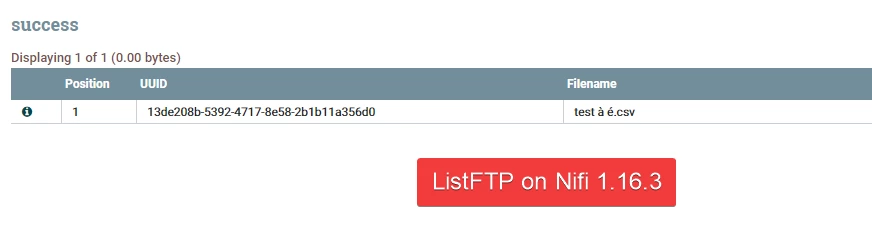
Now, the processors ListFTP, FetchFTP, PutFTP won't work with filenames that contains french accents like à é etc..

It worked like a charm on Nifi 1.16.3

Could you please help me on this topic ? I will happy to provide all the information that you need to debug the problem.


Thank you.
sinRudra_0-1692202695966.png


sinRudra_1-1692202708872.png


sinRudra_2-1692202731958.png


MattWho
MattWhoAnswer
Titanium ⭐️⭐️
Aug 18, 2023 12:16 PM UTC

@sinRudra 

As a workaround you could take the "nifi-standard-nar-1.16.3.nar" from the NiFi 1.16.3 distro and add it to your NiFi 1.21 install.  This will give you access to both version of all the standard nar components. The nifi-standard-nar does however contain a lot of components besides just listFTP.  You'll end up seeing two available versions of a lot of components with either 1.21.0 or 1.16.3 as the version when adding components to the canvas.

If you found that the provided solution(s) assisted you with your query, please take a moment to login and click Accept as Solution below each response that helped.

Thank you,

Matt

9 replies

DianaTorres
Community Manager
Community Manager
Aug 16, 2023 8:30 PM UTC


@sinRudra Welcome to the Cloudera Community!

To help you get the best possible solution, I have tagged our NiFi experts @steven-matison  who may be able to assist you further.

Please keep us updated on your post, and we hope you find a satisfactory solution to your query.

Translate
Regards, Diana Torres, Senior Community Moderator
cotopaul
Platinum ⭐️
Aug 17, 2023 1:03 PM UTC

@sinRudra,

I do not think that your problem is related to the name itself and/or the characters. Your error messages states clearly that you do not have the required permissions to extract the file. If there would have been an issue with the name, you would have received an error message stating that the file cannot be found in that location. Make sure that you have all the configurations done properly to be able to access that ftp location.

Translate
sinRudra
sinRudraAuthor
Silver ⭐️⭐️
Aug 17, 2023 1:12 PM UTC

Hello @cotopaul 


Thanks for taking time to look at the issue.


I have tested with same ftp account on the nifi version 1.16.3 and 1.21.0. It works perfectly fine on 1.16.3.


FetchFtp gives the permission error because filename fetched from listftp contains characters (black question marks)

sinRudra_0-1692277732719.png

I can assure that the there is no problem concerning the permissions. with the Nifi 1.21.0, i fetched the files without special characters in the filename.


Translate
MattWho
Titanium ⭐️⭐️
Titanium ⭐️⭐️
Aug 17, 2023 5:14 PM UTC

@sinRudra 

I recommend reading through the comments, suggestions, and troubleshooting done within the following Apache NiFi Jira to see if you are encountering similar observations.
https://issues.apache.org/jira/browse/NIFI-10143

If so, it may be best to create a new Apache JIra for your specific character set issues to see what the committer community can do for you.

If you found that the provided solution(s) assisted you with your query, please take a moment to login and click Accept as Solution below each response that helped.

Thank you,

Matt

Translate
sinRudra
sinRudraAuthor
Silver ⭐️⭐️
Aug 18, 2023 8:47 AM UTC

Hello @MattWho 


Thanks for the jira link.

It seems that the following commit in the version nifi 1.17.0 have somehow broke the recognition of french characters : 

sinRudra_0-1692347876359.png

 to test it, i downloaded nifi 1.17.0 and ran the tests, got the following result

sinRudra_1-1692348050771.png

I will create a Apache Jira ticket.


In the interim, could you propose some alternative solutions? Perhaps a custom processor using the listftp code, but with modifications from version 1.17.0 removed? What are your thoughts?


Thank you for your help.


Translate
MattWho
Titanium ⭐️⭐️
MattWhoAnswer
Titanium ⭐️⭐️
Aug 18, 2023 12:16 PM UTC

@sinRudra 

As a workaround you could take the "nifi-standard-nar-1.16.3.nar" from the NiFi 1.16.3 distro and add it to your NiFi 1.21 install.  This will give you access to both version of all the standard nar components. The nifi-standard-nar does however contain a lot of components besides just listFTP.  You'll end up seeing two available versions of a lot of components with either 1.21.0 or 1.16.3 as the version when adding components to the canvas.

If you found that the provided solution(s) assisted you with your query, please take a moment to login and click Accept as Solution below each response that helped.

Thank you,

Matt

Translate
sinRudra
sinRudraAuthor
Silver ⭐️⭐️
Aug 18, 2023 12:27 PM UTC

Hello @MattWho 


Thanks for the workaround. I tested and it worked.


Thank you very much.

Translate
steven-matison
Platinum ⭐️⭐️
Platinum ⭐️⭐️
Aug 18, 2023 12:27 PM UTC

A solution and a jira, excellent work gents!   

Translate
sinRudra
sinRudraAuthor
Silver ⭐️⭐️
Aug 18, 2023 3:23 PM UTC

For information, jira ticket created.


https://issues.apache.org/jira/browse/NIFI-11967

Translate