Paulito
Silver ⭐️⭐️⭐️
July 17, 2023
Solved

NIFI Extract text from JSON (a bit complex JSON returned from an API)

I'm using the NIFI ExtractText Processor and I'm trying to come up with the regular expression to extract values from a JSON String that is in the flowfile-content coming from a response of an API (of course I cannot change how the API responds).


JSON Data returned from the REST API is: 

{
  "Result" : {
    "SessionID" : null,
    "ResultData" : {
      "DATAENTITYNAME" : "List",
      "CURRENTCURSORPOSITION" : 2,
      "DATARECORD" : [ {
        "DATAFIELD" : [ {
          "FIELDNAME" : "name",
          "FIELDLABEL" : "Name",
          "DATATYPE" : "VARCHAR",
          "FIELDVALUE" : "JSMITH",
          "ISKEYFIELD" : true
        }, {
          "FIELDNAME" : "namedesc",
          "FIELDLABEL" : "Name Desc.",
          "DATATYPE" : "MIXVARCHAR",
          "FIELDVALUE" : "John Smith",
          "ISKEYFIELD" : false
        }, {
          "FIELDNAME" : "hireddate",
          "FIELDLABEL" : "Hired Date",
          "DATATYPE" : "DATE",
          "FIELDVALUE" : "01-JAN-2010",
          "ISKEYFIELD" : false
        }]      
}, {
        "DATAFIELD" : [ {
          "FIELDNAME" : "name",
          "FIELDLABEL" : "Name",
          "DATATYPE" : "VARCHAR",
          "FIELDVALUE" : "RSTONE",
          "ISKEYFIELD" : true
        }, {
          "FIELDNAME" : "namedesc",
          "FIELDLABEL" : "Name Desc.",
          "DATATYPE" : "MIXVARCHAR",
          "FIELDVALUE" : "Robert Stone",
          "ISKEYFIELD" : false
        }, {
          "FIELDNAME" : "hireddate",
          "FIELDLABEL" : "Hired Date",
          "DATATYPE" : "DATE",
          "FIELDVALUE" : "01-JAN-2011",
          "ISKEYFIELD" : false
        }]
      },     
},
    "InfoAlert" : null,
    "WarningAlert" : null
  },
  "ConfirmationAlert" : null,
  "ErrorAlert" : [ ]
}
 
How do I get all "name" and "namedesc"?  (in the example: JSMITH -> John Smith and RSTONE -> Robert Stone)
 
Thanks!!!!!

 
SAMSAL
SAMSALAnswer
Platinum ⭐️⭐️⭐️
July 18, 2023

Hi @Paulito ,

The easiest way I can think of is to do this in two Processors:


1- JoltTransformJson: Allows you to transform your json by simplifying it into an array or records where each record has list of fieldname:fieldvalue. To achieve this you need to provide the following jolt spec in the "Jolt Specification" property of the processor:

[
{
"operation": "shift",
"spec": {
"Result": {
"ResultData": {
"DATARECORD": {
"*": {
"DATAFIELD": {
"*": {
"FIELDVALUE": "[&3].@(1,FIELDNAME)"
}
}
}
}
}
}
}
}
]


Basically the spec above will give you the following json based on the provided input:


[ {
"name" : "JSMITH",
"namedesc" : "John Smith",
"hireddate" : "01-JAN-2010"
}, {
"name" : "RSTONE",
"namedesc" : "Robert Stone",
"hireddate" : "01-JAN-2011"
} ]


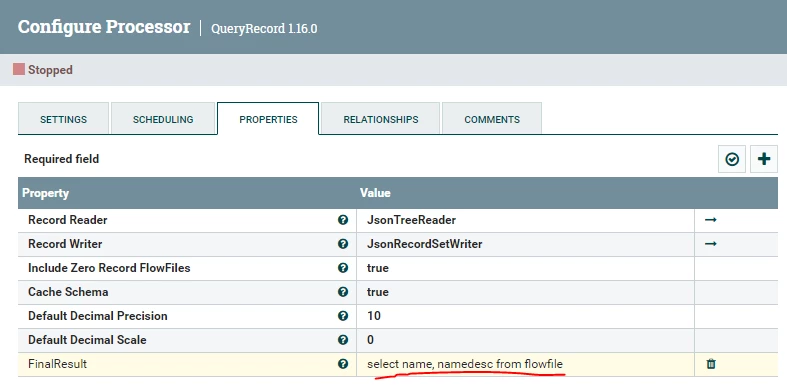
2- QueryRecord Processor: to allow you to select the fields you are interested in for the given API as follows. The query is just like sql query and you can either specify wildcard (*) for all fields or just list particular fields as follows:

SAMSAL_0-1689721462315.png


The out put of the QueryRecord will look like this:

[
{
"name": "JSMITH",
"namedesc": "John Smith"
},
{
"name": "RSTONE",
"namedesc": "Robert Stone"
}
]


Of course you can make this dynamic for each API by providing both the Jolt spec and the Query as flowfile attributes since both allow expression language (EL) in the value field.


You can also achieve the same result by using just the Jolt Transformation processor but the spec would be more complex and I dont want to overwhelm you in case you are new to it, but if you are interested in that let me know and I will be happy to provide you the spec.


If this helps please accept solution.

Thanks


12 replies

Paulito
PaulitoAuthor
Silver ⭐️⭐️⭐️
July 17, 2023

PS: of course any other Processors instead of "ExtractText" that solve the problem is also welcome 🙂

Translate
DianaTorres
Community Manager
Community Manager
July 17, 2023

@Paulito Welcome to the Cloudera Community!

To help you get the best possible solution, I have tagged our NiFi experts @steven-matison and @SAMSAL  who may be able to assist you further.

Please keep us updated on your post, and we hope you find a satisfactory solution to your query.

Translate
Regards, Diana Torres, Senior Community Moderator
SAMSAL
Platinum ⭐️⭐️⭐️
July 17, 2023

Hi @Paulito ,

How do you like to get the output all the names and namesdesc? Would like to get them as list in json, csv or any other format, or you want them to be store in flowfile attributes ?


Translate
Paulito
PaulitoAuthor
Silver ⭐️⭐️⭐️
July 18, 2023

Thanks Samsal, would be ok to have a json such as 

   "LIST" : [ {

               "name": "JSMITH",

               "namedesc": "John Smith"

                }, {

               "name": "RSTONE",

               "namedesc": "Robert Stone"

             }]

or similarly in a CSV

"JSMITH", "John Smith"

"RSTONE", "Robert Stone"

Thanks


PS: of course the number of records returned by the API can be more than 2 and also the numer of fields can be more than the example of 3 (depending on the list I ask to the API to return. I normally can see what it is returned so I can know in advance which are all the possible   "FIELDNAME"  

and the decide which are the fieldname I want to have in the JSON or in CSV, but it is of also fine to have all of them (in the example I gave they would be "name", "namedesc", "hireddate")

Translate
SAMSAL
SAMSALAnswer
Platinum ⭐️⭐️⭐️
July 18, 2023

Hi @Paulito ,

The easiest way I can think of is to do this in two Processors:


1- JoltTransformJson: Allows you to transform your json by simplifying it into an array or records where each record has list of fieldname:fieldvalue. To achieve this you need to provide the following jolt spec in the "Jolt Specification" property of the processor:

[
{
"operation": "shift",
"spec": {
"Result": {
"ResultData": {
"DATARECORD": {
"*": {
"DATAFIELD": {
"*": {
"FIELDVALUE": "[&3].@(1,FIELDNAME)"
}
}
}
}
}
}
}
}
]


Basically the spec above will give you the following json based on the provided input:


[ {
"name" : "JSMITH",
"namedesc" : "John Smith",
"hireddate" : "01-JAN-2010"
}, {
"name" : "RSTONE",
"namedesc" : "Robert Stone",
"hireddate" : "01-JAN-2011"
} ]


2- QueryRecord Processor: to allow you to select the fields you are interested in for the given API as follows. The query is just like sql query and you can either specify wildcard (*) for all fields or just list particular fields as follows:

SAMSAL_0-1689721462315.png


The out put of the QueryRecord will look like this:

[
{
"name": "JSMITH",
"namedesc": "John Smith"
},
{
"name": "RSTONE",
"namedesc": "Robert Stone"
}
]


Of course you can make this dynamic for each API by providing both the Jolt spec and the Query as flowfile attributes since both allow expression language (EL) in the value field.


You can also achieve the same result by using just the Jolt Transformation processor but the spec would be more complex and I dont want to overwhelm you in case you are new to it, but if you are interested in that let me know and I will be happy to provide you the spec.


If this helps please accept solution.

Thanks


Translate
Paulito
PaulitoAuthor
Silver ⭐️⭐️⭐️
July 19, 2023

Thanks @SAMSAL , the first processor works as a dream, (FANTASTIC THANKS).

For the second I might have missed something as I got correctly only name and namedesc, but they are all set to null... 

Translate
SAMSAL
Platinum ⭐️⭐️⭐️
July 19, 2023

You are welcome. Have you changed anything in the jolt transformation spec, and if so how does the output looks like? Can you also provide the QueryRecord processor configuration.

Translate
Paulito
PaulitoAuthor
Silver ⭐️⭐️⭐️
July 19, 2023

@SAMSAL , thanks alot for your time 🙂

You find at the end of my message the json I got both after the jolt transfromation and after the queryrecord.


As you can see I called a different list and the result has more fields than the original example, but I also change the queryrecord (select) acconrdling.

This is the jolt transformation properties

Paulito_3-1689783209655.png


This is the query record properties (that I call just after the jolt)

Paulito_0-1689783040097.png

This is the json result (beutify) after the jolt trasformation (I just send the first 3 records, in reality they are 100):

[ {
"class" : "STORE",
"classdesc" : "Stores",
"classorg" : "*",
"commissiondate" : "01-JAN-2010",
"datecreated" : "23-FEB-2021 13:57",
"equipmentdesc" : "Superstore",
"imageurl" : "",
"lastsaved" : "07-MAR-2021 13:39",
"latitude" : "",
"location" : "PURLEY",
"locationdesc" : "Purley",
"locationorg" : "RETAIL",
"locationtype" : "L",
"longitude" : "",
"obj_code" : "03293",
"orderline" : "",
"orderorg" : "",
"organization" : "RETAIL",
"partcode" : "",
"partorg" : "",
"poorder" : "",
"propertydefinition" : "",
"status" : "I",
"statusdesc" : "Installed",
"store" : "",
"systemstatus" : "I",
"systemstatusdesc" : "Installed",
"systemtype" : "P",
"type" : "SHOP",
"typedesc" : "Shop / Store"
}, {
"class" : "AREA",
"classdesc" : "Area",
"classorg" : "*",
"commissiondate" : "01-JAN-2010",
"datecreated" : "23-FEB-2021 16:18",
"equipmentdesc" : "Extra - Yard",
"imageurl" : "",
"lastsaved" : "05-MAR-2021 15:09",
"latitude" : "51.4876",
"location" : "CARDIFF",
"locationdesc" : "Cardiff",
"locationorg" : "RETAIL",
"locationtype" : "L",
"longitude" : "",
"obj_code" : "02230.YRD",
"orderline" : "",
"orderorg" : "",
"organization" : "RETAIL",
"partcode" : "",
"partorg" : "",
"poorder" : "",
"propertydefinition" : "",
"status" : "I",
"statusdesc" : "Installed",
"store" : "",
"systemstatus" : "I",
"systemstatusdesc" : "Installed",
"systemtype" : "P",
"type" : "AREA",
"typedesc" : "Area"
}, {
"class" : "AREA",
"classdesc" : "Area",
"classorg" : "*",
"commissiondate" : "01-JAN-2010",
"datecreated" : "23-FEB-2021 16:19",
"equipmentdesc" : "Extra - S/Floor Bakery",
"imageurl" : "",
"lastsaved" : "05-MAR-2021 15:09",
"latitude" : "",
"location" : "CARDIFF",
"locationdesc" : "Cardiff",
"locationorg" : "RETAIL",
"locationtype" : "L",
"longitude" : "",
"obj_code" : "02230.BAK",
"orderline" : "",
"orderorg" : "",
"organization" : "RETAIL",
"partcode" : "",
"partorg" : "",
"poorder" : "",
"propertydefinition" : "",
"status" : "I",
"statusdesc" : "Installed",
"store" : "",
"systemstatus" : "I",
"systemstatusdesc" : "Installed",
"systemtype" : "P",
"type" : "AREA",
"typedesc" : "Area"
} ]


And this is what I got after the QueryRecord (taken the first 3 records, but all are the same)

[ {
"obj_code" : null,
"equipmentdesc" : null
}, {
"obj_code" : null,
"equipmentdesc" : null
}, {
"obj_code" : null,
"equipmentdesc" : null
}]


So it seems that the queryrecord return the correct columns but they are empty.

Thanks again!!!

Translate
SAMSAL
Platinum ⭐️⭐️⭐️
July 19, 2023

hmmm, I dont see any issue with what you have sent. What is your JsonTreeReader & JsonRecordSetWriter looks like. Mine looks like the following:


SAMSAL_0-1689787150760.png


SAMSAL_1-1689787179221.png


Also what version of Nifi are you using?

Thanks


Translate
Paulito
PaulitoAuthor
Silver ⭐️⭐️⭐️
July 20, 2023

@SAMSAL , here the information requested

Paulito_0-1689832452971.png


Paulito_1-1689832479351.png


Paulito_2-1689832501506.png


Thanks again for your help and time.

Cheers

Translate
SAMSAL
Platinum ⭐️⭐️⭐️
July 20, 2023

Hi @Paulito,

I noticed you are using JsonPathReader vs JsonTreeReader which what I used. I'm not if the Path Reader is the right choice and if so how to configure correctly. I tried it in my test environment against your input with different JSONPath config and it did not work for me. Can you use JsonTreeReader instead?

Translate
Paulito
PaulitoAuthor
Silver ⭐️⭐️⭐️
July 20, 2023

@SAMSAL my bad !!! I start to be old i need better glasses 🙂

You are right it works fantastically !!!

THANKS!!!!! 

Translate