Hi, @Nandy113 ,
One way to achieve this is to use the Wait/Notify pattern in NiFi, as shown below:
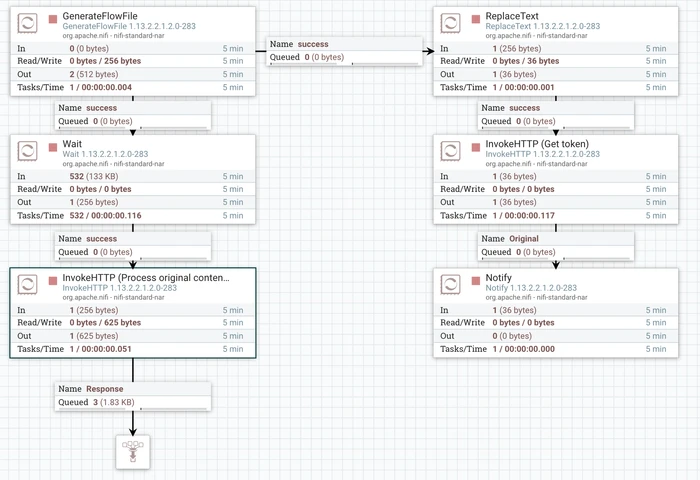
The original flowfile is routed to a Wait processor, where it's going to wait until the authentication token is obtained. The same flowfile is also routed to a ReplaceText processor where its content is replaced with the body content to obtain the access token. The InvokeHTTP processor on the right then makes the call to authenticate and get the token. The response (token) is stored in a "token" attribute of the original flowfile due to the following setting:

Note that the output relationship of that process is "Original" rather than "Response".
That flowfile is then sent to a Notify processor, which will send a notification to the Wait processor to continue to process the flowfile that was waiting. Both the Wait and the Notify processors are configured with the following, so that the authentication for each flowfile notifies the corresponding one that's waiting:

The notify process also has the following setting, which will cause the token to be put in the distributed cache and copied to the flowfile that's waiting:

Once the flowfile is released from the wait, it will have the token attribute, and then we can use that token on the following InvokeHttp processor to authenticate with the server by setting the following header with a dynamic property:

HTH,
André
-- Was your question answered? Please take some time to click on "Accept as Solution" below this post. If you find a reply useful, say thanks by clicking on the thumbs up button.