
jacektrocinski
Gold ⭐️
January 17, 2023
Solved

NiFi WebSocket Headers

I need to pass headers in order make a WebSocket connection.

How can I do this in NiFi?
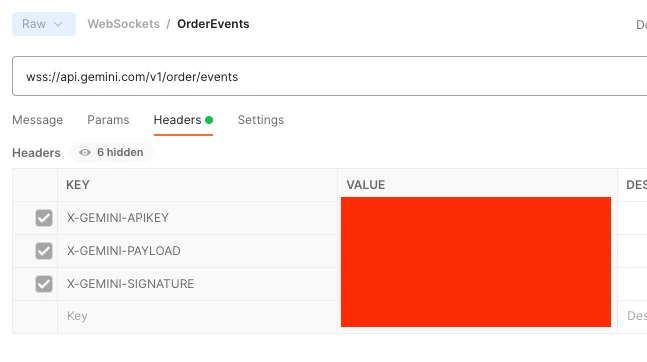
jacektrocinski_0-1673945949528.png


jacektrocinski
Gold ⭐️
January 17, 2023

8 replies

ckumar
Platinum ⭐️
Platinum ⭐️
January 17, 2023

You can use InvokeHTTP processor wich provide options to handle Header 


Thank you

Translate
jacektrocinski
Gold ⭐️
January 17, 2023

@ckumar No, that won't work, I'm trying to invoke a WebSocket URL: wss://api.gemini.com/v1/order/events

InvokeHTTP can't create WebSocket connections.

Translate
ckumar
Platinum ⭐️
Platinum ⭐️
January 17, 2023

Ah my bad, for the WebSocket end point did you try ConnectWebSocket ?

Translate
jacektrocinski
Gold ⭐️
January 17, 2023

@ckumar Yes, I am using ConnectWebSocket but how do I pass a custom header like X-GEMINI-APIKEY to the initial connection?

Translate
jacektrocinski
jacektrocinskiAuthorAnswer
Gold ⭐️
January 17, 2023
ckumar
Platinum ⭐️
Platinum ⭐️
January 17, 2023

ConnectWebSocket does not read any details from Flow file attribute from an incoming flow file.

If you are a Cloudera customer, feel free to file a support ticket with us, we should be able to help you on this with a longer engagement.  


Thank you 

Translate
jacektrocinski
Gold ⭐️
January 18, 2023

@ckumar That is incorrect, the ConnectWebSocket reads attributes from an incoming flow file.

It is also in the documentation that I posted:

https://nifi.apache.org/docs/nifi-docs/components/org.apache.nifi/nifi-websocket-processors-nar/1.19.1/org.apache.nifi.processors.websocket.ConnectWebSocket/additionalDetails.html

I contacted a Cloudera NiFi expert and he confirmed.

The solution I posted is correct.

Translate
ckumar
Platinum ⭐️
Platinum ⭐️
January 18, 2023

@jacektrocinski Yes, Sir, you are right,  I put more focus on read attribute section of the document which has none but missed seeing Additional details. 

Kudos!!


Translate


