

mohdriyaz
Gold ⭐️
November 29, 2024
Question

Nifi 2.0 Start Problem

Hello , 

I use "nifi.cmd start" to start with NIFI.

Sometime  it works and most of the times it doesn't. 

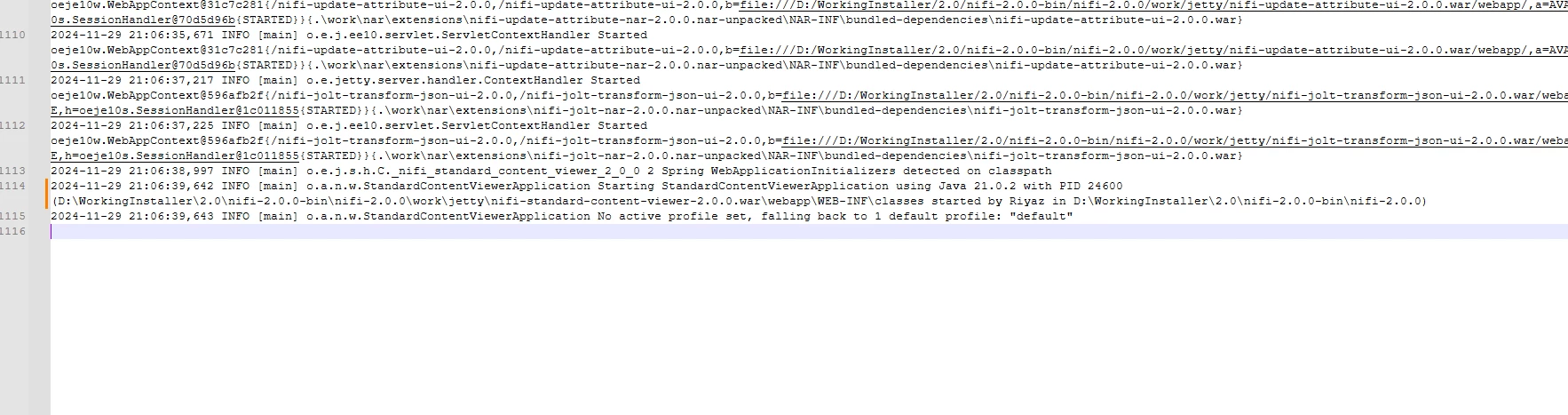
In case  where NIFI doesn't work I am getting following logs : 
mohdriyaz_0-1732896428646.png

2024-11-29 21:06:39,642 INFO [main] o.a.n.w.StandardContentViewerApplication Starting StandardContentViewerApplication using Java 21.0.2 with PID 24600 (D:\WorkingInstaller\2.0\nifi-2.0.0-bin\nifi-2.0.0\work\jetty\nifi-standard-content-viewer-2.0.0.war\webapp\WEB-INF\classes started by Riyaz in D:\WorkingInstaller\2.0\nifi-2.0.0-bin\nifi-2.0.0)
2024-11-29 21:06:39,643 INFO [main] o.a.n.w.StandardContentViewerApplication No active profile set, falling back to 1 default profile: "default"


Any pointers would be appreciated.

Thanks,

Riyaz

15 replies

Dahlgren
Silver ⭐️⭐️⭐️
December 5, 2024

I have the same problem.

Translate
DianaTorres
Community Manager
Community Manager
December 5, 2024

@MattWho @SAMSAL @mburgess Hi! Do you have some insights here?

Translate
Regards, Diana Torres, Senior Community Moderator
PepeVo
Silver ⭐️⭐️⭐️
December 31, 2025

I have a same problem.  Nifi.sh started and failed in next few seconds.

2025-12-31 14:03:57,387 INFO [main] org.apache.nifi.bootstrap.Command Application Process [9606] started
2025-12-31 14:03:57,388 INFO [main] org.apache.nifi.bootstrap.Command Bootstrap Process Running
2025-12-31 14:04:57,392 INFO [StartBootstrapCommand] o.a.n.b.c.ApplicationProcessStatusBootstrapCommand Application Process not found
2025-12-31 14:04:57,392 WARN [StartBootstrapCommand] o.a.n.b.command.StartBootstrapCommand Application monitoring failed with status [STOPPED]


nifi can't start with Java17 but Java21

Any pointers would be appreciated


BV


Translate
DianaTorres
Community Manager
Community Manager
December 31, 2025

Hello @PepeVo! As this is an older post, you would have a better chance of receiving a resolution by starting a new thread. This will also be an opportunity to provide details specific to your environment that could aid others in assisting you with a more accurate answer to your question. You can link this thread as a reference in your new post. Thanks.

Translate
Regards, Diana Torres, Senior Community Moderator
MattWho
Titanium ⭐️⭐️⭐️
Titanium ⭐️⭐️⭐️
December 9, 2024

@mohdriyaz 

These are just INFO level log lines.   What logging did you see in the NiFi bootstrap.log?  
Does the process die or does just appear hung and not progressing to point where UI is becomes available?

On the times where NiFi did start, what log lines are seen immediately after above are output?

Thanks,
Matt

Translate
Dahlgren
Silver ⭐️⭐️⭐️
December 10, 2024

I attach a screenshot of the log when the start succeeds.

2024-12-10 08_58_14-___chcorxas045_e$_nifi-2.0.0_logs_nifi-app.log - Notepad++.png


Translate
MattWho
Titanium ⭐️⭐️⭐️
Titanium ⭐️⭐️⭐️
December 10, 2024

@Dahlgren 

- Make sure you are using a Java 21 JDK and not a Java 21 JRE.
- Try excluding the NiFi directory to include all the repositories from your Virus scanning software and see if that helps resolve the startup issue.

Here is an Apache NiFi slack thread discussing this same issue:
https://apachenifi.slack.com/archives/C0L9UPWJZ/p1731963549046199

Please help our community thrive. If you found any of the suggestions/solutions provided helped you with solving your issue or answering your question, please take a moment to login and click "Accept as Solution" on one or more of them that helped.

Thank you,
Matt


Translate
DianaTorres
Community Manager
Community Manager
December 10, 2024

@Dahlgren @mohdriyaz Has the reply helped resolve your issue? If so, please mark the appropriate reply as the solution, as it will make it easier for others to find the answer in the future. If you are still experiencing the issue, can you provide the information @mattwho has requested? Thanks.

Translate
Regards, Diana Torres, Senior Community Moderator
DianaTorres
Community Manager
Community Manager
December 19, 2024

@mohdriyaz @Dahlgren Has the reply helped resolve your issue? If so, please mark the appropriate reply as the solution, as it will make it easier for others to find the answer in the future. Thanks.

Translate
Regards, Diana Torres, Senior Community Moderator
mohdriyaz
mohdriyazAuthor
Gold ⭐️
January 3, 2025

I found one solution ... ( not the correct way)

just  remove nifi-standard-content-viewer-nar-2.0.0.nar from Lib folder and it will start working.

Only issue with this approach is that you cannot view the flow file contents in JSON or any other format. You can view it only in Hex format (default) 


Translate
