Hi @AndreDre1 ,
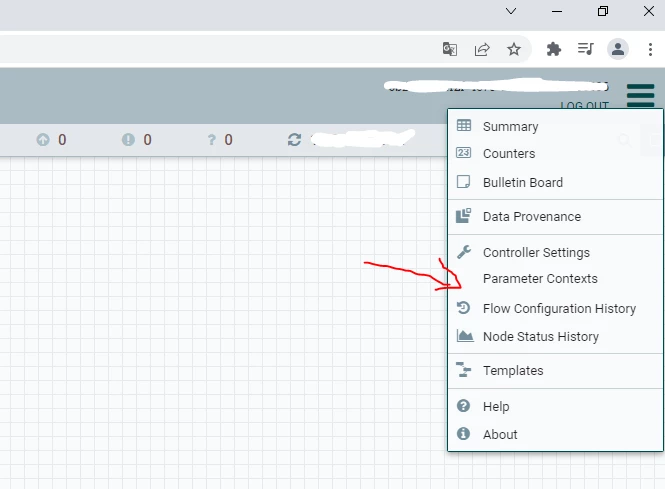
You probably have a default NiFi configuration, which uses the single-user-authorizer. This authorizer doesn't have a Users menu in the UI. To see the Users menu you need to switch to another authorizer.
For example, if you have a brand new installation of NiFi with the default configuration, follow the steps below:
- Edit the conf/nifi.properties file and update the following property:
nifi.security.user.authorizer=managed-authorizer - Add the name of your initial admin in the following two places in conf/authorizers.xml:
...
<userGroupProvider>
<identifier>file-user-group-provider</identifier>
<class>org.apache.nifi.authorization.FileUserGroupProvider</class>
<property name="Users File">./conf/users.xml</property>
<property name="Legacy Authorized Users File"></property>
<property name="Initial User Identity 1">ADMIN_USERNAME_HERE</property>
</userGroupProvider>
...
<accessPolicyProvider>
<identifier>file-access-policy-provider</identifier>
<class>org.apache.nifi.authorization.FileAccessPolicyProvider</class>
<property name="User Group Provider">file-user-group-provider</property>
<property name="Authorizations File">./conf/authorizations.xml</property>
<property name="Initial Admin Identity">ADMIN_USERNAME_HERE</property>
<property name="Legacy Authorized Users File"></property>
<property name="Node Identity 1"></property>
<property name="Node Group"></property>
</accessPolicyProvider>
... - Stop NiFi:
./bin/nifi.sh stop - Remove users.xml and authorizations.xml:
rm conf/users.xml conf/authorizations.xml - Start NiFi:
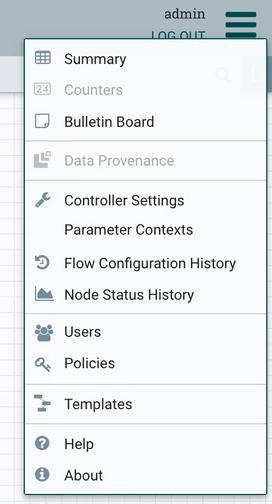
./bin/nifi.sh start - After you login to NiFi you should now be able to see the Users menu:
Cheers,
André
--
Was your question answered? Please take some time to click on "Accept as Solution" below this post.
If you find a reply useful, say thanks by clicking on the thumbs up button.
-- Was your question answered? Please take some time to click on "Accept as Solution" below this post. If you find a reply useful, say thanks by clicking on the thumbs up button.