

Sayed016
Gold ⭐️
December 14, 2022
Question

Not able to start HDFS NFS Gateway after 7.1.8 upgrade

Hello Team,


We recently upgraded from CDP 7.1.6 to CR 7.1.8. After the upgrade, we are having issues with starting the HDFS NFS Gateway role.


Earlier, on CDP 7.1.6, we would run the command - hdfs --daemon start portmap and then start the HDFS NFS Gateway role from the Cloudera Manager, however after the upgrade this is not working (that is the HDFS NFS Gateway role doesn't start after running the above command and starting the role from the Cloudera Manager). We are getting the following issue
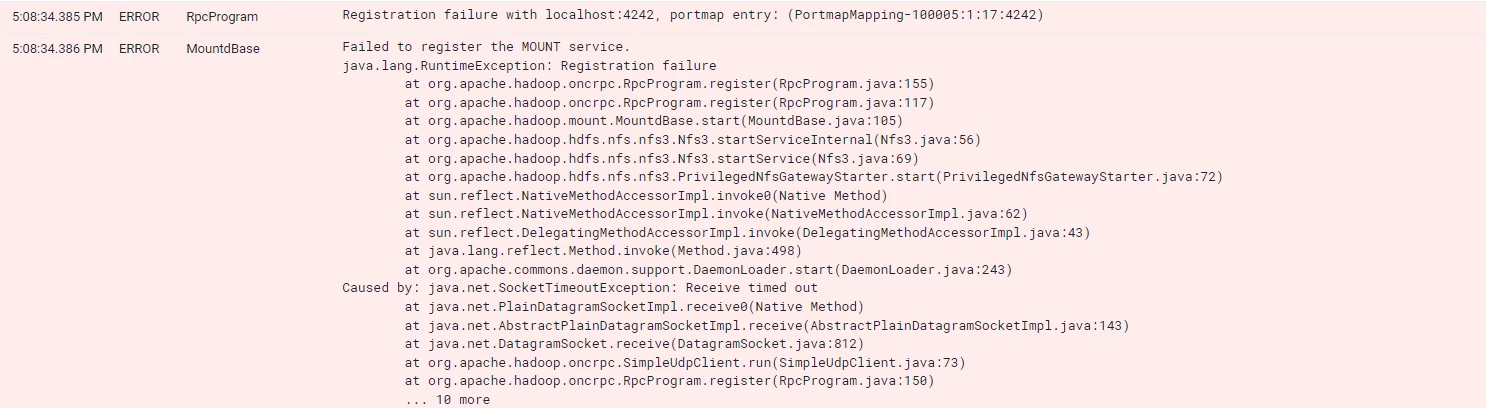
Sayed016_0-1671035557030.png

Due to some security issues, we are not able to start rpcbind service. Is there a workaround to start the NFS Gateway? Note, the mount service does not start when even though the portmap service looks to have a running process.


Best Regards

Sayed Anisul Hoque



3 replies

Asfahan
Gold ⭐️
Gold ⭐️
November 15, 2024

HI Team, you can check the mount using below:

showmount -e <NFS servername>

Although as per the error it OS issue you should be checking with your internal team

Translate
VidyaSargur
Community Manager
Community Manager
December 11, 2024

@Sayed016, Did the response assist in resolving your query? If it did, kindly mark the relevant reply as the solution, as it will aid others in locating the answer more easily in the future. 

Translate
Regards, Vidya Sargur, Community Manager Was your question answered? Make sure to mark the answer as the accepted solution. If you find a reply useful, say thanks by clicking on the thumbs up button.
Sayed016
Sayed016Author
Gold ⭐️
December 11, 2024

@VidyaSargur it somewhat helped. It was failing because we had an NFS client running on that server. Since we have a customer-facing client -> server architecture for NFS, we could not start the HDFS NFS Gateway again on the same port. So, the only solution was to stop the HDFS NFS Gateway.

Translate
