
Our Community is getting an upgrade! To get everything ready for the relaunch, we’ll be placing the site in read-only mode starting September 21st.
We really appreciate your understanding while we get things set up behind the scenes. Catch up on all the exciting details about the move here.
Need help or have questions? Drop us a line at [email protected]

Support Questions
 Hi, I'm CLEO! Something exciting is coming to the Community. Stay Tuned!
- Cloudera Community
- Support
- Support Questions
- Regex # Special Character Escape
- Subscribe to RSS Feed
- Mark Question as New
- Mark Question as Read
- Float this Question for Current User
- Bookmark
- Subscribe
- Mute
- Printer Friendly Page
- Subscribe to RSS Feed
- Mark Question as New
- Mark Question as Read
- Float this Question for Current User
- Bookmark
- Subscribe
- Mute
- Printer Friendly Page
Regex # Special Character Escape
- Labels:
-
Apache NiFi


Created on 05-02-2019 02:20 PM - edited 09-16-2022 07:21 AM
- Mark as New
- Bookmark
- Subscribe
- Mute
- Subscribe to RSS Feed
- Permalink
- Report Inappropriate Content
I'm trying to use regex to match the line:
# DOG CAT BIRD
NiFi regex seems to treat # as a comment character, whereas other regexes do not.
How do I match the literal character # in a string with regex?
The doc page https://nifi.apache.org/docs/nifi-docs/html/expression-language-guide.html#escaping doesn't seem to help me out here.


Created 05-02-2019 03:25 PM
- Mark as New
- Bookmark
- Subscribe
- Mute
- Subscribe to RSS Feed
- Permalink
- Report Inappropriate Content
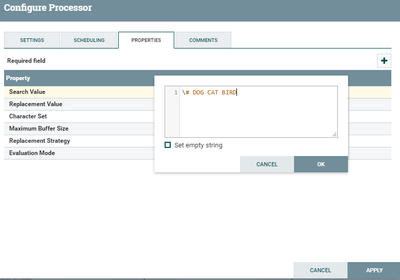
You can ignore the unexpected coloring rendered by the NiFi Expression language editor window.
The java regex replace should work just using "# DOG CAT BIRD" or "\# DOG CAT BIRD".
Thank you,
Matt


Created 05-02-2019 02:54 PM
- Mark as New
- Bookmark
- Subscribe
- Mute
- Subscribe to RSS Feed
- Permalink
- Report Inappropriate Content
Did you try using '\' character?
Created on 05-02-2019 02:59 PM - edited 08-17-2019 03:39 PM
- Mark as New
- Bookmark
- Subscribe
- Mute
- Subscribe to RSS Feed
- Permalink
- Report Inappropriate Content
With the '\' character, the '#' character still highlights the text after it as a comment:
Created 05-02-2019 03:25 PM
- Mark as New
- Bookmark
- Subscribe
- Mute
- Subscribe to RSS Feed
- Permalink
- Report Inappropriate Content
You can ignore the unexpected coloring rendered by the NiFi Expression language editor window.
The java regex replace should work just using "# DOG CAT BIRD" or "\# DOG CAT BIRD".
Thank you,
Matt
Created 05-02-2019 04:45 PM
- Mark as New
- Bookmark
- Subscribe
- Mute
- Subscribe to RSS Feed
- Permalink
- Report Inappropriate Content
Thanks Matt, I didn't realize that the colored text was not a comment in this case.


