ChuckE
Gold ⭐️
December 1, 2023
Solved

Setting Initial Value of Stateful Variables in UpdateAttributes processor

This question has been asked before (here) but never answered so I'm hopeful that today is my lucky day and someone knows the answer.   Because unfortunately, the documentation does not cover the topic.

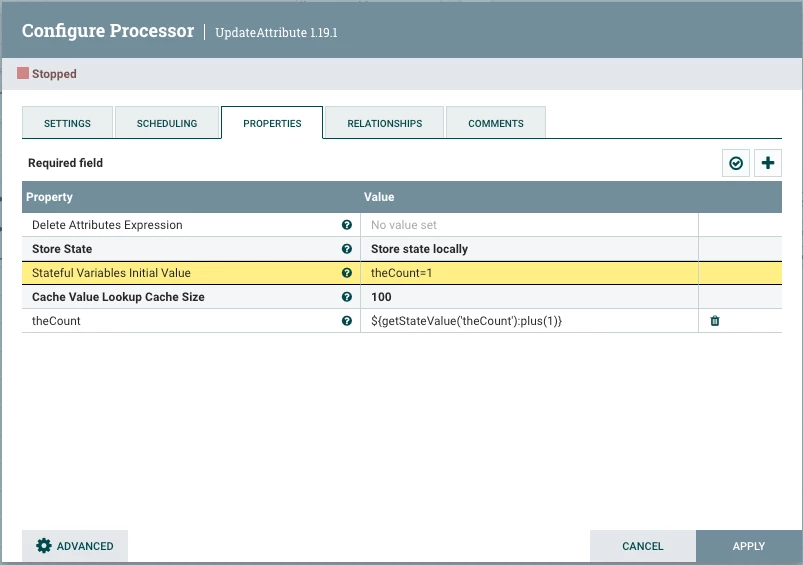
In the UpdateAttribute there is an option to Store State of an attribute by setting the value to "Store state locally".  But to do that I first need to set the "Stateful Variables Initial Value", but the documentation doesn't say how to do that, and everything I've tried fails.   The documentation provides an example for referencing an existing attribute variable, theCount, but there is no mention of how to initialize this attribute variable. 

I've attempted setting the initial value using:

  • theCount=1
  • {"theCount":1}
  • ${theCount=1}
  • 1
  • ${setStateValue('theCount')}     <- grasping at straws with this one

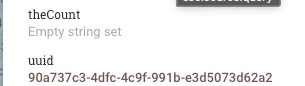
None of these work.  When I look at the value of the attribute theCount it always just shows:  "Empty string set".

I'm including a screen shot of my processor so you can see the configuration.  
ChuckE_0-1701401417557.png

Also, including a screenshot of the Attributes tab showing the theCount attribute.
ChuckE_1-1701401759347.png


SAMSAL
SAMSALAnswer
Platinum ⭐️⭐️⭐️
December 1, 2023

@ChuckE,

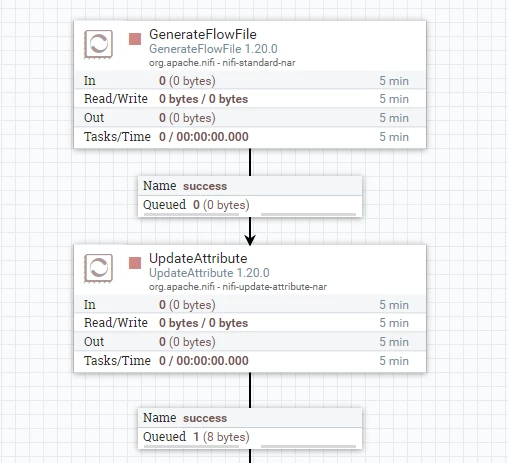
This worked for me :

SAMSAL_0-1701437268401.png

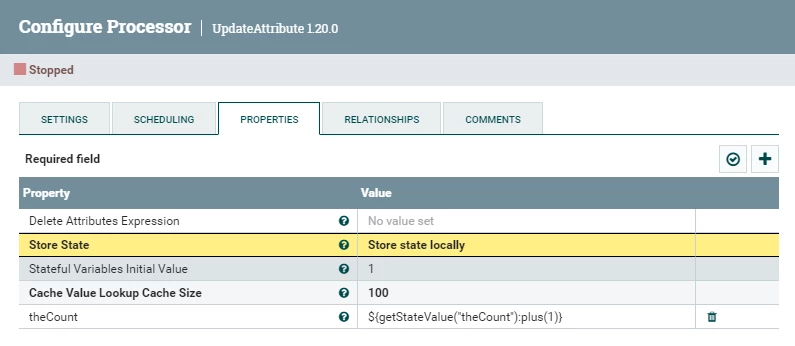
UpdateAttribute Configuration:

SAMSAL_1-1701437310086.png

Notice the "Stateful Variables Initial Value" is set to 1

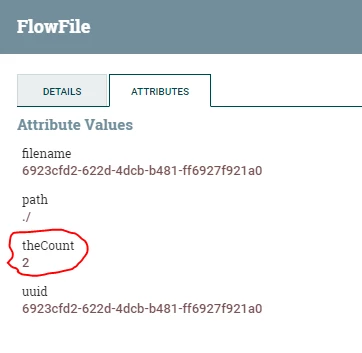
The UpdateAttribute success relationship has the result flowfile with the following attribute:

SAMSAL_2-1701437445671.png

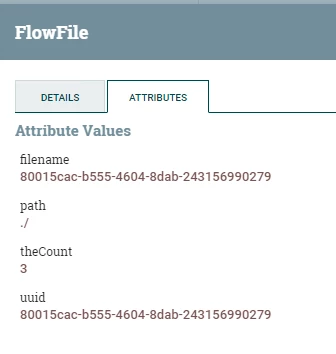
If I run the flow again , the new flowfile will have the following attribute:

SAMSAL_3-1701437507671.png

Its strange that It did not work for you when set the initial value to 1 ? I dont see anything else wrong. If that still did not work for you, can you try to upgrade Nifi just to see if its not a bug with 1.19.1. I use 1.20 for testing but you can upgrade to the latest.

If you find this helpful please accept solution.

Thanks


7 replies

cjervis
Community Manager
Community Manager
December 1, 2023

Perhaps @MattWho or @stevenmatison will have some input here. 

Translate
Keep the questions coming
SAMSAL
SAMSALAnswer
Platinum ⭐️⭐️⭐️
December 1, 2023

@ChuckE,

This worked for me :

SAMSAL_0-1701437268401.png

UpdateAttribute Configuration:

SAMSAL_1-1701437310086.png

Notice the "Stateful Variables Initial Value" is set to 1

The UpdateAttribute success relationship has the result flowfile with the following attribute:

SAMSAL_2-1701437445671.png

If I run the flow again , the new flowfile will have the following attribute:

SAMSAL_3-1701437507671.png

Its strange that It did not work for you when set the initial value to 1 ? I dont see anything else wrong. If that still did not work for you, can you try to upgrade Nifi just to see if its not a bug with 1.19.1. I use 1.20 for testing but you can upgrade to the latest.

If you find this helpful please accept solution.

Thanks


Translate
ChuckE
ChuckEAuthor
Gold ⭐️
December 1, 2023

@SAMSAL 
Thank you for the response.  You are correct, this does work.  I created a new flow from scratch and it worked.  BUT, what I've noticed is that when you set the state on this processor it makes the state VERY STICKY.  You can't change anything in this processor once it has been initialized and then ran.  Even if you turn the processor off, it still remembers the state.  I wasn't aware that the state was that persistent and sticky.  So to make changes to the attribute variable you need to use and configure a new processor.

The next question then is how do you initialize more than one attribute variable?  

Translate
MattWho
Titanium ⭐️⭐️⭐️
Titanium ⭐️⭐️⭐️
December 1, 2023

@ChuckE 

You can right click on the UpdateAttribute processor and "view state" which will allow you to clear the stored state for that processor without needing to create a new processor.

Every dynamic property you add becomes a different local state variable that is added to the FlowFiles as a FlowFile Attribute.

Thanks,
Matt

Translate
MattWho
Titanium ⭐️⭐️⭐️
Titanium ⭐️⭐️⭐️
December 1, 2023

@ChuckE 
Plus 1 on @SAMSAL post.  I also had no problem with it working on my CFM 2.1.5.3 SP3 (Based off Apache NiFi 1.18 with many bug fixes from 1.19 - 1.20) 

MattWho_0-1701446677533.png

MattWho_1-1701446775604.png


Thanks,
Matt

Translate