

rvillanueva
Gold ⭐️
July 24, 2019
Solved

Unable to access Ambari Files View: "Service 'hdfs' check failed: Server Error"

Trying to access Ambari Files View, getting error when the View tries to load...
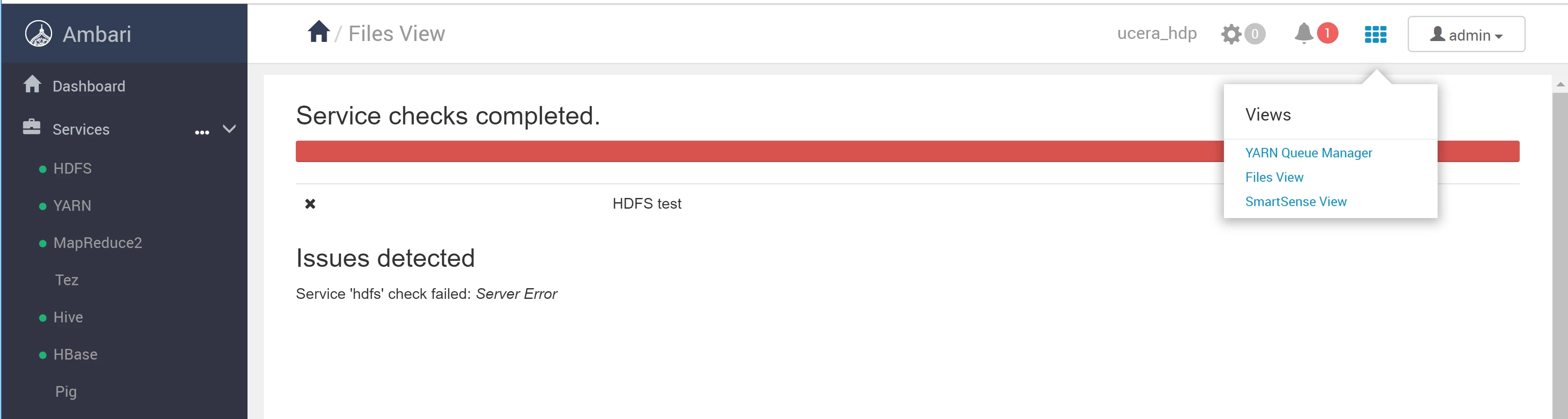
110008-1563919152643.pngAs the error message is so terse, not sure what to do here for further debugging (new to HDP, but HDFS appears to be running normally and not sure which if any of the HDFS namenode logs would be relevant here). Any suggestions or fixes?


jsensharma
Platinum ⭐️⭐️
July 24, 2019

@Reed Villanueva

As we see that you have logged in to "Ambari File View" as admin user. Hence you will need to make sure that the "admin" user has a directory as following in HDFS "/user/admin". If it is missing then please create one.

Example:

# su - hdfs -c "hdfs dfs -mkdir /user/admin"
# su - hdfs -c "hdfs dfs -chown -R admin:hadoop /user/admin"
# su - hdfs -c "hdfs dfs -chmod -R 755 /user/admin"

Then try to re-login to File View.

.

5 replies

jsensharma
Platinum ⭐️⭐️
Platinum ⭐️⭐️
July 24, 2019

@Reed Villanueva

As we see that you have logged in to "Ambari File View" as admin user. Hence you will need to make sure that the "admin" user has a directory as following in HDFS "/user/admin". If it is missing then please create one.

Example:

# su - hdfs -c "hdfs dfs -mkdir /user/admin"
# su - hdfs -c "hdfs dfs -chown -R admin:hadoop /user/admin"
# su - hdfs -c "hdfs dfs -chmod -R 755 /user/admin"

Then try to re-login to File View.

.

Translate
rvillanueva
Gold ⭐️
July 24, 2019

@Jay Kumar SenSharma

Did the above (then logged out and back into Ambari) and did not change results. Furthermore, I had been using the Files View in Ambari fine until recently (not sure what has changed and can see no alerts in the HDFS section in Ambari) without having the admin user having a HDFS user directory made. For my own info, could you explain what you had thought the problem was and how adding a admin HDFS user dir would have helped there?

Translate
jsensharma
Platinum ⭐️⭐️
Platinum ⭐️⭐️
July 24, 2019

@Reed Villanueva

When we access FileView then by design it checks if the user who has logged in to the Ambari has a valid home directory in HDFS or not? Either we need to create the users home directory in HDFS on our own OR we can refer to the following doc for automatic home directory creation in HDFS for any newly added user in ambari.

https://docs.hortonworks.com/HDPDocuments/Ambari-2.7.3.0/administering-ambari/content/amb_enable_user_home_directory_creation.html

.

If you are noticing that even after creating a valid home directory for the user if the FileView is failing on HDFS test.

Please try this:

Create a new FileView instance to see if the issue persist?

Ambari UI --> Manage Ambari --> Views --> File View --> Create instance.Then please share the following data:


Please share the complete log if the new File view also fails at hdfs test.

/var/log/ambari-server/ambari-server.log 
/var/log/ambari-server/files-view/files-view.log

Translate
rvillanueva
Gold ⭐️
July 24, 2019

See comments / discussion of accepted answer for the steps that ultimately solved the problem.

Translate
