Unable to connect NiFi to HDFS on HDP sandbox 3.0.1
Hi all,
I'm trying to connect NiFi (installed in my windows host) to HDP sandbox 3.0.1 (vmware) , but I have some trouble. For example if i try to use ListHDFS processor, it works, but if I try to use FetchHDFS it doesn't work, I got the error:
ERROR [Timer-Driven Process Thread-7] o.a.nifi.processors.hadoop.FetchHDFS FetchHDFS[id=32589ddd-017c-1000-5c99-2e601313c742] Failed to process session due to org.apache.nifi.processor.exception.FlowFileAccessException: Failed to import data from org.apache.hadoop.hdfs.client.HdfsDataInputStream@2dec7fd9: org.apache.hadoop.hdfs.DFSInputStream@7eb12001 for StandardFlowFileRecord[uuid=8a5cd0d3-8a89-43e7-a3af-7f369a8e8412,claim=,offset=0,name=00000_0,size=0] due to org.apache.nifi.processor.exception.FlowFileAccessException: Unable to create ContentClaim due to org.apache.hadoop.hdfs.BlockMissingException: Could not obtain block: BP-1419118625-172.17.0.2-1543512323726:blk_1073742033_1212 file=<path>; Processor Administratively Yielded for 1 sec: org.apache.hadoop.hdfs.BlockMissingException: Could not obtain block: BP-1419118625-172.17.0.2-1543512323726:blk_1073742033_1212 file=<path>
? causes: org.apache.nifi.processor.exception.FlowFileAccessException: Unable to create ContentClaim due to org.apache.hadoop.hdfs.BlockMissingException: Could not obtain block: BP-1419118625-172.17.0.2-1543512323726:blk_1073742033_1212 file=<path>
? causes: org.apache.nifi.processor.exception.FlowFileAccessException: Failed to import data from org.apache.hadoop.hdfs.client.HdfsDataInputStream@2dec7fd9: org.apache.hadoop.hdfs.DFSInputStream@7eb12001 for StandardFlowFileRecord[uuid=8a5cd0d3-8a89-43e7-a3af-7f369a8e8412,claim=,offset=0,name=00000_0,size=0] due to org.apache.nifi.processor.exception.FlowFileAccessException: Unable to create ContentClaim due to org.apache.hadoop.hdfs.BlockMissingException: Could not obtain block: BP-1419118625-172.17.0.2-1543512323726:blk_1073742033_1212 file=<path>
org.apache.nifi.processor.exception.FlowFileAccessException: Failed to import data from org.apache.hadoop.hdfs.client.HdfsDataInputStream@2dec7fd9: org.apache.hadoop.hdfs.DFSInputStream@7eb12001 for StandardFlowFileRecord[uuid=8a5cd0d3-8a89-43e7-a3af-7f369a8e8412,claim=,offset=0,name=00000_0,size=0] due to org.apache.nifi.processor.exception.FlowFileAccessException: Unable to create ContentClaim due to org.apache.hadoop.hdfs.BlockMissingException: Could not obtain block: BP-1419118625-172.17.0.2-1543512323726:blk_1073742033_1212 file=<path>
I tried to change network settings from NAT to Host-Only in vmware options (I found this solution in some other thread) but I got this error while starting VM:
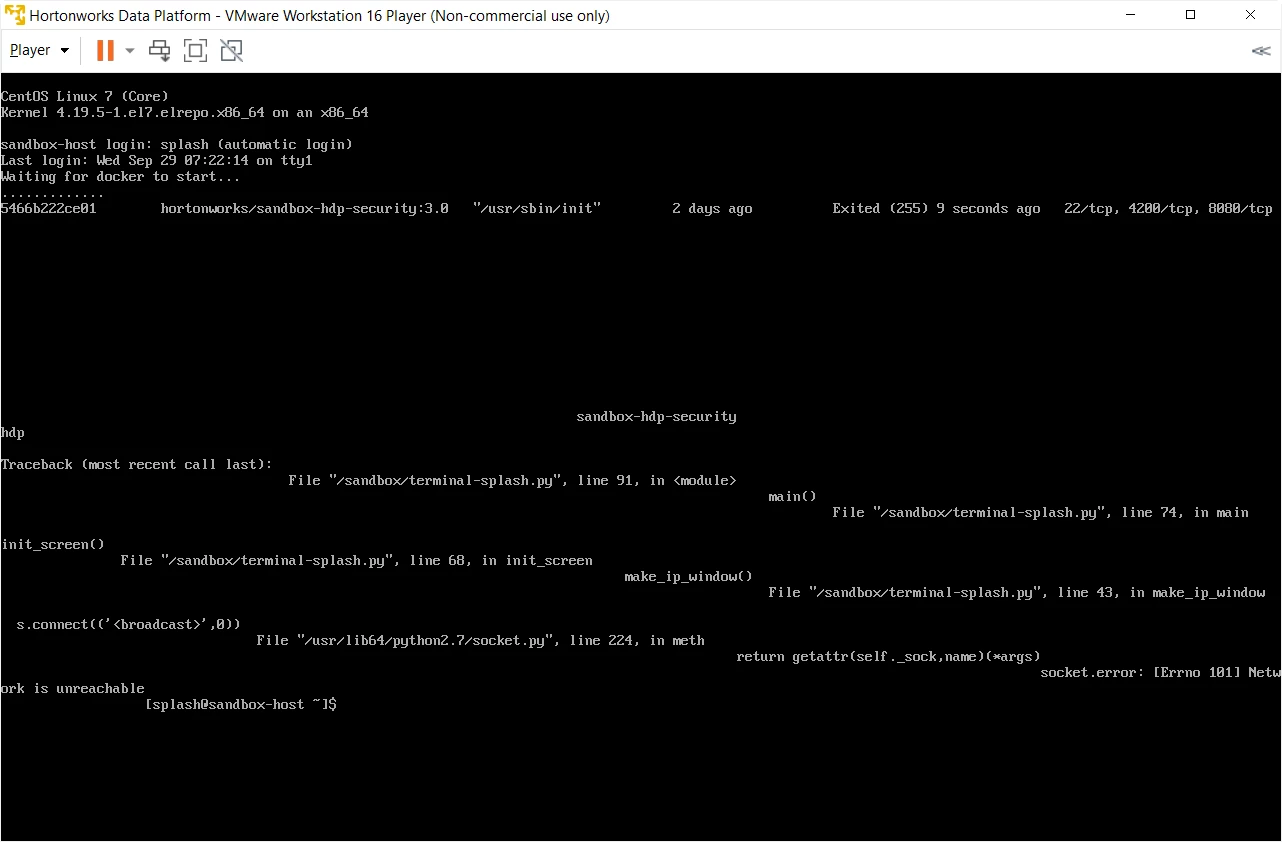
I tried also to install NiFi on VM without success. How can I solve this issue?
Thanks to all
Simone