Our Community is getting an upgrade! To get everything ready for the relaunch, we’ll be placing the site in read-only mode starting September 21st.
We really appreciate your understanding while we get things set up behind the scenes. Catch up on all the exciting details about the move here.
Need help or have questions? Drop us a line at [email protected]
Created 08-10-2022 10:57 AM
Is there any way to update the flow description in the NiFi Registry after the initial creation of the flow that does not require restarting version control? I checked the REST API endpoints as well and didn't see anything.
I would like to be able to clean up descriptions (or even just correct a typo) without going through a cumbersome export versions, import flow, import versions, delete and re-import PGs process.
Thanks.
Created 08-10-2022 01:54 PM
You can use the NiFi-Registry Rest-Api to change the description on an existing version controlled flow.
https://nifi.apache.org/docs/nifi-registry-docs/rest-api/index.html#updateFlow
curl -X 'PUT' 'https://<nifi-registry-hostname>:<nifi-registry-port>/nifi-registry-api/buckets/<bucket UUID>/flows/<versioned flow UUID>' -H 'Authorization: Bearer <token>' -H 'Content-Type: application/json' --data-raw '{"bucketIdentifier":"<bucket UUID>","description":"new-description","name":"<versioned flow name>","type":"Flow"}' --compressed --insecure
My NiFi-Registry is secured and uses a login provider for user authentication. If you are doing the same, you will need to obtain a bearer token for your user who has read/write/delete on the bucket containing the flow you want to modify.
The rest of what you need to make this rest-api call can be obtained via the NiFi-registry's UI for the flow to be modified:
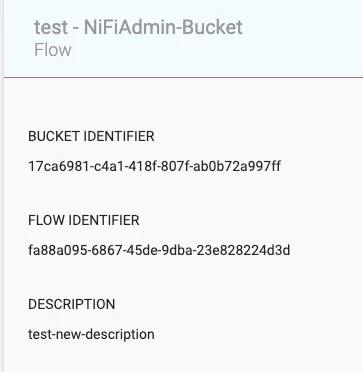
Using above example:
<versioned flow name> = "test"
<bucket uuid> = "17ca6981-c4a1-418f-807f-ab0b72a997ff"
<versioned flow UUID> = "fa88a095-6867-45de-9dba-23e828224d3d"
If you found this response assisted with your query, please take a moment to login and click on "Accept as Solution" below this post.
Thank you,
Matt

Created 08-10-2022 01:54 PM
You can use the NiFi-Registry Rest-Api to change the description on an existing version controlled flow.
https://nifi.apache.org/docs/nifi-registry-docs/rest-api/index.html#updateFlow
curl -X 'PUT' 'https://<nifi-registry-hostname>:<nifi-registry-port>/nifi-registry-api/buckets/<bucket UUID>/flows/<versioned flow UUID>' -H 'Authorization: Bearer <token>' -H 'Content-Type: application/json' --data-raw '{"bucketIdentifier":"<bucket UUID>","description":"new-description","name":"<versioned flow name>","type":"Flow"}' --compressed --insecure
My NiFi-Registry is secured and uses a login provider for user authentication. If you are doing the same, you will need to obtain a bearer token for your user who has read/write/delete on the bucket containing the flow you want to modify.
The rest of what you need to make this rest-api call can be obtained via the NiFi-registry's UI for the flow to be modified:
Using above example:
<versioned flow name> = "test"
<bucket uuid> = "17ca6981-c4a1-418f-807f-ab0b72a997ff"
<versioned flow UUID> = "fa88a095-6867-45de-9dba-23e828224d3d"
If you found this response assisted with your query, please take a moment to login and click on "Accept as Solution" below this post.
Thank you,
Matt

Created 08-10-2022 04:43 PM
Thank you! I looked, but not in the right place. I skimmed over the bucket API, but didn't look in detail as I assumed (incorrectly) that it was not relevant to updating a flow.

