

Our Community is getting an upgrade! To get everything ready for the relaunch, we’ll be placing the site in read-only mode starting September 21st.
We really appreciate your understanding while we get things set up behind the scenes. Catch up on all the exciting details about the move here.
Need help or have questions? Drop us a line at [email protected]

Support Questions

Find answers, ask questions, and share your expertise
Announcements
Share your experience with Cloudera on G2 and get a $25 Amazon Gift card.
Hi, I'm CLEO! Something exciting is coming to the Community. Stay Tuned!

ambari REST API + how to get all versions from ambari

avatar

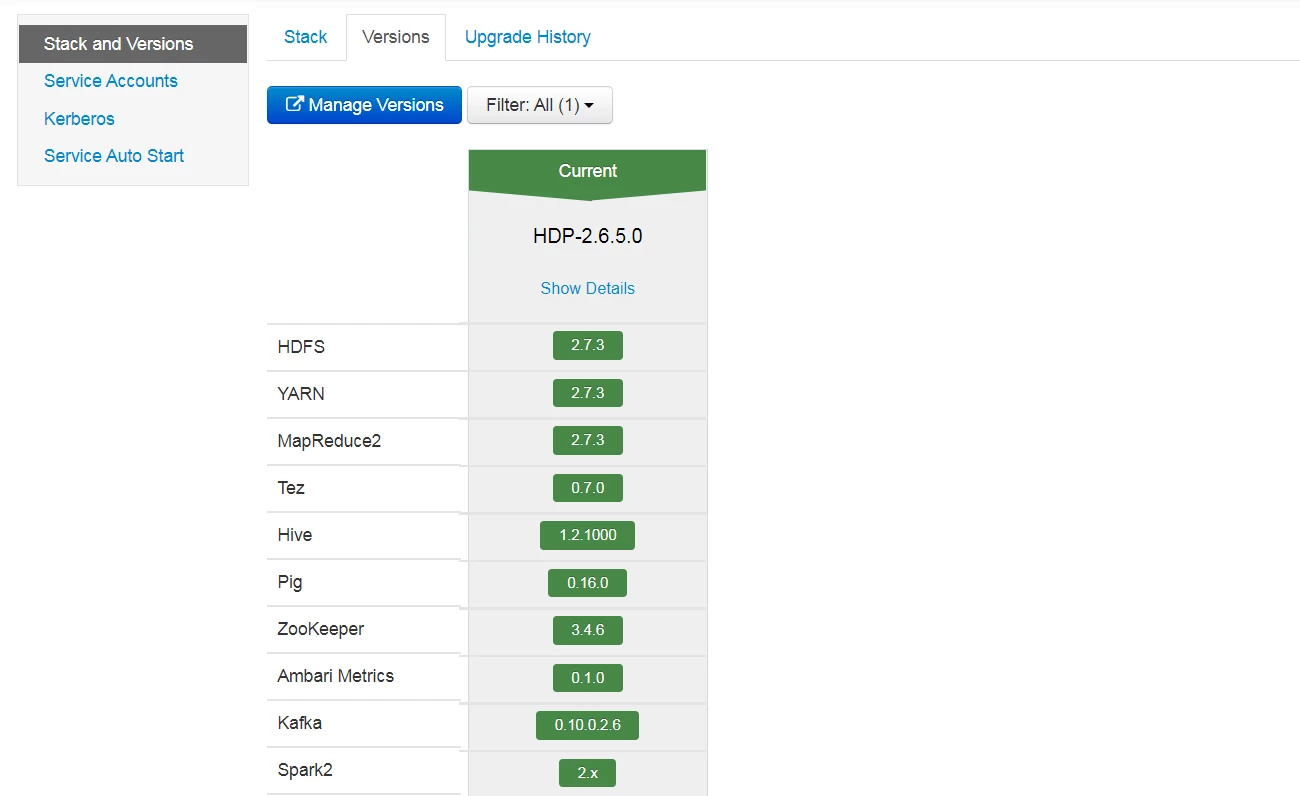
from ambari we can capture all version , by click on `Admin` button and the click on `stack and version`

finally click on `Versions` , then we get the following details
 

Capture.PNG


we want to know how to capture all these version by using ambari rest api?


we try


curl -u admin:admin -H 'X-Requested-By:admin' 'http://localhost:8080/api/v1/clusters/HDP/configuratons/service_config_versions'

but its not return any info

 

Michael-Bronson
1 ACCEPTED SOLUTION

avatar
Contributor

You can try to use this command : http://<ambari-server>:8080/api/v1/stacks/{stackName}/versions/{stackVersion}/services


To get help on API calls use this : http://<ambari-server>:8080/api-docs. You can try out api calls to understand what api returns.

View solution in original post

2 REPLIES 2

avatar
Expert Contributor

You can try the below curl command:


curl -u admin:<password> -X GET http://<ambari_server_Host>:8080/api/v1/stacks/<Stack_Name>/versions/<Stack_Version>/services/<SERVI...


For Example:


curl -u admin:<password> -X GET http://<ambari_server_Host>:8080/api/v1/stacks/HDP/versions/3.1/services/ZOOKEEPER


Or


curl -u admin:<password> -X GET http://<ambari_server_Host>:8080/api/v1/stacks/HDF/versions/3.4/services/ZOOKEEPER


avatar
Contributor

You can try to use this command : http://<ambari-server>:8080/api/v1/stacks/{stackName}/versions/{stackVersion}/services


To get help on API calls use this : http://<ambari-server>:8080/api-docs. You can try out api calls to understand what api returns.

