@kailash salton
I have tried as much as possible to explain the process of doing a successful hbase backup. I think for sure is to enable hbase backup by adding some parameters documented below.
There are a couple of things to do like copying the core-site.xml to the hbase/conf directory etc. I hope this process helps you achieve your target. I have not included the incremental that documentation you can easily find
Check the directories in hdfs
[hbase@nanyuki ~]$ hdfs dfs -ls /
Found 12 items
drwxrwxrwx   - yarn   hadoop          0 2018-12-17 13:07 /app-logs
drwxr-xr-x   - hdfs   hdfs            0 2018-09-24 00:22 /apps
.......
drwxr-xr-x   - hdfs   hdfs            0 2019-01-29 06:06 /test
drwxrwxrwx   - hdfs   hdfs            0 2019-06-04 23:14 /tmp
drwxr-xr-x   - hdfs   hdfs            0 2018-12-17 13:04 /user
Created a backup directory in hdfs
[root@nanyuki ~]# su - hdfs
Last login: Wed Jun  5 20:47:02 CEST 2019
[hdfs@nanyuki ~]$ hdfs dfs -mkdir /backup
[hdfs@nanyuki ~]$ hdfs dfs -chown hbase  /backup
Validate the backup directory was created with correct permissions
[hdfs@nanyuki ~]$ hdfs dfs -ls /
Found 13 items
drwxrwxrwx   - yarn   hadoop          0 2018-12-17 13:07 /app-logs
drwxr-xr-x   - hdfs   hdfs            0 2018-09-24 00:22 /apps
drwxr-xr-x   - yarn   hadoop          0 2018-09-24 00:12 /ats
drwxr-xr-x   - hbase  hdfs            0 2019-06-05 21:11 /backup
.......
drwxr-xr-x   - hdfs   hdfs            0 2018-12-17 13:04 /user
Invoked the hbase shell to check the tables
[hbase@nanyuki ~]$ hbase shell
HBase Shell; enter 'help<RETURN>' for list of supported commands.
Type "exit<RETURN>" to leave the HBase Shell
Version 1.1.2.2.6.5.0-292, r897822d4dd5956ca186974c10382e9094683fa29, Fri May 11 08:00:59 UTC 2018
hbase(main):001:0> list_namespace
NAMESPACE
PDFTable
default
hbase
3 row(s) in 4.6610 seconds
Check the tables
hbase(main):002:0> list_namespace_tables 'hbase'
TABLE
acl
meta
namespace
3 row(s) in 0.1970 seconds
Hbase need a table called "backup" table in hbase namespace which was missing this table is created if hbase backup is enabled see below so I had to add the below parameters in Custom hbase-site at the same time enabling hbase backup
hbase.backup.enable=true
hbase.master.logcleaner.plugins=YOUR_PLUGINS,org.apache.hadoop.hbase.backup.master.BackupLogCleaner
hbase.procedure.master.classes=YOUR_CLASSES,org.apache.hadoop.hbase.backup.master.LogRollMasterProcedureManager
hbase.procedure.regionserver.classes=YOUR_CLASSES,org.apache.hadoop.hbase.backup.regionserver.LogRollRegionServerProcedureManager
hbase.coprocessor.region.classes=YOUR_CLASSES,org.apache.hadoop.hbase.backup.BackupObserver
After adding the above properties in Custom hbase-site and restarting hbase magically the backup table was created!
[hbase@nanyuki ~]$ hbase shell
HBase Shell; enter 'help<RETURN>' for list of supported commands.
Type "exit<RETURN>" to leave the HBase Shell
Version 1.1.2.2.6.5.0-292, r897822d4dd5956ca186974c10382e9094683fa29, Fri May 11 08:00:59 UTC 2018
hbase(main):001:0> list_namespace_tables 'hbase'
TABLE
acl
backup
meta
namespace
4 row(s) in 0.3230 seconds
Error with the backup command
[hbase@nanyuki ~]$ hbase backup create "full"  hdfs://nanyuki.kenya.ke:8020/backup  -set texas
2019-06-05 22:28:37,475 ERROR [main] util.AbstractHBaseTool: Error running command-line tool
java.io.IOException: Backup set 'texas' is either empty or does not exist
        at org.apache.hadoop.hbase.backup.impl.BackupCommands$CreateCommand.execute(BackupCommands.java:182)
        at org.apache.hadoop.hbase.backup.BackupDriver.parseAndRun(BackupDriver.java:111)
        at org.apache.hadoop.hbase.backup.BackupDriver.doWork(BackupDriver.java:126)
        at org.apache.hadoop.hbase.util.AbstractHBaseTool.run(AbstractHBaseTool.java:112)
        at org.apache.hadoop.util.ToolRunner.run(ToolRunner.java:76)
        at org.apache.hadoop.hbase.backup.BackupDriver.main(BackupDriver.java:131)
To resolve the error "Backup set 'texas' is either empty or does not exist" I pre-emptively create the directory
[hdfs@nanyuki ~]$ hdfs dfs -touchz /backup/texas
[hdfs@nanyuki ~]$ hdfs dfs -ls /backup
Found 1 items
-rw-r--r--   3 hdfs hdfs          0 2019-06-05 22:51 /backup/texas
Check the core-site.xml is in /.../hbase/conf directory if not like below I copied the core-site.xml over
[root@nanyuki ~] cp /etc/hadoop/2.6.5.0-292/0/core-site.xml /etc/hbase/conf/
validate the copy
[root@nanyuki conf]# ls -lrt /etc/hbase/conf/
total 60
-rw-r--r-- 1 root  root   4537 May 11  2018 hbase-env.cmd
-rw-r--r-- 1 hbase hadoop  367 Sep 23  2018 hbase-policy.xml
-rw-r--r-- 1 hbase hadoop 4235 Sep 23  2018 log4j.properties
-rw-r--r-- 1 hbase root     18 Oct  1  2018 regionservers
............
-rw-r--r-- 1 root  root   3946 Jun  5 22:38 core-site.xml
Relaunched the hbase backup, it was like frozen but at last, I got a "SUCCESS"
[hbase@nanyuki ~]$ hbase backup create "full"  hdfs://nanyuki.kenya.ke:8020/backup
2019-06-05 22:52:57,024 INFO  [main] util.BackupClientUtil: Using existing backup root dir: hdfs://nanyuki.kenya.ke:8020/backup
Backup session backup_1559767977522 finished. Status: SUCCESS
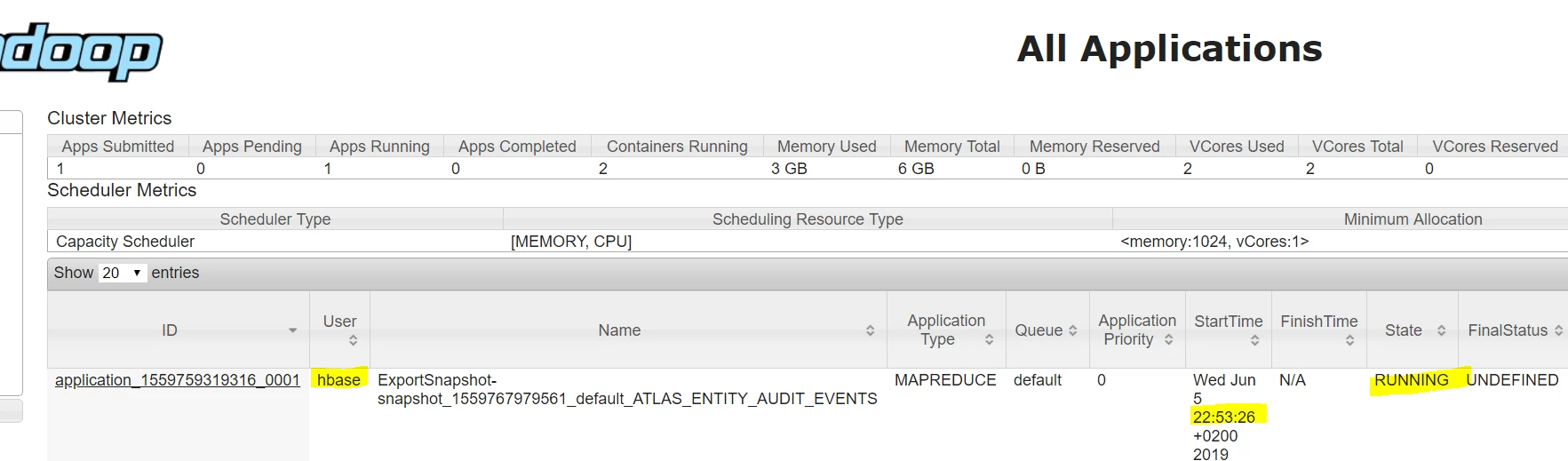
Checked the YARN UI some backup process was going on see screenshot below hbase_backup.PNG
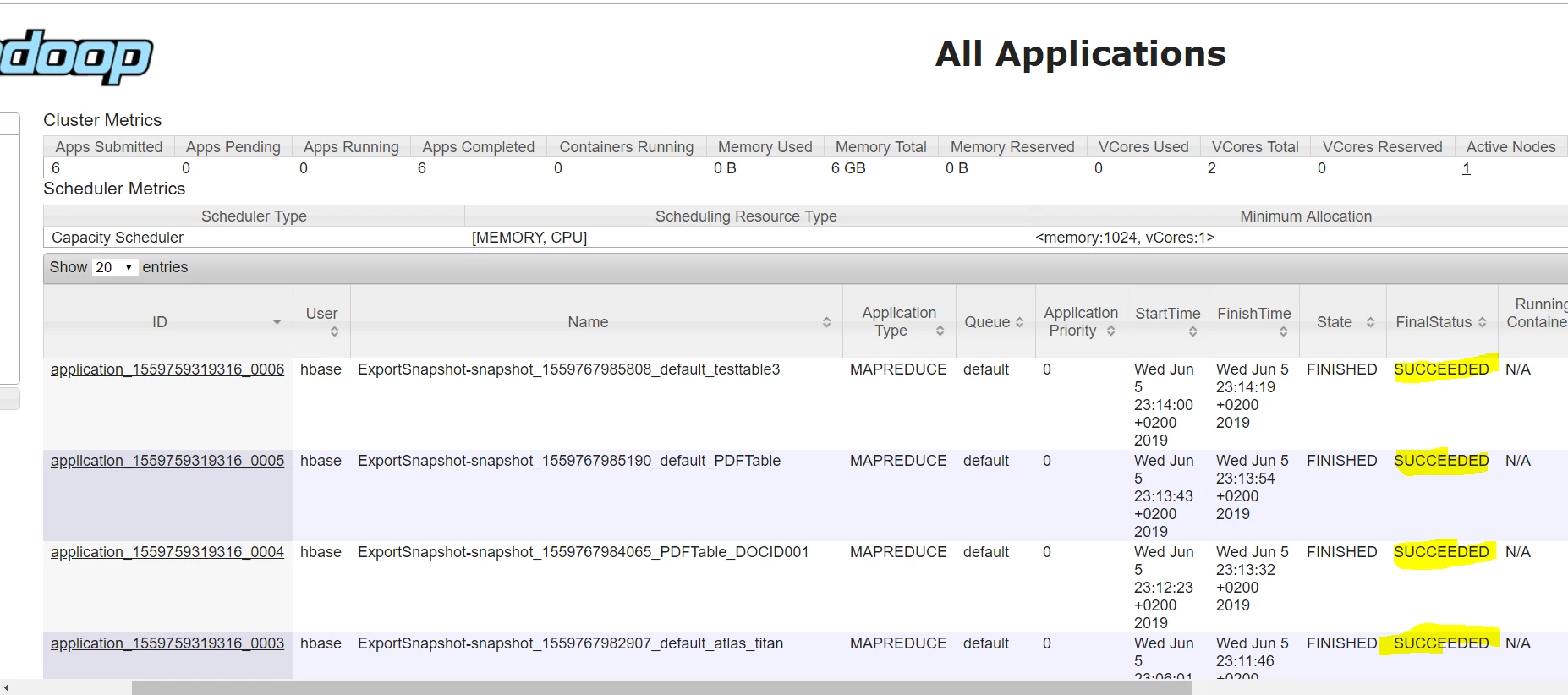
After successful backup see below screenshot hbase_backup2.PNG
Validate the backup was done this give some details like time, type "FULL" etc
[hbase@nanyuki hbase-client]$ bin/hbase backup show
Unsupported command for backup: show
[hbase@nanyuki hbase-client]$ hbase backup history
ID             : backup_1559767977522
Type           : FULL
Tables         : ATLAS_ENTITY_AUDIT_EVENTS,jina,atlas_titan,PDFTable:DOCID001,PDFTable,testtable3
State          : COMPLETE
Start time     : Wed Jun 05 22:52:57 CEST 2019
End time       : Wed Jun 05 23:14:20 CEST 2019
Progress       : 100
Backup in the backup directory in hdfs
[hdfs@nanyuki backup]$ hdfs dfs -ls /backup
Found 2 items
drwxr-xr-x   - hbase hdfs          0 2019-06-05 23:11 /backup/backup_1559767977522
Happy hadooping
Reference Hbase backup commands




