

kumsath
Gold ⭐️
March 10, 2022
Question

removing scientific notation after divison

I am using the below NIFI EXPRESSION in the update attribute

GrossProducFormula.PNG


This works fine, but after division getting scientific notation, say for an example if the 

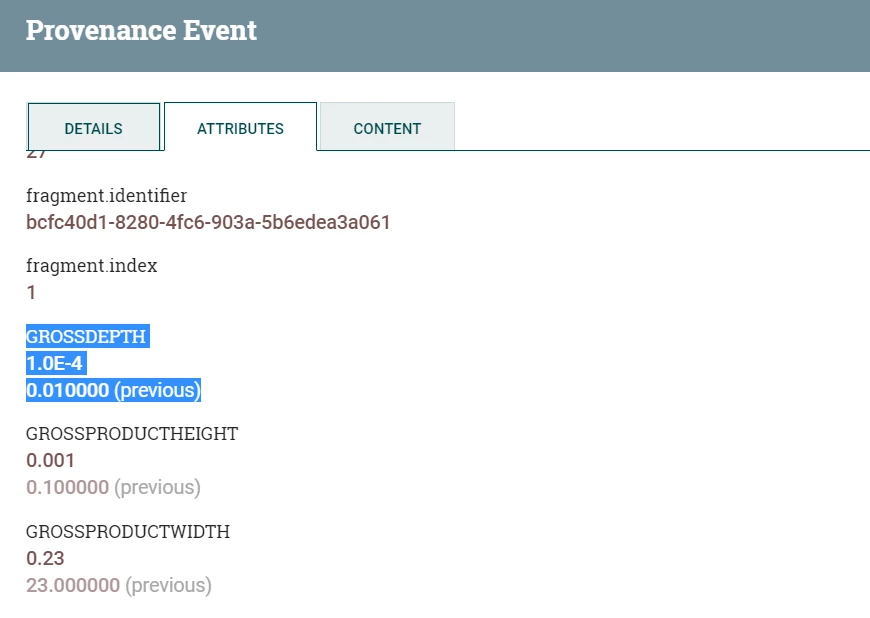
GROSSDEPTH = 0.010000, then 
the expression output is coming as : 
GROSSDEPTH
1.0E-4
how to remove this scientific notation. Please helpGrossProductDepthValue.PNG
3 replies

steven-matison
Platinum ⭐️⭐️
Platinum ⭐️⭐️
March 10, 2022

@kumsath This may not be the best way, but check out this solution here:


https://community.cloudera.com/t5/Support-Questions/How-correct-convert-from-Decimal-with-E-to-float-in-Apache/m-p/236511


Translate
kumsath
kumsathAuthor
Gold ⭐️
March 11, 2022

Thanks for the update Steven. I had gone through those article before.  Here I am using and update attribute which contains number for variables. 

update attribute with multiple attributesupdate attribute with multiple attributes

After this flow i am receiving the output as  GROSSDEPTH =1.0E-4  

So the question is execute script will work in this scenario? Please suggest.

Translate
steven-matison
Platinum ⭐️⭐️
Platinum ⭐️⭐️
March 11, 2022

@kumsath Yes, when i saw your post I started digging around too.  The issue here is number manipulation and type casting a "number" versus a "string". That easy gets complicated in attributes and with nifi expression language functions.   The solution i referenced would take the "number" and make a number in which the visual representation should then be correct.  Its worth a try since that execute script should be very easy to test.    The alternative is to do your "math" upstream or in an execute script processor not in updateattribute.

Translate

