


NiFi Ranger based policy descriptions
The intent of this article is to show how NiFi policies in Ranger map to what you would see when using NiFi's default file based authorizer via the NiFi UI. This article will cover what access each of the policies granted to the entities (user and server) that assigned to them.
There are controller level policies and component level policies in NiFi.
The controller level policies are not tied to any specific component uuid. In Ranger those policies will just show as
/<some policy name>
-
These include the following:
| Ranger Policy (Base policies): | NiFi Policies (Hamburger menu) | Ranger permissions description: |
| /resources *** Note: No policies will be available until this policy is manually added. | N/A | This policy allows Ranger to retrieve a listing of all available policies from NiFi. The server/user from the keystore being used by Ranger must be granted “read” privileges to this resource. |
| /flow * See note [3] below | View the user interface | Read/View - This policy gives users the ability to view the NiFi UI. All users must be granted “read” privileges to this policy or they will not be able to open the NiFi UI. If you are running a NiFi Cluster and/or accessing Your NiFi via a proxy, You need to grant all Nodes and any proxies read access to this policy as well. Write/Modify - N/A |
| /system | View system Diagnostics | Read/View - Gives granted users access to the system diagnostics. In a NiFi cluster, nodes will need to access as well to display system diagnostic stats returned by other nodes. Write/Modify - N/A |
| /controller | Access the controller | Read/View - Gives granted users and/or NiFi cluster nodes the ability to view:- Controller thread pool configuration- Cluster management page- Controller level Reporting tasks- Controller level Controller services Write/Modify - Gives granted users and/or NiFi cluster nodes the ability to create/modify:- Controller thread pool configuration- Cluster management page- Controller level Reporting tasks- Controller level Controller services |
| /counters | Access counters | Read/View - Gives granted users ability to view counters Write/Modify - Gives granted users ability to modify counters |
| /provenance | Query provenance | Read/View -Gives granted users ability to run provenance queries or access Provenance lineage graphs. Write/Modify - N/A |
| /restricted-components * See note [1] below | Access restricted components | Read/View - N/A Write/Modify - Gives granted users ability to add components to the canvas that are tagged as “restricted” |
| /proxy * See note [2] below | Proxy user requests | Read/View - Allows proxy servers to send request on behalf of other users. Write/Modify - Required |
| /site-to-site | Retrieve site-to-site details | Read/View - Allows Other NiFi nodes to retrieve Site-To-Site details about this NiFi. |
| /policies *** This policy has no purpose when using ranger and does not need to be used. | Access all policies | Read/View - Gives granted users the ability to view existing policies. Write/Modify - Gives granted users the ability to create new policies and modify existing policies. |
| /tenants *** This policy has no purpose when using Ranger and does not need to be used. | Access users/user groups | Read/View - Gives granted users the ability to view currently authorized users and user groups. Write/Modify - Gives granted uses the ability to add, delete, and modify existing users and user groups. |
| /parameter-contexts | Access parameter contexts | Read/View - Allows users to view and use ALL existing parameter contexts. Write/Modify - Allows users to create, modify, and delete ALL parameter contexts. |
| /parameter-contexts/<uuid> | Access Specific existing parameter context | Read/View - Allows users to view and use a specific existing parameter context. Write/Modify - Allows users to modify or delete a specific parameter context. |
[1] new sub policies introduced for "/restricted-components" as of HDF 3.2 (Apache NiFi 1.12+). See following article for details:
[2] All nodes in your NiFi cluster must be assigned to the "/proxy" policy.
[3] All users must at a minimum be assigned to the "/flow" policy in order to view the NiFi UI.
-
The component level granular policies are based on the components assigned uuid. For connections, the policies are enforced based upon the processor component the connection originates from.
-
This includes the following policies:
| Ranger Component based policies: | NiFi Component based policies: component | Equivalent NiFi file based authorizer policy:Policy | Ranger permissions description: |
| /data-transfer/input-ports/<uuid> | Each NiFi remote input port is assigned a unique <uuid> | Receive data via site-to-site | Both read and write is required and should be granted to the source NIFi servers sending data to this NiFi via this input port. |
| /data-transfer/output-ports/<uuid> | Each NiFi remote output port is assigned a unique <uuid> | Send data via site-to-site | Both read and write is required and should be granted to the source NIFi servers pulling data from this NiFi via this output port. |
| /process-groups/<uuid> | Each NiFi process group is assigned a unique <uuid> | View the component Modify the component | Read - (allows user to view process group details only) Write - (allows user to start, stop or delete process group. Users are able to added components inside process group and add controller services to process group) |
| /data/process-groups/<uuid> | Each NiFi process group is assigned a unique <uuid> | View the data Modify the data | Read - (allows user to view data was processed by components in this process group and list queues) Write - (allows users to empty queues/purge data from queues within process group) |
| /policies/process-groups/<uuid> *** not needed when using Ranger | Each NiFi process group is assigned a unique <uuid> | View the policies Modify the policies | Read - N/A in Ranger
|
| /processors/<uuid> | Each NiFi processor is assigned a unique <uuid> | View the component Modify the component | Read - (Allows user to view processor configuration only)
|
| /data/processors/<uuid> | Each NiFi processor is assigned a unique <uuid> | View the data Modify the data | Read - (allows user to view data processed this processor and list queues on this processors outbound connections) Write - (allows users to empty queues/purge data from this processors outbound connections) |
| /policies/processors/<uuid> *** Not needed when using Ranger | Each NiFi processor is assigned a unique <uuid> | View the policies Modify the policies | Read - N/A in Ranger Write - N/A in Ranger |
| /controller-services/<uuid> | Each NiFi controller services is assigned a unique <uuid> | View the component
Modify the component | Read - (Allows user to view controller service configuration only)
|
| /provenance-data/<component-type>/<component-UUID> | Each NiFi component is assigned a unique <uuid> | view provenance | Read - Allows users to view provenance events generated by this component Write - N/A in Ranger |
| /operation/<component-type>/<component-UUID> | Each NiFi component is assigned a unique <uuid> | operate the component | Read - N/A in Ranger Write - Allows users to operate components by changing component run status (start/stop/enable/disable), remote port transmission status, or terminating processor threads |
There will be a unique policy for each and every component based on the specific components assigned uuid available.
Component level authorizations are inherited from the parent process group when no specific processor or sub process group component level policy is set.
Ranger supports the " * " wildcard when assigning policies.
-
In a NiFi cluster, all nodes must be granted the ability to view and modify component data in order for user to list or empty queues in processor component outbound connections. With Ranger this can be accomplished by using the a wildcard to grant all the NiFi nodes read and write to "/data/*" NiFi resource.
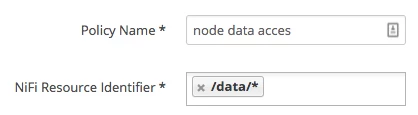
*** Users should not be given global access to all data, but instead be restricted to specific process groups they have been granted access to.
*** Also note at time of writing Ranger groups are not supported by NiFi for authorization.
UPDATE: Ranger based group support was added as a new feature/capability in HDF 3.1.x

