

Kiranq
Silver ⭐️⭐️⭐️
July 27, 2023
Question

Access Nifi Registry bucket hosted on a server from a locally hosted Nifi instance using client certificates

Hi,


My Nifi Registry is hosted on a server and is configured using client certificates and I have my Nifi instance hosted locally on my machine also using client certificates.
I am encountering this issues when I try to access buckets created in Nifi Registry from my Nifi instance:
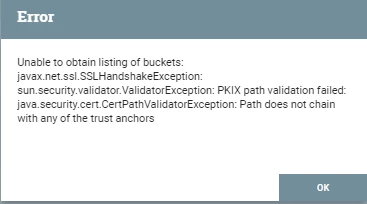
Kiranq_0-1690481234734.png


More details of Nifi client certificates:
Owner: CN=localhost, OU=NIFI
Issuer: CN=localhost, OU=NIFI

More details of Nifi Registry client certificates: 

Owner: CN=<dns>, OU=NIFI
Issuer: CN=localhost, OU=NIFI


I read somewhere that the issuer of NiFi Registry cert, should be the owner of the trusted cert in NiFI's truststore and same is the case in my issue but even then, I cant access Nifi registry from my NIfi instance.

Can anyone point out any technical issues or suggest where I am going wrong?Thanks

3 replies

Kiranq
KiranqAuthor
Silver ⭐️⭐️⭐️
July 29, 2023

Awaiting response.

Translate
cotopaul
Platinum ⭐️
July 31, 2023

as far as I can tell from your error message, your problem is related to your security certificates. I am no expert here, but maybe you can await for a response from @steven-matison.

While you do that, I strongly recommend you to go through the following two links, as they are eye-opening when it comes to working with certificates:


https://community.cloudera.com/t5/Community-Articles/NIFI-SSL-in-Modern-Versions-of-NiFi/ta-p/371937


https://community.cloudera.com/t5/Support-Questions/Configure-StandardSSLContextService-for-Elasticsearch/m-p/302719


Translate
MattWho
Titanium ⭐️⭐️⭐️
Titanium ⭐️⭐️⭐️
July 31, 2023

@Kiranq 
What version of Java is your NiFi using?

Sharing the output for your NiFi-Registry configured keystore and truststore in the nifi-registry.properties file would help.
Sharing the keystore and truststore configured in your NiFi registry client would help as well.

./keytool -v -list -keystore <keystore or trustsore>


You can also use openssl to see what is sent from the server (NiFi-Registry) to client (NiFi) in the initial TLS exchange.

./openssl s_client -connect <nifi-regisry hostname>:<NiFi-Registry port> -showcerts


Matt

Translate
