
Our Community is getting an upgrade! To get everything ready for the relaunch, we’ll be placing the site in read-only mode starting September 21st.
We really appreciate your understanding while we get things set up behind the scenes. Catch up on all the exciting details about the move here.
Need help or have questions? Drop us a line at [email protected]

Archives of Support Questions (Read Only)
- Cloudera Community
- Board Archive
- Archives of Support Questions (Read Only)
- ... '2018-01-31T19:01:09+00:00', which cannot be c...
- Subscribe to RSS Feed
- Mark Question as New
- Mark Question as Read
- Float this Question for Current User
- Bookmark
- Subscribe
- Mute
- Printer Friendly Page
- Subscribe to RSS Feed
- Mark Question as New
- Mark Question as Read
- Float this Question for Current User
- Bookmark
- Subscribe
- Mute
- Printer Friendly Page
... '2018-01-31T19:01:09+00:00', which cannot be converted to a timestamp." (PutSQL)
- Labels:
-
Apache NiFi


Created on 04-02-2018 12:15 AM - edited 09-16-2022 06:03 AM
- Mark as New
- Bookmark
- Subscribe
- Mute
- Subscribe to RSS Feed
- Permalink
- Report Inappropriate Content
Hi Hortonworks!
I'm facing issues with the insertion of timestamps in to a PostgreSQL database using PutSQL. More specifically when trying to insert a date in the format '2018-01-31T19:01:09+00:00' in to a timestamptz column I get the following error message:
2018-04-01 19:29:40,091 ERROR [Timer-Driven Process Thread-5] o.apache.nifi.processors.standard.PutSQL PutSQL[id=7997503a-0162-1000-ee81-a0361cad5e0c] Failed to update database for StandardFlowFileRecord[uuid=d02e8b39-e564-4c37-a08a-dab8931e9890,claim=StandardContentClaim [resourceClaim=StandardResourceClaim[id=1522615075930-15, container=default, section=15], offset=11492, length=163],offset=0,name=32836401373126,size=163] due to java.sql.SQLDataException: The value of the sql.args.5.value is '2018-01-31T20:19:35+00:00', which cannot be converted to a timestamp; routing to failure: java.sql.SQLDataException: The value of the sql.args.5.value is '2018-01-31T20:19:35+00:00', which cannot be converted to a timestamp
java.sql.SQLDataException: The value of the sql.args.5.value is '2018-01-31T20:19:35+00:00', which cannot be converted to a timestamp
 at org.apache.nifi.processors.standard.PutSQL.setParameters(PutSQL.java:711)
 at org.apache.nifi.processors.standard.PutSQL.lambda$null$5(PutSQL.java:313)
 at org.apache.nifi.processor.util.pattern.ExceptionHandler.execute(ExceptionHandler.java:127)
 at org.apache.nifi.processors.standard.PutSQL.lambda$new$6(PutSQL.java:311)
 at org.apache.nifi.processors.standard.PutSQL.lambda$new$9(PutSQL.java:354)
 at org.apache.nifi.processor.util.pattern.PutGroup.putFlowFiles(PutGroup.java:91)
 at org.apache.nifi.processor.util.pattern.Put.onTrigger(Put.java:101)
 at org.apache.nifi.processors.standard.PutSQL.lambda$onTrigger$20(PutSQL.java:574)
 at org.apache.nifi.processor.util.pattern.PartialFunctions.onTrigger(PartialFunctions.java:114)
 at org.apache.nifi.processor.util.pattern.RollbackOnFailure.onTrigger(RollbackOnFailure.java:184)
 at org.apache.nifi.processors.standard.PutSQL.onTrigger(PutSQL.java:574)
 at org.apache.nifi.controller.StandardProcessorNode.onTrigger(StandardProcessorNode.java:1122)
 at org.apache.nifi.controller.tasks.ContinuallyRunProcessorTask.call(ContinuallyRunProcessorTask.java:147)
 at org.apache.nifi.controller.tasks.ContinuallyRunProcessorTask.call(ContinuallyRunProcessorTask.java:47)
 at org.apache.nifi.controller.scheduling.TimerDrivenSchedulingAgent$1.run(TimerDrivenSchedulingAgent.java:128)
 at java.util.concurrent.Executors$RunnableAdapter.call(Executors.java:511)
 at java.util.concurrent.FutureTask.runAndReset(FutureTask.java:308)
 at java.util.concurrent.ScheduledThreadPoolExecutor$ScheduledFutureTask.access$301(ScheduledThreadPoolExecutor.java:180)
 at java.util.concurrent.ScheduledThreadPoolExecutor$ScheduledFutureTask.run(ScheduledThreadPoolExecutor.java:294)
 at java.util.concurrent.ThreadPoolExecutor.runWorker(ThreadPoolExecutor.java:1149)
 at java.util.concurrent.ThreadPoolExecutor$Worker.run(ThreadPoolExecutor.java:624)
 at java.lang.Thread.run(Thread.java:748)
Caused by: java.text.ParseException: Unparseable date: "2018-01-31T20:19:35+00:00"
 at java.text.DateFormat.parse(DateFormat.java:366)
 at org.apache.nifi.processors.standard.PutSQL.setParameter(PutSQL.java:911)
 at org.apache.nifi.processors.standard.PutSQL.setParameters(PutSQL.java:707)
 ... 21 common frames omitted
I have tested the insertion of '2018-01-31T19:01:09+00:00' in to the timestamptz column from the command line and it works perfectly. I have tried various alternative formats such as:
- '2018-01-31 19:01:09+00:00'
- '2018-01-31 19:01:09+00'
- '2018-01-31T19:01:09+00'
- '2018-01-31 19:01:09'
They all fail with the same error in Nifi, even though they are all inserted just fine when performing the INSERT from the command line.
Please find a screenshot of my flow attached. Let me know if you need any more details.
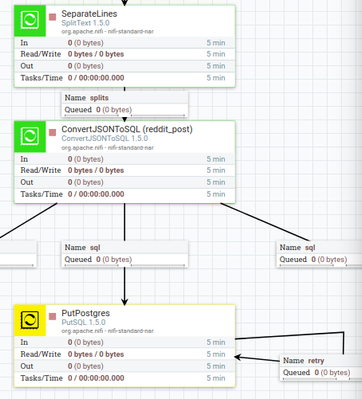
I have come across various questions regarding this topic, but I still don't get what is going on. Most notably:
- https://stackoverflow.com/questions/42352064/putsql-date-format-error?rq=1
- https://stackoverflow.com/questions/45685703/nifi-putsql-timestamp-datetime-error-cannot-be-converte...
- https://stackoverflow.com/questions/11133759/0000-00-00-000000-can-not-be-represented-as-java-sql-ti...
- https://stackoverflow.com/questions/46702722/trying-to-solve-remove-the-timestamp-format-conversion-...
Created on 04-03-2018 07:29 PM - edited 08-17-2019 09:34 PM
- Mark as New
- Bookmark
- Subscribe
- Mute
- Subscribe to RSS Feed
- Permalink
- Report Inappropriate Content
I resolved this by using an ExecuteStreamCommand processor which calls a python script which converts a JSON line in to it's respective SQL insert statement. The table of interest in this case is `reddit_post`.
Code of the python script (I'm aware that there is no need for the `INSERT` argument, but this is there because I plan on adding an `UPDATE` option later on):
import json
import argparse
import sys

# For command line arguments
parser = argparse.ArgumentParser(description='Converts JSON to respective SQL statement')
parser.add_argument('statement_type', type=str, nargs=1)
parser.add_argument('table_name', type=str, nargs=1)

# Reading the command line arguments
statement_type = parser.parse_args().statement_type[0]
table_name = parser.parse_args().table_name[0]

# Initialize SQL statement
statement = ''

for line in sys.stdin:
  # Load JSON line
  lineJSON = json.loads(line)

  # Add table name and SQL syntax
  if statement_type == 'INSERT':
    statement += 'INSERT INTO {} '.format(table_name)

  # Add table parameters and SQL syntax
  statement += '({}) '.format(', '.join(lineJSON.keys()))

  # Add table values and SQL syntax
  # Note that strings are formatted with single quotes, other data types are converted to strings (for the join method)
  statement += "VALUES ({});".format(', '.join("'{0}'".format(value) if type(value) == str else str(value) for value in lineJSON.values()))

  # Send statement to stdout
  print(statement)
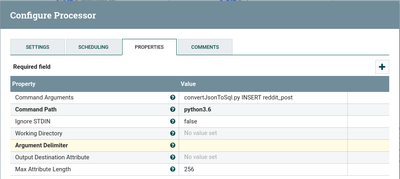
Configuration of ExecuteStreamCommand (Note that Argument Delimeter is set to a single space)
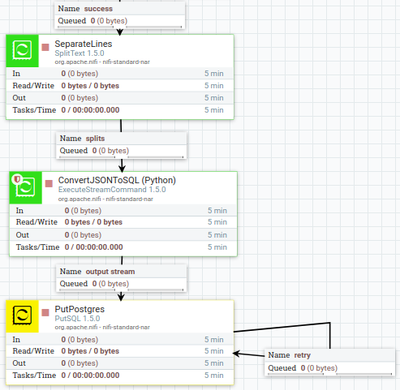
Flow snippet:
I hope this can help someone that came across a similar issue. If you have any advice on how to improve the script, flow, or anything else please don't hesitate to let me know!
Created on 04-03-2018 07:29 PM - edited 08-17-2019 09:34 PM
- Mark as New
- Bookmark
- Subscribe
- Mute
- Subscribe to RSS Feed
- Permalink
- Report Inappropriate Content
I resolved this by using an ExecuteStreamCommand processor which calls a python script which converts a JSON line in to it's respective SQL insert statement. The table of interest in this case is `reddit_post`.
Code of the python script (I'm aware that there is no need for the `INSERT` argument, but this is there because I plan on adding an `UPDATE` option later on):
import json
import argparse
import sys

# For command line arguments
parser = argparse.ArgumentParser(description='Converts JSON to respective SQL statement')
parser.add_argument('statement_type', type=str, nargs=1)
parser.add_argument('table_name', type=str, nargs=1)

# Reading the command line arguments
statement_type = parser.parse_args().statement_type[0]
table_name = parser.parse_args().table_name[0]

# Initialize SQL statement
statement = ''

for line in sys.stdin:
  # Load JSON line
  lineJSON = json.loads(line)

  # Add table name and SQL syntax
  if statement_type == 'INSERT':
    statement += 'INSERT INTO {} '.format(table_name)

  # Add table parameters and SQL syntax
  statement += '({}) '.format(', '.join(lineJSON.keys()))

  # Add table values and SQL syntax
  # Note that strings are formatted with single quotes, other data types are converted to strings (for the join method)
  statement += "VALUES ({});".format(', '.join("'{0}'".format(value) if type(value) == str else str(value) for value in lineJSON.values()))

  # Send statement to stdout
  print(statement)
Configuration of ExecuteStreamCommand (Note that Argument Delimeter is set to a single space)
Flow snippet:
I hope this can help someone that came across a similar issue. If you have any advice on how to improve the script, flow, or anything else please don't hesitate to let me know!


Created 01-25-2024 07:01 AM
- Mark as New
- Bookmark
- Subscribe
- Mute
- Subscribe to RSS Feed
- Permalink
- Report Inappropriate Content
if Google sends you here, most probably you're looking for https://community.cloudera.com/t5/Support-Questions/PUTSQL-which-cannot-be-converted-to-a-timestamp/...


