Archives of Support Questions (Read Only)

This is an archived board for historical reference. Information and links may no longer be available or relevant
Announcements
This board is archived and read-only for historical reference. To ask a new question, please post a new topic on the appropriate active board.

API / VIA script / command + how to verify ZKFailoverController status on nodes

avatar

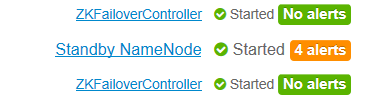
we want to verify by API or any approach by script / command that ZKFailoverController is started ( status green from ambari GUI )

in our cluster ZKFailoverController is on master01 and master03 machines

so how to identify ZKFailoverController is started (green state ) on master01 and master03 machines ?


example from Ambari GUI


64608-capture.png

Michael-Bronson
1 ACCEPTED SOLUTION

avatar
Master Mentor

@Michael Bronson

You can try something like following:

#  curl -u admin:admin -H "X-Requested-By: ambari" -X GET "http://amb25101.example.com:8080/api/v1/clusters/plain_ambari/components?fields=ServiceComponentInfo/service_name,ServiceComponentInfo/component_name,ServiceComponentInfo/state,host_components/HostRoles/host_name,host_components/HostRoles/state" | grep -A 2 "\"component_name\" \: \"ZKFC\"" |  awk '{print $NF}' > /tmp/requests_details.txt; sed -e '1,2d' -e s'/--//g'  -e 's/\n//g' -e 's/"//g' -e '/^$/d' /tmp/requests_details.txt | awk 'NR%3{printf "%s ",$0;next;}1' 

.

Example Output:

STARTED ZKFC, amb25102.example.com,
STARTED ZKFC, amb25103.example.com,

View solution in original post

1 REPLY 1

avatar
Master Mentor

@Michael Bronson

You can try something like following:

#  curl -u admin:admin -H "X-Requested-By: ambari" -X GET "http://amb25101.example.com:8080/api/v1/clusters/plain_ambari/components?fields=ServiceComponentInfo/service_name,ServiceComponentInfo/component_name,ServiceComponentInfo/state,host_components/HostRoles/host_name,host_components/HostRoles/state" | grep -A 2 "\"component_name\" \: \"ZKFC\"" |  awk '{print $NF}' > /tmp/requests_details.txt; sed -e '1,2d' -e s'/--//g'  -e 's/\n//g' -e 's/"//g' -e '/^$/d' /tmp/requests_details.txt | awk 'NR%3{printf "%s ",$0;next;}1' 

.

Example Output:

STARTED ZKFC, amb25102.example.com,
STARTED ZKFC, amb25103.example.com,