
Our Community is getting an upgrade! To get everything ready for the relaunch, we’ll be placing the site in read-only mode starting September 21st.
We really appreciate your understanding while we get things set up behind the scenes. Catch up on all the exciting details about the move here.
Need help or have questions? Drop us a line at [email protected]

Archives of Support Questions (Read Only)
- Cloudera Community
- Board Archive
- Archives of Support Questions (Read Only)
- After upgrading ambari from 2.4.2 to 2.5.0, Not ab...
- Subscribe to RSS Feed
- Mark Question as New
- Mark Question as Read
- Float this Question for Current User
- Bookmark
- Subscribe
- Mute
- Printer Friendly Page
- Subscribe to RSS Feed
- Mark Question as New
- Mark Question as Read
- Float this Question for Current User
- Bookmark
- Subscribe
- Mute
- Printer Friendly Page
After upgrading ambari from 2.4.2 to 2.5.0, Not able to Login into Ambari WebUI
- Labels:
-
Apache Ambari



Created 05-18-2017 08:53 AM
- Mark as New
- Bookmark
- Subscribe
- Mute
- Subscribe to RSS Feed
- Permalink
- Report Inappropriate Content
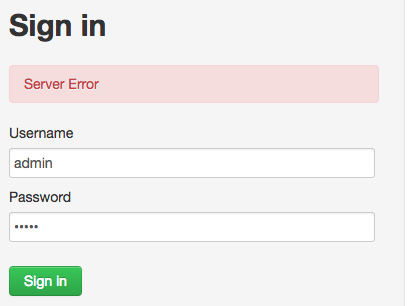
I have upgrade Ambari from 2.4.2 to 2.5.0, After that I am not able to login into ambari getting following error in ambari-server.log file,
18 May 2017 07:56:33,975 ERROR [ambari-client-thread-26] ContainerResponse:419 - The RuntimeException could not be mapped to a response, re-throwing to the HTTP container
com.google.common.cache.CacheLoader$InvalidCacheLoadException: CacheLoader returned null for key 58.
at com.google.common.cache.LocalCache$Segment.getAndRecordStats(LocalCache.java:2348)
at com.google.common.cache.LocalCache$Segment.loadSync(LocalCache.java:2318)
at com.google.common.cache.LocalCache$Segment.lockedGetOrLoad(LocalCache.java:2280)
at com.google.common.cache.LocalCache$Segment.get(LocalCache.java:2195)
at org.apache.ambari.server.security.AbstractSecurityHeaderFilter.doFilter(AbstractSecurityHeaderFilter.java:125)
at org.eclipse.jetty.servlet.ServletHandler$CachedChain.doFilter(ServletHandler.java:1478)
at org.eclipse.jetty.servlets.UserAgentFilter.doFilter(UserAgentFilter.java:82)
at org.eclipse.jetty.http.HttpParser.parseAvailable(HttpParser.java:231)
at org.eclipse.jetty.server.AsyncHttpConnection.handle(AsyncHttpConnection.java:82)
at org.eclipse.jetty.io.nio.SelectChannelEndPoint.handle(SelectChannelEndPoint.java:696)
at org.eclipse.jetty.io.nio.SelectChannelEndPoint$1.run(SelectChannelEndPoint.java:53)
at org.eclipse.jetty.util.thread.QueuedThreadPool.runJob(QueuedThreadPool.java:608)
at org.eclipse.jetty.util.thread.QueuedThreadPool$3.run(QueuedThreadPool.java:543)
at java.lang.Thread.run(Thread.java:748)
18 May 2017 07:56:33,977 WARN [ambari-client-thread-26] ServletHandler:561 - Error Processing URI: /api/v1/users/admin - (com.google.common.cache.CacheLoader$InvalidCacheLoadException) CacheLoader returned null for key 58.
18 May 2017 07:56:33,977 WARN [ambari-client-thread-26] ServletHandler:561 - Error Processing URI: /api/v1/users/admin - (com.google.common.cache.CacheLoader$InvalidCacheLoadException) CacheLoader returned null for key 58.


Created 05-18-2017 09:02 AM
- Mark as New
- Bookmark
- Subscribe
- Mute
- Subscribe to RSS Feed
- Permalink
- Report Inappropriate Content
Zeppelin View is removed from ambari 2.5 but looks like a reference stays there.
So please check if the "resource_id = 58" is pointing to Zeppelin View? You can do this by running the following query on ambari DB.
select * from adminresourcetype where resource_type_id IN (select resource_type_id from adminresource where resource_id = 58);
If that is the case then please Take Ambari DB Dump and then run the following commands to clean the Zeppelin View reference:
DELETE FROM adminprivilege where resource_id in (58);
DELETE FROM adminresource where resource_id in (58);
Then restart Ambari Server
# ambari-server stop
# ambari-server start
.
Created 05-18-2017 08:56 AM
- Mark as New
- Bookmark
- Subscribe
- Mute
- Subscribe to RSS Feed
- Permalink
- Report Inappropriate Content
Do you also see a NullPointerException something like following in your ambari server log?
java.lang.NullPointerException
	at org.apache.ambari.server.security.authorization.PermissionHelper.getPermissionLabels
.
Can you please share the complete stackTrace in that case?
Created 05-18-2017 08:58 AM
- Mark as New
- Bookmark
- Subscribe
- Mute
- Subscribe to RSS Feed
- Permalink
- Report Inappropriate Content
Yes, I can see some Exceptions are like this,
18 May 2017 07:56:33,754 WARN [ambari-client-thread-26] PermissionHelper:78 - Error occurred when cluster or view is searched based on resource id
java.lang.NullPointerException
at org.apache.ambari.server.security.authorization.PermissionHelper.getPermissionLabels(PermissionHelper.java:74)
I guess it is the same Exception you said.
Created 05-18-2017 09:04 AM
- Mark as New
- Bookmark
- Subscribe
- Mute
- Subscribe to RSS Feed
- Permalink
- Report Inappropriate Content
Created 05-18-2017 09:02 AM
- Mark as New
- Bookmark
- Subscribe
- Mute
- Subscribe to RSS Feed
- Permalink
- Report Inappropriate Content
Zeppelin View is removed from ambari 2.5 but looks like a reference stays there.
So please check if the "resource_id = 58" is pointing to Zeppelin View? You can do this by running the following query on ambari DB.
select * from adminresourcetype where resource_type_id IN (select resource_type_id from adminresource where resource_id = 58);
If that is the case then please Take Ambari DB Dump and then run the following commands to clean the Zeppelin View reference:
DELETE FROM adminprivilege where resource_id in (58);
DELETE FROM adminresource where resource_id in (58);
Then restart Ambari Server
# ambari-server stop
# ambari-server start
.
Created 05-18-2017 09:40 AM
- Mark as New
- Bookmark
- Subscribe
- Mute
- Subscribe to RSS Feed
- Permalink
- Report Inappropriate Content
I am using postgresql as embedded DB for ambari. Which database should I use for query. Is it ambari or postgres, please suggest.
Created 05-18-2017 09:48 AM
- Mark as New
- Bookmark
- Subscribe
- Mute
- Subscribe to RSS Feed
- Permalink
- Report Inappropriate Content
If you are using embedded postgres DB the you should try:
# psql -U ambari ambari
Password for user ambari:  bigdata
.
psql => command
-U ambari => is the username
ambari => is the DB name
It will ask for password, Where we can try using the ambari's default password as "bigdata"
If the password is changed then we can check the file.
# grep 'server.jdbc.user.passwd' /etc/ambari-server/conf/ambari.properties
server.jdbc.user.passwd=/etc/ambari-server/conf/password.dat

# cat /etc/ambari-server/conf/password.dat
bigdata
.
Created 05-18-2017 10:20 AM
- Mark as New
- Bookmark
- Subscribe
- Mute
- Subscribe to RSS Feed
- Permalink
- Report Inappropriate Content
Were you able to run the select query to findout the problematic resource?
select*from adminresourcetype where resource_type_id IN (select resource_type_id from adminresource where resource_id =58);


