
Our Community is getting an upgrade! To get everything ready for the relaunch, we’ll be placing the site in read-only mode starting September 21st.
We really appreciate your understanding while we get things set up behind the scenes. Catch up on all the exciting details about the move here.
Need help or have questions? Drop us a line at [email protected]

Archives of Support Questions (Read Only)
- Cloudera Community
- Board Archive
- Archives of Support Questions (Read Only)
- Ambari 2.1 , not able to connect WI error as (Unab...
- Subscribe to RSS Feed
- Mark Question as New
- Mark Question as Read
- Float this Question for Current User
- Bookmark
- Subscribe
- Mute
- Printer Friendly Page
- Subscribe to RSS Feed
- Mark Question as New
- Mark Question as Read
- Float this Question for Current User
- Bookmark
- Subscribe
- Mute
- Printer Friendly Page
Ambari 2.1 , not able to connect WI error as (Unable to connect to ambari server. Confirm Ambari Server is running and you can reach Ambari Server from this machine )
- Labels:
-
Apache Ambari


Created 07-31-2016 06:19 AM
- Mark as New
- Bookmark
- Subscribe
- Mute
- Subscribe to RSS Feed
- Permalink
- Report Inappropriate Content
From ambari logfile
31 Jul 2016 07:03:08,401 INFO [main] Configuration:594 - Reading password from existing file 31 Jul 2016 07:03:08,447 INFO [main] Configuration:864 - Hosts Mapping File null 31 Jul 2016 07:03:08,448 INFO [main] HostsMap:60 - Using hostsmap file null 31 Jul 2016 07:03:09,669 INFO [main] ControllerModule:185 - Detected POSTGRES as the database type from the JDBC URL 31 Jul 2016 07:03:12,339 INFO [main] ControllerModule:558 - Binding and registering notification dispatcher class org.apache.ambari.server.notifications.dispatchers.AlertScriptDispatcher 31 Jul 2016 07:03:12,375 INFO [main] ControllerModule:558 - Binding and registering notification dispatcher class org.apache.ambari.server.notifications.dispatchers.EmailDispatcher 31 Jul 2016 07:03:12,678 INFO [main] ControllerModule:558 - Binding and registering notification dispatcher class org.apache.ambari.server.notifications.dispatchers.SNMPDispatcher 31 Jul 2016 07:04:29,015 INFO [main] Configuration:594 - Reading password from existing file 31 Jul 2016 07:04:29,061 INFO [main] Configuration:864 - Hosts Mapping File null 31 Jul 2016 07:04:29,061 INFO [main] HostsMap:60 - Using hostsmap file null 31 Jul 2016 07:04:30,049 INFO [main] ControllerModule:185 - Detected POSTGRES as the database type from the JDBC URL 31 Jul 2016 07:04:32,210 INFO [main] ControllerModule:558 - Binding and registering notification dispatcher class org.apache.ambari.server.notifications.dispatchers.AlertScriptDispatcher 31 Jul 2016 07:04:32,227 INFO [main] ControllerModule:558 - Binding and registering notification dispatcher class org.apache.ambari.server.notifications.dispatchers.EmailDispatcher 31 Jul 2016 07:04:32,388 INFO [main] ControllerModule:558 - Binding and registering notification dispatcher class org.apache.ambari.server.notifications.dispatchers.SNMPDispatcher 31 Jul 2016 07:05:38,265 ERROR [main] DBAccessorImpl:100 - Error while creating database accessor org.postgresql.util.PSQLException: Connection refused. Check that the hostname and port are correct and that the postmaster is accepting TCP/IP connections. at org.postgresql.core.v3.ConnectionFactoryImpl.openConnectionImpl(ConnectionFactoryImpl.java:207) at org.postgresql.core.ConnectionFactory.openConnection(ConnectionFactory.java:64) at org.postgresql.jdbc2.AbstractJdbc2Connection.<init>(AbstractJdbc2Connection.java:138) at org.postgresql.jdbc3.AbstractJdbc3Connection.<init>(AbstractJdbc3Connection.java:29)
.
.
.
at com.google.inject.internal.InjectorImpl.callInContext(InjectorImpl.java:1024) at com.google.inject.internal.InjectionRequestProcessor$StaticInjection.injectMembers(InjectionRequestProcessor.java:110) at com.google.inject.internal.InjectionRequestProcessor.injectMembers(InjectionRequestProcessor.java:78) at com.google.inject.internal.InternalInjectorCreator.injectDynamically(InternalInjectorCreator.java:170) at com.google.inject.internal.InternalInjectorCreator.build(InternalInjectorCreator.java:109) at com.google.inject.Guice.createInjector(Guice.java:95) at com.google.inject.Guice.createInjector(Guice.java:72) at com.google.inject.Guice.createInjector(Guice.java:62) at org.apache.ambari.server.controller.AmbariServer.main(AmbariServer.java:701) Caused by: java.net.ConnectException: Connection timed out at java.net.PlainSocketImpl.socketConnect(Native Method) at java.net.AbstractPlainSocketImpl.doConnect(AbstractPlainSocketImpl.java:345) at java.net.AbstractPlainSocketImpl.connectToAddress(AbstractPlainSocketImpl.java:206) at java.net.AbstractPlainSocketImpl.connect(AbstractPlainSocketImpl.java:188) at java.net.SocksSocketImpl.connect(SocksSocketImpl.java:392) at java.net.Socket.connect(Socket.java:589) at java.net.Socket.connect(Socket.java:538) at org.postgresql.core.PGStream.<init>(PGStream.java:60) at org.postgresql.core.v3.ConnectionFactoryImpl.openConnectionImpl(ConnectionFactoryImpl.java:101) ... 47 more
Please can you help
Created on 08-01-2016 09:29 AM - edited 08-18-2019 05:13 AM
- Mark as New
- Bookmark
- Subscribe
- Mute
- Subscribe to RSS Feed
- Permalink
- Report Inappropriate Content
Thanks for your reply. I did the following this it worked for me.
1) Stopped the Ambari and Postgresql database
[root@centos ~]# ambari-server stop Using python /usr/bin/python2.6 Stopping ambari-server Ambari Server stopped [root@centos ~]# service postgresql stop Stopping postgresql service: [ OK ] [root@centos ~]#
2) Changed the network setting VM ware from Bridge to NAT
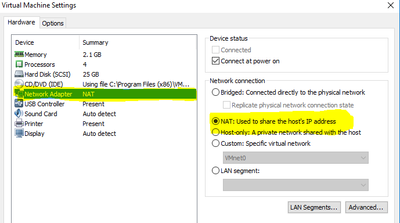
3) Restarted the Network Service
#service network restart
4) Started the Postgresql database
[root@centos ~]# service postgresql start Starting postgresql service: [ OK ]
5) Stared the Ambari-service
[root@centos ~]# ambari-server stop Using python /usr/bin/python2.6 Starting ambari-server
After complete this mine Ambari Web Interface was working fine.


Created 07-31-2016 06:40 AM
- Mark as New
- Bookmark
- Subscribe
- Mute
- Subscribe to RSS Feed
- Permalink
- Report Inappropriate Content
Hello,
Ambari is not able to connect to postgres database. Please check for below possible errors.
1] Postgres SQL is listening on a different port that what is configured under /etc/ambari-server/conf/ambari.properties
2] Postgres is not running
3] firewall issues
Created 07-31-2016 06:41 AM
- Mark as New
- Bookmark
- Subscribe
- Mute
- Subscribe to RSS Feed
- Permalink
- Report Inappropriate Content
Please let us know if the issue is resolved
Created 07-31-2016 07:04 AM
- Mark as New
- Bookmark
- Subscribe
- Mute
- Subscribe to RSS Feed
- Permalink
- Report Inappropriate Content
Thank you for reply
I was able to connect when i have installed & Setup the ambar, however now not able to login
1) Postgrec SQl is listening the port to 5432
2) Its running fine , please find log
postgres 1604 1 0 11:01 ? 00:00:00 /usr/bin/postmaster -p 5432 -D /var/lib/pgsql/data postgres 1606 1604 0 11:01 ? 00:00:00 postgres: logger process postgres 1608 1604 0 11:01 ? 00:00:01 postgres: writer process
3) How to verify the firewall , kindly advise
Created 07-31-2016 07:11 AM
- Mark as New
- Bookmark
- Subscribe
- Mute
- Subscribe to RSS Feed
- Permalink
- Report Inappropriate Content
1] If you ambari-server and postgres database is running on different hosts then try "telnet post-gres-hostname 5432" from the ambari-server machine
2] Make sure ambari.properties has the correct end point configured
Created 07-31-2016 01:13 PM
- Mark as New
- Bookmark
- Subscribe
- Mute
- Subscribe to RSS Feed
- Permalink
- Report Inappropriate Content
1)Both Installed on same server
2)Could you elaborate ambari-properties has correct end point ?
Created on 08-01-2016 09:29 AM - edited 08-18-2019 05:13 AM
- Mark as New
- Bookmark
- Subscribe
- Mute
- Subscribe to RSS Feed
- Permalink
- Report Inappropriate Content
Thanks for your reply. I did the following this it worked for me.
1) Stopped the Ambari and Postgresql database
[root@centos ~]# ambari-server stop Using python /usr/bin/python2.6 Stopping ambari-server Ambari Server stopped [root@centos ~]# service postgresql stop Stopping postgresql service: [ OK ] [root@centos ~]#
2) Changed the network setting VM ware from Bridge to NAT
3) Restarted the Network Service
#service network restart
4) Started the Postgresql database
[root@centos ~]# service postgresql start Starting postgresql service: [ OK ]
5) Stared the Ambari-service
[root@centos ~]# ambari-server stop Using python /usr/bin/python2.6 Starting ambari-server
After complete this mine Ambari Web Interface was working fine.


