
Our Community is getting an upgrade! To get everything ready for the relaunch, we’ll be placing the site in read-only mode starting September 21st.
We really appreciate your understanding while we get things set up behind the scenes. Catch up on all the exciting details about the move here.
Need help or have questions? Drop us a line at [email protected]

Archives of Support Questions (Read Only)
- Cloudera Community
- Board Archive
- Archives of Support Questions (Read Only)
- Re: [Ambari] Critical Random Alerts: connection fa...
- Subscribe to RSS Feed
- Mark Question as New
- Mark Question as Read
- Float this Question for Current User
- Bookmark
- Subscribe
- Mute
- Printer Friendly Page
- Subscribe to RSS Feed
- Mark Question as New
- Mark Question as Read
- Float this Question for Current User
- Bookmark
- Subscribe
- Mute
- Printer Friendly Page
[Ambari] Critical Random Alerts: connection failed to IP:PORT
- Labels:
-
Apache Ambari


Created on 03-02-2016 10:20 AM - edited 08-19-2019 04:57 AM
- Mark as New
- Bookmark
- Subscribe
- Mute
- Subscribe to RSS Feed
- Permalink
- Report Inappropriate Content
Hi all,
We've installed an HDP cluster (2.3.4.0-3485) on Azure. All services have been implemented including Ambari (2.2.0.0).
We allo "kerberized" the cluster.
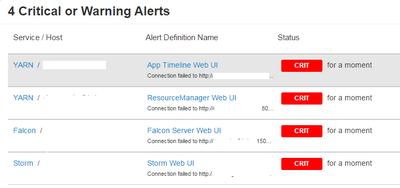
Nevertheless, sometimes some alerts appears mentionning a connection failed with a service (random too) talking about credentials (see screenshot).
After a while, they disappear.
Do you know how can I managed them or best, correct this issue ?
I'd really appreciate for your help.
KR,
Michaël




Created 03-03-2016 02:04 PM
- Mark as New
- Bookmark
- Subscribe
- Mute
- Subscribe to RSS Feed
- Permalink
- Report Inappropriate Content
This is a known issue:
https://issues.apache.org/jira/browse/AMBARI-14847
Fixed in Ambari 2.2.2. There are two workarounds, but they are not ideal:
1. You can make the alert thread pool single-threaded
/usr/lib/python2.6/site-packages/ambari_agent/AlertSchedulerHandler.py
And change the parameters to:
  APS_CONFIG = {
      'apscheduler.threadpool.core_threads': 1,
      'apscheduler.threadpool.max_threads': 1,
      'apscheduler.coalesce': True,
      'apscheduler.standalone': False,
      'apscheduler.misfire_grace_time': 5
    }
2. You can try increasing the timeout period in
/usr/lib/python2.6/site-packages/resource_management/libraries/functions/curl_krb_request.py
Change the -5m to something higher, like -12h
This would need to be done on each agent experiencing the problem. Or, just wait for Ambari 2.2.2, which should be out soon.


Created 03-02-2016 10:21 AM
- Mark as New
- Bookmark
- Subscribe
- Mute
- Subscribe to RSS Feed
- Permalink
- Report Inappropriate Content
What version of Java is it

Created 03-02-2016 10:59 AM
- Mark as New
- Bookmark
- Subscribe
- Mute
- Subscribe to RSS Feed
- Permalink
- Report Inappropriate Content
Created on 03-02-2016 01:00 PM - edited 08-19-2019 04:57 AM
- Mark as New
- Bookmark
- Subscribe
- Mute
- Subscribe to RSS Feed
- Permalink
- Report Inappropriate Content
Thank you @Neeraj Sabharwal for your quick answer.
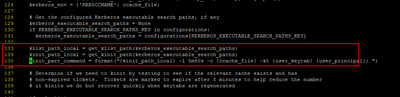
We have already seen this topic and applied the solution. We also tried with 5m40 but same errors.
curl_krb_request file

alert_check_oozie_server file
To answer to @Artem Ervits, my Java version is oracle jdk1.8.0_60.
I use Ambari 2.2 and I'll se that I've two folders OOZIE on UNIX: 4.0.0.2.0 and 4.2.0.2.3. The modification has been made on the first one 4.0.0.2.0 because in the second one, I do not have the alert_check_oozie_server.py file. In Ambari, it mentions that my OOZIE version is 4.2.0.2.3.
Any advice ?
Many thanks
Created 03-03-2016 02:04 PM
- Mark as New
- Bookmark
- Subscribe
- Mute
- Subscribe to RSS Feed
- Permalink
- Report Inappropriate Content
This is a known issue:
https://issues.apache.org/jira/browse/AMBARI-14847
Fixed in Ambari 2.2.2. There are two workarounds, but they are not ideal:
1. You can make the alert thread pool single-threaded
/usr/lib/python2.6/site-packages/ambari_agent/AlertSchedulerHandler.py
And change the parameters to:
  APS_CONFIG = {
      'apscheduler.threadpool.core_threads': 1,
      'apscheduler.threadpool.max_threads': 1,
      'apscheduler.coalesce': True,
      'apscheduler.standalone': False,
      'apscheduler.misfire_grace_time': 5
    }
2. You can try increasing the timeout period in
/usr/lib/python2.6/site-packages/resource_management/libraries/functions/curl_krb_request.py
Change the -5m to something higher, like -12h
This would need to be done on each agent experiencing the problem. Or, just wait for Ambari 2.2.2, which should be out soon.
Created 03-04-2016 03:32 PM
- Mark as New
- Bookmark
- Subscribe
- Mute
- Subscribe to RSS Feed
- Permalink
- Report Inappropriate Content
Thank you very much for your return.
I think we will wait for Ambari 2.2.2 because, now, we understood the alert so it's not really criticial...
Best regards,
Michaël
Created 03-04-2016 04:04 PM
- Mark as New
- Bookmark
- Subscribe
- Mute
- Subscribe to RSS Feed
- Permalink
- Report Inappropriate Content
@Michael DURIEUX please accept the best answer.


