
Our Community is getting an upgrade! To get everything ready for the relaunch, we’ll be placing the site in read-only mode starting September 21st.
We really appreciate your understanding while we get things set up behind the scenes. Catch up on all the exciting details about the move here.
Need help or have questions? Drop us a line at [email protected]

Archives of Support Questions (Read Only)
- Cloudera Community
- Board Archive
- Archives of Support Questions (Read Only)
- Ambari server setup error during select stack and ...
- Subscribe to RSS Feed
- Mark Question as New
- Mark Question as Read
- Float this Question for Current User
- Bookmark
- Subscribe
- Mute
- Printer Friendly Page
- Subscribe to RSS Feed
- Mark Question as New
- Mark Question as Read
- Float this Question for Current User
- Bookmark
- Subscribe
- Mute
- Printer Friendly Page
Ambari server setup error during select stack and repo


Created 06-10-2016 12:15 PM
- Mark as New
- Bookmark
- Subscribe
- Mute
- Subscribe to RSS Feed
- Permalink
- Report Inappropriate Content
Dear folks,
I am currently trying to set up HDP 2.4 but I am having issues after launching install wizard. I had started with documentation provided here: https://docs.hortonworks.com/HDPDocuments/Ambari-2.2.2.0/bk_Installing_HDP_AMB/content/ch_Getting_Re...
I had not faced any issues until now.
I am currently in section 3 where it mentions to Installing, Configuring and deploying a HDP cluster.
Here I opened a browser on my desktop and opened ambari host machine and logged into ambari.
Then, I launched installation wizard and setup my cluster name. Further, I selected stack HDP 2.4 and enabled RHEL6 in repository options for my centos6.5 machine. I observe that when I try to wget the URL mentioned for HDP 2.4 and HDP utils they work fine , but it gives the error in wizard and hence not able to proceed.
I am working behind proxy, and I thought it could be an issue and therefore I stumbled upon the link http://docs.hortonworks.com/HDPDocuments/Ambari-2.2.1.0/bk_ambari_reference_guide/content/_how_to_se... which mention how to provide proxy info in the ambari-env.sh file. I did that but during ambari-server restart it throws an error that -Dhttp.proxyHost=<myproxyaddress> command not found
Any help in this regard is appreciated.
Regards,
Rahul

Created 06-10-2016 01:05 PM
- Mark as New
- Bookmark
- Subscribe
- Mute
- Subscribe to RSS Feed
- Permalink
- Report Inappropriate Content
Also please do not put the ip address inside single quotes else it will cause issues while passing to the JVM as argument
Example:
export AMBARI_JVM_ARGS=$AMBARI_JVM_ARGS' -Xmn1024m -Xms2048m -Xmx2048m -Djava.security.auth.login.config=/etc/ambari-server/conf/krb5JAASLogin.conf -Djava.security.krb5.conf=/etc/krb5.conf -Djavax.security.auth.useSubjectCredsOnly=false -Dhttp.proxyHost=172.28.84.6 -Dhttp.proxyPort=3128 -Dhttp.proxyUser=someUserName -Dhttp.proxyPassword=somePassword'


Created 06-10-2016 12:30 PM
- Mark as New
- Bookmark
- Subscribe
- Mute
- Subscribe to RSS Feed
- Permalink
- Report Inappropriate Content
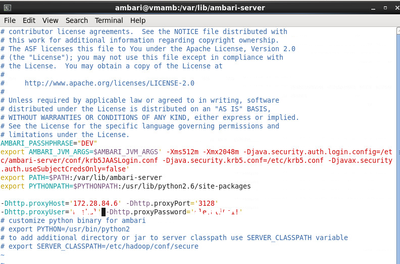
Can you paste the contents on ambari-env.sh here.
Created on 06-10-2016 12:34 PM - edited 08-19-2019 02:17 AM
- Mark as New
- Bookmark
- Subscribe
- Mute
- Subscribe to RSS Feed
- Permalink
- Report Inappropriate Content
I am uploading the content as an image with username and password blurred.
Created 06-10-2016 12:38 PM
- Mark as New
- Bookmark
- Subscribe
- Mute
- Subscribe to RSS Feed
- Permalink
- Report Inappropriate Content
I ideally would consider them being a part of some environment variable but which env variable?
Created 06-10-2016 12:59 PM
- Mark as New
- Bookmark
- Subscribe
- Mute
- Subscribe to RSS Feed
- Permalink
- Report Inappropriate Content
The "-Dhttp.proxyHost" is a JVM option which is passed via AMBARI_JVM_ARGS variable to the jvm hence you will need to add those properties inside the "AMBARI_JVM_ARGS" only. Then restart the server.
Created 06-10-2016 01:05 PM
- Mark as New
- Bookmark
- Subscribe
- Mute
- Subscribe to RSS Feed
- Permalink
- Report Inappropriate Content
Also please do not put the ip address inside single quotes else it will cause issues while passing to the JVM as argument
Example:
export AMBARI_JVM_ARGS=$AMBARI_JVM_ARGS' -Xmn1024m -Xms2048m -Xmx2048m -Djava.security.auth.login.config=/etc/ambari-server/conf/krb5JAASLogin.conf -Djava.security.krb5.conf=/etc/krb5.conf -Djavax.security.auth.useSubjectCredsOnly=false -Dhttp.proxyHost=172.28.84.6 -Dhttp.proxyPort=3128 -Dhttp.proxyUser=someUserName -Dhttp.proxyPassword=somePassword'
Created 06-13-2016 05:03 AM
- Mark as New
- Bookmark
- Subscribe
- Mute
- Subscribe to RSS Feed
- Permalink
- Report Inappropriate Content
Many thanks! That works like a charm. Probably we can amend the documentation to include that it needs to be added to AMBARI_JVM_ARGS.
BR,
Rahul


