
Our Community is getting an upgrade! To get everything ready for the relaunch, we’ll be placing the site in read-only mode starting September 21st.
We really appreciate your understanding while we get things set up behind the scenes. Catch up on all the exciting details about the move here.
Need help or have questions? Drop us a line at [email protected]

Archives of Support Questions (Read Only)
- Cloudera Community
- Board Archive
- Archives of Support Questions (Read Only)
- Ambari shows HiveServer2 and Hive Metastore is sto...
- Subscribe to RSS Feed
- Mark Question as New
- Mark Question as Read
- Float this Question for Current User
- Bookmark
- Subscribe
- Mute
- Printer Friendly Page
- Subscribe to RSS Feed
- Mark Question as New
- Mark Question as Read
- Float this Question for Current User
- Bookmark
- Subscribe
- Mute
- Printer Friendly Page
Ambari shows HiveServer2 and Hive Metastore is stopped but they are running
- Labels:
-
Apache Ambari
-
Apache Hadoop
-
Apache Hive


Created on 08-04-2016 03:59 PM - edited 08-18-2019 04:20 AM
- Mark as New
- Bookmark
- Subscribe
- Mute
- Subscribe to RSS Feed
- Permalink
- Report Inappropriate Content
Ambari dashboard is showing HiveServer2 and Hive Metastore is stopped, but from the command line I am able to login into hive cli and hiveserver2 using beeline client also.
I have 6 node cluster in which I have installed hive server in 2 nodes and hive client is installed in all 6 nodes. In node1 ambari dashboard it was showing hiveserver2 and hive metastore is stopped but in node2 it was started.
In node1:
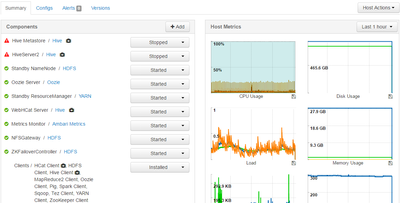
In node2:
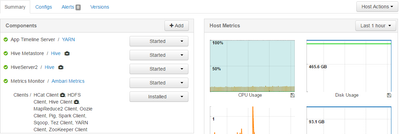
When checked the process id which was available in /var/run/hive/hive.pid and hive-server.pid, they are same.
[node1 ~]$ cd /var/run/hive
[node1.staging.iad hive]$ ls
hive.pid  hive-server.pid
[node1 hive]$ cat hive.pid
14037
[node1 hive]$ cat hive-server.pid
16654
[node1 hive]$ ps -ef| grep 14037
dinesh     564 32124  0 15:10 pts/0    00:00:00 grep 14037
hive     14037     1  0 Aug03 ?        00:01:45 /usr/lib/jvm/jre/bin/java -Xmx1024m -Dhdp.version=2.3.4.0-3485 -Djava.net.preferIPv4Stack=true -Dhdp.version=2.3.4.0-3485 -Dhadoop.log.dir=/var/log/hadoop/hive -Dhadoop.log.file=hadoop.log -Dhadoop.home.dir=/usr/hdp/2.3.4.0-3485/hadoop -Dhadoop.id.str=hive -Dhadoop.root.logger=INFO,console -Djava.library.path=:/usr/hdp/current/hadoop-client/lib/native/Linux-amd64-64:/usr/hdp/2.3.4.0-3485/hadoop/lib/native -Dhadoop.policy.file=hadoop-policy.xml -Djava.net.preferIPv4Stack=true -Xmx1024m -XX:MaxPermSize=512m -Xmx1024m -Dhadoop.security.logger=INFO,NullAppender org.apache.hadoop.util.RunJar /usr/hdp/2.3.4.0-3485/hive/lib/hive-service-1.2.1.2.3.4.0-3485.jar org.apache.hadoop.hive.metastore.HiveMetaStore -hiveconf hive.log.file=hivemetastore.log -hiveconf hive.log.dir=/var/log/hive
[node1 hive]$ ps -ef| grep 16654
dinesh     621 32124  0 15:10 pts/0    00:00:00 grep 16654
hive     16654     1  0 Aug03 ?        00:01:32 /usr/lib/jvm/jre/bin/java -Xmx1024m -Dhdp.version=2.3.4.0-3485 -Djava.net.preferIPv4Stack=true -Dhdp.version=2.3.4.0-3485 -Dhadoop.log.dir=/var/log/hadoop/hive -Dhadoop.log.file=hadoop.log -Dhadoop.home.dir=/usr/hdp/2.3.4.0-3485/hadoop -Dhadoop.id.str=hive -Dhadoop.root.logger=INFO,console -Djava.library.path=:/usr/hdp/current/hadoop-client/lib/native/Linux-amd64-64:/usr/hdp/2.3.4.0-3485/hadoop/lib/native -Dhadoop.policy.file=hadoop-policy.xml -Djava.net.preferIPv4Stack=true -Xmx1024m -XX:MaxPermSize=512m -Xmx512m -Dhadoop.security.logger=INFO,NullAppender org.apache.hadoop.util.RunJar /usr/hdp/2.3.4.0-3485/hive/lib/hive-service-1.2.1.2.3.4.0-3485.jar org.apache.hive.service.server.HiveServer2 --hiveconf hive.aux.jars.path=file:///usr/hdp/current/hive-webhcat/share/hcatalog/hive-hcatalog-core.jar -hiveconf hive.metastore.uris=  -hiveconf hive.log.file=hiveserver2.log -hiveconf hive.log.dir=/var/log/hive


Created 08-04-2016 04:27 PM
- Mark as New
- Bookmark
- Subscribe
- Mute
- Subscribe to RSS Feed
- Permalink
- Report Inappropriate Content
@Dinesh E Here is an article on why this could happen. It explains why and steps to take when such a scenario occurs :
Hope this helps!

Created 11-15-2016 05:09 PM
- Mark as New
- Bookmark
- Subscribe
- Mute
- Subscribe to RSS Feed
- Permalink
- Report Inappropriate Content
@Dinesh, This is problem resolved after upgrading the HDP from 2.3.4 to 2.4.2
Created 11-16-2016 08:37 AM
- Mark as New
- Bookmark
- Subscribe
- Mute
- Subscribe to RSS Feed
- Permalink
- Report Inappropriate Content
@Jayanta Das Thanks for the update.

- « Previous
-
- 1
- 2
- Next »

